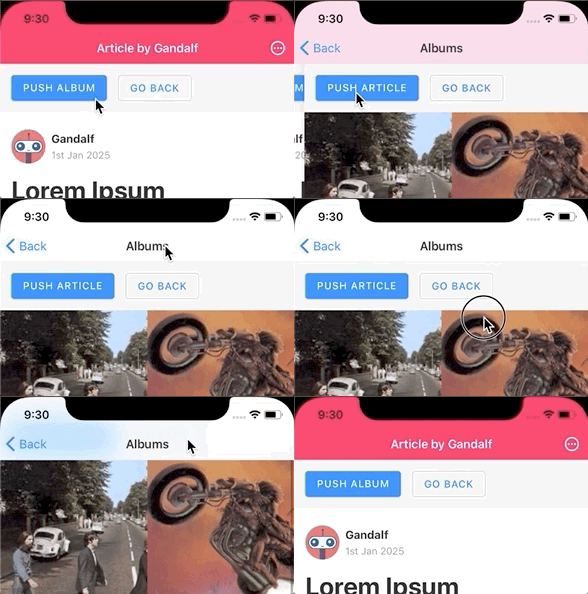
With this, the user will be able to specify a `getId` function for their screens which returns an unique ID to use for the screen:

```js
<Stack.Screen
  name="Profile"
  component={ProfileScreen}
  getId={({ params }) => params.userId}
/>
```

This is an alternative to the `key` option in `navigate` with several advantages:

- Often users specify a key that's dependent on data already in params, such as `userId`. So it's much easier to specify it one place rather than at every call site.
- Users won't need to deal with generating a unique key for routes manually.
- This will work with other actions such as `push`, and not just navigate.
- With this, it'll be possible to have multiple instances of the screen even if you use `navigate`, which may be desirable in many cases (such as profile screens).
This commit adds new `header` and `headerShown` options in drawer navigator to be able to show a header, along with a bunch of header related options similar to stack navigator.

Historically, we have suggested to nest a stack navigator inside drawer navigator to render a header. While it works, it's not efficient to nest an entire navigator just for a header, considering it adds a lot of additional overhead from the code to handle animations, gestures etc. which won't ever be run in this case. It also increases the view hierarchy which has negative impacts on performance on Android, and could cause content not to render on older iOS devices.

Another issue with the approach is that since drawer navigator is at the root in this setup, it's possible to open drawer from every screen in the stack navigator, which usually isn't the expected behaviour. It's necessary to write additional code to disable the gesture to open drawer in all screens but first.

In addition, users also need to add a custom drawer icon to the header manually to be able to toggle the drawer

If drawer navigator could render its own header we'd avoid all these shortcomings as well as make the code simpler.

For now, I have implemented a new `Header` component in drawer since it's way simpler than stack navigator header. Though we may consider creating a shared UI package and add such components there which all our navigators could use.

The `Header` includes a button to toggle the drawer by default, and supports customization options such as showing custom left/right/title components. For this commit, I have kept `headerShown` to `false` by default coz I wasn't sure if it'd be a breaking change to start showing headers in drawers. Probably we can toggle it to `true` by default in next major.
Previously, 'resetRoot' directly performed a 'setState' on the container instead of dispatching an action. This meant that hooks such as listener for 'preventRemove' won't be notified by it. This commit changes it to dispatch a regular 'RESET' action which will behave the same as other actions.
When navigating from ScreenA to ScreenB and then back to ScreenA,
react-navigation unconditionally calls `Keyboard.dismiss()`.
If the user is fast enough and taps on a `TextInput` after coming
back from ScreenB, the keyboard opens, just to be dismissed again.
This would also happen if some logic automatically focuses the
`TextInput` in ScreenA. This behaviour can be seen observed in
https://snack.expo.io/lTDZhVNhV.
The `use-subscription` package has a peer dep on latest React. This is problematic when using npm due to it's peer dependency algorithm which installs multiple versions of React when using an older version of React (Native).

This means that we'll need to use an ancient version of `use-subscription` to support older React versions with npm and make sure to never update it, or test with every version.

It's much lower maintenance to incporporate the same update in render logic that `use-subscription` has and not deal with dependencies. So this commit removes the `use-subscription` dependency.

See https://github.com/react-navigation/react-navigation/issues/9021#issuecomment-721679760 for more context.
For apps with push notifications linking to screens inside the app, currently we need to handle them separately (e.g. [instructions for firebase](https://rnfirebase.io/messaging/notifications#handling-interaction), [instructions for expo notifications](https://docs.expo.io/push-notifications/receiving-notifications/)). But if we add a link in the notification to use for deep linking, we can instead reuse the same deep linking logic instead.

This commit adds the `getInitialURL` and `subscribe` options which internally used `Linking` API to allow more advanced implementations by combining it with other sources such as push notifications.

Example usage with Firebase notifications could look like this:

```js
const linking = {
  prefixes: ['myapp://', 'https://myapp.com'],
  async getInitialURL() {
    // Check if app was opened from a deep link
    const url = await Linking.getInitialURL();

    if (url != null) {
      return url;
    }

    // Check if there is an initial firebase notification
    const message = await messaging().getInitialNotification();

    // Get the `url` property from the notification which corresponds to a screen
    // This property needs to be set on the notification payload when sending it
    return message?.notification.url;
  },
  subscribe(listener) {
    const onReceiveURL = ({ url }: { url: string }) => listener(url);

    // Listen to incoming links from deep linking
    Linking.addEventListener('url', onReceiveURL);

    // Listen to firebase push notifications
    const unsubscribeNotification = messaging().onNotificationOpenedApp(
      (message) => {
        const url = message.notification.url;

        if (url) {
          // If the notification has a `url` property, use it for linking
          listener(url);
        }
      }
    );

    return () => {
      // Clean up the event listeners
      Linking.removeEventListener('url', onReceiveURL);
      unsubscribeNotification();
    };
  },
  config,
};
```
Currently when we receive a deep link after the app is rendered, it always results in a `navigate` action. While it's ok with the default configuration, it may result in incorrect behaviour when a custom `getStateForPath` function is provided and it returns a routes array different than the initial route and new route pair.
The commit changes 2 things:
1. Add ability to reset state via params of `navigate` by specifying a `state` property instead of `screen`
2. Update `getStateForAction` to return an action for reset when necessary according to the deep linking configuration
Closes#8952
Changes done here will work properly with https://github.com/software-mansion/react-native-screens/pull/624 merged and released. The documentation of `screensEnabled` and `activeLimit` props should also be added. It also enabled `Screens` in iOS stack-navigator by default.

New things:
- `detachInactiveScreens` - prop for navigators with `react-native-screens` integration that can be set by user. It controls if the `react-native-screens` are used by the navigator.
- `detachPreviousScreen` - option that tells to keep the previous screen active. It can be set by user, defaults to `true` for normal mode and `false` for the last screen for mode = “modal”.

Co-authored-by: Satyajit Sahoo <satyajit.happy@gmail.com>
The commit improves the navigation state object to have more specific types.
e.g. The `routeNames` array will now have proper type instead of `string[]`
This feature adds the sceneContainerStyle prop to the bottom-tabs navigator, to allow setting styles on the container's view. It's already implemented in the material-top-tabs and drawer navigators, I've simply ported it into the bottom-tabs navigator.

It also fixes this issue:

https://github.com/react-navigation/react-navigation/issues/8076

Co-authored-by: Satyajit Sahoo <satyajit.happy@gmail.com>
Motivation
--
Previously when using `headerMode="float"` with headerTransparent set to true, we cant press header buttons in Android. This PR fixes this. (resolves#8731 )
Been doing some debugging and found out that this is caused by `HeaderContainer` being set as `absolute`. Initially it didn't have width & height in Android when it's set to default, that's why we can't access the children.
So, the solution in this PR is to define the height by using headerHeight. But, since we can't access headerHeight from header, Im using local state for keeping up with the headerHeight. Or should I move the HeaderHeight provider out of StackContainer? I'm not sure, since I think it was intended to be kept inside the StackContainer
Test Plan
--
With this config, now the header button can be clicked. Tested in both platform
```typescript
<Stack.Navigator
headerMode="float"
screenOptions={{
headerTransparent: true
}}
>
<Stack.Screen
name="Home Screen"
component={Home}
/>
<Stack.Screen
name="Details Screen"
component={Details}
/>
</Stack.Navigator>
```
Android:
-

iOS:
--
<img width="300" src="https://user-images.githubusercontent.com/24470609/94682743-9a3e3580-034f-11eb-8e90-2d31748bde5c.gif" />
Prefixes should be more flexible for situations like wild card subdomain. On android and IOS we can define wild cards by * but react-navigation does not work, In this PR I added support for RegExp Prefixes.
For Example
```js
{
prefixes: [
/^[^.s]+.example.com/g
],
}
```
I tested this work well.
Closes#8941
Co-authored-by: Satyajit Sahoo <satyajit.happy@gmail.com>
Referenced from 4b26429c49/src/components/MaterialCommunityIcon.tsx (L14)https://callstack.github.io/react-native-paper/getting-started.html
> To get smaller bundle size by excluding modules you don't use, you can use our optional babel plugin. The plugin automatically rewrites the import statements so that only the modules you use are imported instead of the whole library. Add react-native-paper/babel to the plugins section in your babel.config.js for production environment. It should look like this:
> ```
> module.exports = {
> presets: ['module:metro-react-native-babel-preset'],
> env: {
> production: {
> plugins: ['react-native-paper/babel'],
> },
> },
> };
> ```
> If you created your project using Expo, it'll look something like this:
> ```
> module.exports = function(api) {
> api.cache(true);
> return {
> presets: ['babel-preset-expo'],
> env: {
> production: {
> plugins: ['react-native-paper/babel'],
> },
> },
> };
> };
> ```
Closes#8821
Currently, stack router adds a duplicate route when pushing a new route with a key that already exists. This is a buggy behaviour since keys need to be unique in the stack.

This commit fixes the behaviour to bring the existing route with the same key to focus (and merge new params if any) instead of adding a duplicate route.
This adds a compact height mode for iOS devices that are in a compact vertical class (phones in landscape). This is similar to the size change that happens to the header when in landscape mode. Finding a size reference was challenging since most apps lock phones to portrait, but [this answer](https://stackoverflow.com/a/25550871) on Stack Overflow states that it should be 32 pts.

I asked yesterday in the Discord chat if there would be interest in this and some other enhancements here, but no on replied, so I thought I would go ahead and open this to at least start a discussion.
What just randomly reading, but I think there's a typo
```
['ab', 'aba'].sort((a, b) => {
      if (a.startsWith(b)) {
        return -1;
      }

      if (b.startsWith(a)) {
        return 1;
      }
});
(2) ["aba", "ab"]
['ab', 'a'].sort((a, b) => {
      if (a.startsWith(b)) {
        return -1;
      }

      if (b.startsWith(a)) {
        return 1;
      }
});
(2) ["ab", "a"]
```
Instead of adding stubs for specific platforms such as Web, Mac OS and Windows, the commit changes the logic to use libraries such as gesture handler and masked view only for the platforms they explictly support. This means that we don't need to manually add all new platforms that aren't supported by these libraries in order for React Navigation to run on those platforms.
React Native 0.62 removes the deprecated `accessibilityStates` property and replaces it with an `accessibilityState` object instead. This PR adds the new property where needed, but leaves the old one in place for backwards compatibility. Without the change, the selected tab in BottomTabNavigator isn't announced properly in VoiceOver.
In the process of upgrading from v4, I noticed a regression.
In the past, the function form of `tabBarLabel` did get an `orientation: 'landscape' | 'portrait'`, this is no longer the case.
However, when using a custom Text rendering, we need to apply a margin to the text in horizontal mode.

Since the orientation/horizontal state is decided based on internal heuristics, It is a huge pain with a high bug potential when reimplementing that detection myself.
Allows you to subscribe to gesture navigation events, we have a custom keyboard that we want to hide and show when gesture is being used to navigate (same as native keyboard)
If the state being rehydrated contained multiple `routes` and had an `index`, we incorrectly kept the same index even if the index of the focused route changed in the state after rehydration. This commit ensures that we also adjust the index appropriately according to the new index of the focused route.
A lot of times, we want to prompt before leaving a screen if we have unsaved changes. Currently, we need to handle multiple cases to prevent this:

- Disable swipe gestures
- Override the back button in header
- Override the hardware back button on Android

This PR adds a new event which is emitted before a screen gets removed, and the developer has a chance to ask the user before closing the screen.

Example:

```js
React.useEffect(
  () =>
    navigation.addListener('beforeRemove', (e) => {
      if (!hasUnsavedChanges) {
        return;
      }

      e.preventDefault();

      Alert.alert(
        'Discard changes?',
        'You have unsaved changes. Are you sure to discard them and leave the screen?',
        [
          { text: "Don't leave", style: 'cancel', onPress: () => {} },
          {
            text: 'Discard',
            style: 'destructive',
            onPress: () => navigation.dispatch(e.data.action),
          },
        ]
      );
    }),
  [navigation, hasUnsavedChanges]
);
```
The PR changes a few things about linking configuration:

- Moves the configuration for screens to a screens property so that it's possible to specify other options like `initialRouteName` for the navigator at root
- The nesting in the configuration needs to strictly match the shape of the navigation tree, it can't just rely on URL's shape anymore
- If a screen is not specified in the configuration, it won't be parsed to/from the URL (this is essential to handle unmatched screens)
- Treat `path: ''` and no specified path in the same way, unless `exact` is specified
- Disallow specifying unmatched screen with old format
- Add support for `initialRouteName` at top level
- Automatically adapt old configuration to new format
Added `collapsable={false}` to the View in order for the Android to render screens properly. This issue is most probably similar to 9c06a92d09 but fixes it on Android since the View seems to be removed from a native view hierarchy due to not drawing anything. To see the bug go to https://github.com/software-mansion/react-native-screens/issues/544.
The `devtools` package extracts the redux devtools extension integration to a separate package. In future we can add more tools such as flipper integration to this package.

Usage:

```js
import * as React from 'react';
import { NavigationContainer } from '@react-navigation/native';
import { useReduxDevToolsExtension } from '@react-navigation/devtools';

export default function App() {
  const navigationRef = React.useRef();

  useReduxDevToolsExtension(navigationRef);

  return (
    <NavigationContainer ref={navigationRef}>{/* ... */}</NavigationContainer>
  );
}
```
Currently, to access the focused child screen, we need to do something like this:

```js
const routeName = route.state
  ? route.state.routes[route.state.index].name
  : route.params?.screen || 'Feed';
```

However, it doesn't handle some cases, such as when `route.state` is partial. This helper will make it easier:

```js
const routeName = getFocusedRouteNameFromRoute(route) ?? 'Feed';
```
## Motivation

Right now `headerMode: float` renders an absolutely-positioned header. To offset the content appropriately, it then measures the height of the header and compensates with a margin. This approach unfortunately doesn't work well for animations.

Before             |  After
:-------------------------:|:-------------------------:
<img src="http://ashoat.com/jerky_absolute.gif" width="300" />  |  <img src="http://ashoat.com/smooth_relative.gif" width="300" />

## Approach

When rendering the header absolutely we want to render it above (after, in sibling order) the content. But when rendering it relatively we want to render it first (before, in sibling order).

The margin compensation code is no longer necessary so I removed it.

## Test plan

I used the `StackHeaderCustomization` example to make sure transitions between `headerTransparent` and `!headerTransparent` looked good. I added a custom (taller) header to test if height transitions looked good, and toggled `headerShown` to make sure that transitioned well too.

Would be open to any other suggestions of things to test!
The PR reworks history integration to better integrate with browser's history stack and supports nested navigation more reliably:
- On each navigation, save the navigation in memory and use it to reset the state when user presses back/forward
- Improve heuristic to determine if we should do a push, replace or back
This closes#8230, closes#8284 and closes#8344
Currently, if we don't have matching routes for a path, we'll reuse the path name for the route name. This doesn't produce an error, and renders the initial route in the navigator. However, the user doesn't have a way of handling this with the default configuration.
This PR adds support for a wildcard pattern ('*'). The wildcard pattern will be matched after all other patterns were matched and will always match unmatched screens. This allows the user to implement a 404 screen.
Example:
```js
{
Home: '',
Profile: 'user/:id',
404: '*',
}
```
This config will return the `404` route for paths which didn't match `Home` or `Profile`, e.g. - `/test`
Closes#8019
Co-authored-by: Evan Bacon <baconbrix@gmail.com>
User can pass a `ref` to the container to get current options, like they can with `NavigationContainer`:

```js
const ref = React.createRef();

const html = renderToString(
  <ServerContainer ref={ref}>
    <App />
  </ServerContainer>
);

ref.current.getCurrentOptions(); // Options for screen
```
When doing SSR, the app needs to be aware of request URL to render correct navigation state.
The `ServerContainer` component lets us pass the `location` object to use for SSR.
The shape of the `location` object matches the `location` object in the browser.

Usage:

```js
ReactDOM.renderToString(
  <ServerContainer location={{ pathname: req.path, search: req.search }}>
    <App />
  </ServerContainer>
);
```

Updated example: https://github.com/react-navigation/react-navigation/pull/8298
## Motivation

Some designs call for custom keyboard inputs, or other bottom-aligned views meant overlap over the keyboard. Right now the best option on Android for this case is to set `tabBarVisible`. However changes to `tabBarVisible` doesn't get animated currently, which makes the custom-keyboard-open experience a bit more jarring than the native-keyboard-open one.

## Approach

I basically cribbed the `Animated.Value` we were using for `keyboardHidesTabBar` and made it depend on both. Note that the offset height depends on which of the two uses cases we're dealing with, which is explained in the code.

## Test plan

I played around with the `BottomTabs` example, setting certain screens to `tabBarVisible: true` and making sure it animated.
I made sure 1.0 is backwards compatible with react-navigation, which means using rn-safe-area-context@1+ with older versions of react-navigation will still work.
The tests are being bundled and shipped in prod, this adds a bit of unneeded weight to npm installs. Now they won't be included.

```
@react-navigation/core
- before: 274 files - pkg: 211.0 kB - unpkg: 1 MB
- after: 238 files - pkg: 192.1 kB - unpkg: 827.3 kB
```
Currently, when we define path patterns in the linking config, they ignore the parent screen's path when parsing, for example, say we have this config:

{
  Home: {
    path: 'home',
    screens: {
      Profile: 'u/:id',
    },
  },
}
If we parse the URL /home, we'll get this state:

{
  routes: [{ name: 'Home' }],
}
If we parse the URL /home/u/cal, we'll get this state:

{
  routes: [
    {
      name: 'Home',
      state: {
        routes: [
          {
            name: 'Home',
            state: {
              routes: [
                {
                  name: 'Profile',
                  params: { id: 'cal' },
                },
              ],
            },
          },
        ],
      },
    },
  ],
}
Note how we have 2 Home screens nested inside each other. This is not something people usually expect and it seems to trip up a lot of people. Something like following will be more intuitive:

{
  routes: [
    {
      name: 'Home',
      state: {
        routes: [
          {
            name: 'Profile',
            params: { id: 'cal' },
          },
        ],
      },
    },
  ],
}
Essentially, we're treating patterns as relative to their parent rather than matching the exact segments. This PR changes the behavior of parsing links to treat configs like so. I hope it'll be easier to understand for people.

There is also a new option, exact, which brings back the olde behavior of matching the exact pattern:

{
  Home: {
    path: 'home',
    screens: {
      Profile: {
        path: 'u/:id',
        exact: true,
      },
    },
  },
}
Which will be useful if home is not in the URL, e.g. /u/cal.

This change only affects situations where both parent and child screen configuration have a pattern defined. If the parent didn't have a pattern defined, nothing changes from previous behavior:

{
  Home: {
    screens: {
      Profile: {
        path: 'u/:id',
      },
    },
  },
}
# Why

When using the stack navigator on iOS, it takes a (too) long time before the  `didFocus` and stack `onTransitionEnd` lifecycle events are triggered. The visual animation is typically completed well within 500 msec, but it takes around 1000 msec before the previously mentioned events are emitted. This causes problems with for instance `react-navigation-shared-element`, which relies on these events to fire in a timely manner(https://github.com/IjzerenHein/react-navigation-shared-element/issues/24)

# How

This PR updates the resting threshold so that the underlying spring settles faster. No visual differences or differences in smoothness were witnessed during testing.

## Before

Time to settle `didFocus`: **941**
Time to settle `stack.onTransitionEnd`: **924**

```
15:59:55.743 [ListViewStack]startTransition, closing: false, nestingDepth: 1
15:59:55.744 [ListViewStack]willFocus, scene: "DetailScreen", depth: 1, closing: false
15:59:55.745 Transition start: "ListScreen" -> "DetailScreen"
15:59:56.667 [ListViewStack]endTransition, closing: false, nestingDepth: 1
15:59:56.668 Transition end: "DetailScreen"
15:59:56.685 [ListViewStack]didFocus, scene: "DetailScreen", depth: 1
```

## After

Time to settle `didFocus`: **529**
Time to settle `stack.onTransitionEnd`: **512**

```
15:55:00.686 [ListViewStack]startTransition, closing: false, nestingDepth: 1
15:55:00.687 [ListViewStack]willFocus, scene: "DetailScreen", depth: 1, closing: false
15:55:00.687 Transition start: "ListScreen" -> "DetailScreen"
15:55:01.198 [ListViewStack]endTransition, closing: false, nestingDepth: 1
15:55:01.199 Transition end: "DetailScreen"
15:55:01.216 [ListViewStack]didFocus, scene: "DetailScreen", depth: 1
This commit adds a check to detect if the screen content fills the available body, and if yes, then it adjusts the styles so that scrolling triggers a scroll on the body which hides the address bar in browser.

Tested on Safari in iOS and Chrome on Android.

This behaviour can be overriden by the user by specifying `cardStyle: { flex: 1 }`, which will keep both the header and the address bar always visible.
Gesture handler doesn't work great on Web and causes issues such as disabling text selection even when not enabled. So we stub it out. It also reduces bundle size on web.
The `Link` component can be used to navigate to URLs. On web, it'll use an `a` tag for proper accessibility. On React Native, it'll use a `Text`.

Example:

```js
<Link to="/feed/hot">Go to 🔥</Link>
```

Sometimes we might want more complex styling and more control over the behaviour, or navigate to a URL programmatically. The `useLinkTo` hook can be used for that.

Example:

```js
function LinkButton({ to, ...rest }) {
  const linkTo = useLinkTo();

  return (
    <Button
      {...rest}
      href={to}
      onPress={(e) => {
        e.preventDefault();
        linkTo(to);
      }}
    />
  );
}
```
* Add padding bottom to ios presentation modal
Because of the translateY moving the screen out to the bottom of view by 10 pt, these 10pt are hidden under the screen, or steal this size from the safe area. To avoid cutting elements, the size of the screen could be decreased by the `topOffset` using padding on the bottom. Fixes#7856
* Update packages/stack/src/TransitionConfigs/CardStyleInterpolators.tsx
Co-Authored-By: Serhii Vecherenko <SDSLeon999@gmail.com>
Co-authored-by: Satyajit Sahoo <satyajit.happy@gmail.com>
Co-authored-by: Serhii Vecherenko <SDSLeon999@gmail.com>
By default, params passed to nested navigators is used to initialize the navigator if it's not rendered already. The `initial` option would let the user control this behaviour. By specifying `initial: false`, it'll be possible to acheive the old behaviour of rendering the initial route of the stack before navigating to the new screen.

Example:

```js
navigation.navigate('Account', {
  screen: 'Settings',
  initial: false,
});
```
seems `react-native-screens` doesn't handle active screens properly and shows a blank page instead on web when a number is specified in the `active` prop.
closes#7485
I find it sometimes useful to define overlay renderer on my own. Eg. I needed to replace the background with BlurView and with this API I find it quite easy

Co-authored-by: Satyajit Sahoo <satyajit.happy@gmail.com>
The problem here is that when we scroll back really fast, even though velocity is negative, `Math.abs(translation + velocity * gestureVelocityImpact)` will end up bigger than `distance / 2`.
I removed the `Math.abs`, I think it's not necessary. When `translation + velocity * gestureVelocityImpact` is negative, it's also < `distance / 2` and we should just close the screen.
Closes#6782
the previously used fort weight of 500 would effectively be converted to `fontWeight: bold` because of https://github.com/facebook/react-native/pull/25341

this fixes the title appearance to look as customary
This adds ability to listen to events from the component where the navigator is defined, even if the screen is not rendered.
```js
<Tabs.Screen
name="Chat"
component={Chat}
options={{ title: 'Chat' }}
listeners={{
tabPress: e => console.log('Tab press', e.target),
}}
/>
```
Closes#6756
The latest version of yarn has a bug where trying to upgrade a package fails with an error such as 'expected workspace package to exist for ...'. Downgrading to an older version fixes it.
The `unmountInactiveScreens` prop lets user unmount all inactive screens for the whole navigator when they go out of focus. It'll be better to have the option to do that per screen, so I have added the `unmountOnBlur` option instead.

To get the previous behaviour, user can specify the option in `screenOptions`.
Currently, when a screen is replaced the new screen comes into focus with a push animation. However, sometimes you might want to customize how the animation looks like.

For example, when the user logs out, animating out the previous screen like pop feels more natural than doing a push animation with the sign in screen. The PR adds a new `animationTypeForReplace` option to control this. Specifying `animationTypeForReplace: 'pop'` will pop the previous screen, otherwise the new screen will be pushed like before.

Co-authored-by: Michał Osadnik <micosa97@gmail.com>
Using `resetRoot` requires knowledge of the whole navigation tree that a specific screen shouldn't have. It's better to remove it to discourage resetting whole navigator state from inside a screen.

It's still possible if the user needs it:
- Expose `resetRoot` from container's ref via context
- Use `reset` with the target set to the root navigation state's key
2020-01-23 14:44:34 +01:00
469 changed files with 187994 additions and 17078 deletions
about: Report an issue with Bottom Tab Navigator (@react-navigation/bottom-tabs)
title: ''
labels: bug, package:bottom-tabs
assignees: ''
---
**Current Behavior**
- What code are you running and what is happening?
- Include a screenshot or video if it makes sense.
**Expected Behavior**
- What do you expect should be happening?
- Include a screenshot or video if it makes sense.
**How to reproduce**
- You must provide a way to reproduce the problem. If you are having an issue with your machine or build tools, the issue belongs on another repository as that is outside of the scope of React Navigation.
- Either re-create the bug on [Snack](https://snack.expo.io) or link to a GitHub repository with code that reproduces the bug.
- Explain how to run the example app and any steps that we need to take to reproduce the issue from the example app.
- Keep the repro code as simple as possible, with the minimum amount of code required to repro the issue.
- Before reporting an issue, make sure you are on latest version of the package.
about: Report an issue with Drawer Navigator (@react-navigation/drawer)
title: ''
labels: bug, package:drawer
assignees: ''
---
**Current Behavior**
- What code are you running and what is happening?
- Include a screenshot or video if it makes sense.
**Expected Behavior**
- What do you expect should be happening?
- Include a screenshot or video if it makes sense.
**How to reproduce**
- You must provide a way to reproduce the problem. If you are having an issue with your machine or build tools, the issue belongs on another repository as that is outside of the scope of React Navigation.
- Either re-create the bug on [Snack](https://snack.expo.io) or link to a GitHub repository with code that reproduces the bug.
- Explain how to run the example app and any steps that we need to take to reproduce the issue from the example app.
- Keep the repro code as simple as possible, with the minimum amount of code required to repro the issue.
- Before reporting an issue, make sure you are on latest version of the package.
about: Report an issue with Material Bottom Tab Navigator (@react-navigation/material-bottom-tabs)
title: ''
labels: bug, package:material-bottom-tabs
assignees: ''
---
**Current Behavior**
- What code are you running and what is happening?
- Include a screenshot or video if it makes sense.
**Expected Behavior**
- What do you expect should be happening?
- Include a screenshot or video if it makes sense.
**How to reproduce**
- You must provide a way to reproduce the problem. If you are having an issue with your machine or build tools, the issue belongs on another repository as that is outside of the scope of React Navigation.
- Either re-create the bug on [Snack](https://snack.expo.io) or link to a GitHub repository with code that reproduces the bug.
- Explain how to run the example app and any steps that we need to take to reproduce the issue from the example app.
- Keep the repro code as simple as possible, with the minimum amount of code required to repro the issue.
- Before reporting an issue, make sure you are on latest version of the package.
about: Report an issue with Material Top Tab Navigator (@react-navigation/material-top-tabs)
title: ''
labels: bug, package:material-top-tabs
assignees: ''
---
**Current Behavior**
- What code are you running and what is happening?
- Include a screenshot or video if it makes sense.
**Expected Behavior**
- What do you expect should be happening?
- Include a screenshot or video if it makes sense.
**How to reproduce**
- You must provide a way to reproduce the problem. If you are having an issue with your machine or build tools, the issue belongs on another repository as that is outside of the scope of React Navigation.
- Either re-create the bug on [Snack](https://snack.expo.io) or link to a GitHub repository with code that reproduces the bug.
- Explain how to run the example app and any steps that we need to take to reproduce the issue from the example app.
- Keep the repro code as simple as possible, with the minimum amount of code required to repro the issue.
- Before reporting an issue, make sure you are on latest version of the package.
about: Report an issue with Native Stack Navigator (@react-navigation/native-stack)
title: ''
labels: bug, package:native-stack
assignees: ''
---
**Current Behavior**
- What code are you running and what is happening?
- Include a screenshot or video if it makes sense.
**Expected Behavior**
- What do you expect should be happening?
- Include a screenshot or video if it makes sense.
**How to reproduce**
- You must provide a way to reproduce the problem. If you are having an issue with your machine or build tools, the issue belongs on another repository as that is outside of the scope of React Navigation.
- Either re-create the bug on [Snack](https://snack.expo.io) or link to a GitHub repository with code that reproduces the bug.
- Explain how to run the example app and any steps that we need to take to reproduce the issue from the example app.
- Keep the repro code as simple as possible, with the minimum amount of code required to repro the issue.
- Before reporting an issue, make sure you are on latest version of the package.
about: Report an issue with Stack Navigator (@react-navigation/stack)
title: ''
labels: bug, package:stack
assignees: ''
---
**Current Behavior**
- What code are you running and what is happening?
- Include a screenshot or video if it makes sense.
**Expected Behavior**
- What do you expect should be happening?
- Include a screenshot or video if it makes sense.
**How to reproduce**
- You must provide a way to reproduce the problem. If you are having an issue with your machine or build tools, the issue belongs on another repository as that is outside of the scope of React Navigation.
- Either re-create the bug on [Snack](https://snack.expo.io) or link to a GitHub repository with code that reproduces the bug.
- Explain how to run the example app and any steps that we need to take to reproduce the issue from the example app.
- Keep the repro code as simple as possible, with the minimum amount of code required to repro the issue.
- Before reporting an issue, make sure you are on latest version of the package.
about: Report an issue which is not about a specific navigator.
title: ''
labels: bug
assignees: ''
---
**Current Behavior**
- What code are you running and what is happening?
- Include a screenshot or video if it makes sense.
**Expected Behavior**
- What do you expect should be happening?
- Include a screenshot or video if it makes sense.
**How to reproduce**
- You must provide a way to reproduce the problem. If you are having an issue with your machine or build tools, the issue belongs on another repository as that is outside of the scope of React Navigation.
- Either re-create the bug on [Snack](https://snack.expo.io) or link to a GitHub repository with code that reproduces the bug.
- Explain how to run the example app and any steps that we need to take to reproduce the issue from the example app.
- Keep the repro code as simple as possible, with the minimum amount of code required to repro the issue.
- Before reporting an issue, make sure you are on latest version of the package.
This library is a community effort: it can only be great if we all help out in one way or another! If you feel like you aren't experienced enough using React Navigation to contribute, you can still make an impact by:
- Responding to one of the open [issues](https://github.com/react-navigation/react-navigation/issues). Even if you can't resolve or fully answer a question, asking for more information or clarity on an issue is extremely beneficial for someone to come after you to resolve the issue.
- Creating public example repositories or [Snacks](https://snack.expo.io/) of navigation problems you have solved and sharing the links.
- Answering questions on [Stack Overflow](https://stackoverflow.com/search?q=react-navigation).
- Answering questions in our [Reactiflux](https://www.reactiflux.com/) channel.
- Providing feedback on the open [PRs](https://github.com/react-navigation/react-navigation/pulls).
- Providing feedback on the open [RFCs](https://github.com/react-navigation/rfcs).
- Improving the [website](https://github.com/react-navigation/react-navigation.github.io).
If you don't know where to start, check the ones with the label [`good first issue`](https://github.com/react-navigation/react-navigation/labels/good%20first%20issue) - even fixing a typo in the documentation is a worthy contribution!
## Development workflow
The project uses a monorepo structure for the packages managed by [yarn workspaces](https://yarnpkg.com/lang/en/docs/workspaces/) and [lerna](https://lerna.js.org). To get started with the project, run `yarn` in the root directory to install the required dependencies for each package:
```sh
yarn
```
While developing, you can run the [example app](/example/) with [Expo](https://expo.io/) to test your changes:
```sh
yarn example start
```
Make sure your code passes TypeScript and ESLint. Run the following to verify:
```sh
yarn typescript
yarn lint
```
To fix formatting errors, run the following:
```sh
yarn lint --fix
```
Remember to add tests for your change if possible. Run the unit tests by:
```sh
yarn test
```
Running the e2e tests with Detox (on iOS) requires the following:
- Mac with macOS (at least macOS High Sierra 10.13.6)
- Xcode 10.1+ with Xcode command line tools
First you need to install `applesimutils` and `detox-cli`:
```sh
brew tap wix/brew
brew install applesimutils
yarn global add detox-cli
```
Then you can build and run the tests:
```sh
detox build -c ios.sim.debug
detox test -c ios.sim.debug
```
### Commit message convention
We follow the [conventional commits specification](https://www.conventionalcommits.org/en) for our commit messages:
-`fix`: bug fixes, e.g. fix crash due to deprecated method.
-`feat`: new features, e.g. add new method to the module.
-`refactor`: code refactor, e.g. migrate from class components to hooks.
-`docs`: changes into documentation, e.g. add usage example for the module..
-`test`: adding or updating tests, eg add integration tests using detox.
-`chore`: tooling changes, e.g. change CI config.
Our pre-commit hooks verify that your commit message matches this format when committing.
We use [TypeScript](https://www.typescriptlang.org/) for type checking, [ESLint](https://eslint.org/) with [Prettier](https://prettier.io/) for linting and formatting the code, and [Jest](https://jestjs.io/) for testing.
Our pre-commit hooks verify that the linter and tests pass when committing.
### Scripts
The `package.json` file contains various scripts for common tasks:
-`yarn install`: setup project by installing all dependencies and pods.
-`yarn typescript`: type-check files with TypeScript.
-`yarn lint`: lint files with ESLint.
-`yarn test`: run unit tests with Jest.
-`yarn example start`: run the example app with Expo.
### Sending a pull request
> **Working on your first pull request?** You can learn how from this _free_ series: [How to Contribute to an Open Source Project on GitHub](https://egghead.io/series/how-to-contribute-to-an-open-source-project-on-github).
When you're sending a pull request:
- Prefer small pull requests focused on one change.
- Verify that linters and tests are passing.
- Review the documentation to make sure it looks good.
- Follow the pull request template when opening a pull request.
- For pull requests that change the API or implementation, discuss with maintainers first by opening an issue.
## Publishing
Maintainers with write access to the GitHub repo and the npm organization can publish new versions. To publish a new version, first, you need to export a `GH_TOKEN` environment variable as mentioned [here](https://github.com/lerna/lerna/tree/master/commands/version#--create-release-type). Then run:
```sh
yarn release
```
This will automatically bump the version and publish the packages. It'll also publish the changelogs on GitHub for each package.
## Code of Conduct
### Our Pledge
We as members, contributors, and leaders pledge to make participation in our community a harassment-free experience for everyone, regardless of age, body size, visible or invisible disability, ethnicity, sex characteristics, gender identity and expression, level of experience, education, socio-economic status, nationality, personal appearance, race, religion, or sexual identity and orientation.
We pledge to act and interact in ways that contribute to an open, welcoming, diverse, inclusive, and healthy community.
### Our Standards
Examples of behavior that contributes to a positive environment for our community include:
- Demonstrating empathy and kindness toward other people
- Being respectful of differing opinions, viewpoints, and experiences
- Giving and gracefully accepting constructive feedback
- Accepting responsibility and apologizing to those affected by our mistakes, and learning from the experience
- Focusing on what is best not just for us as individuals, but for the overall community
Examples of unacceptable behavior include:
- The use of sexualized language or imagery, and sexual attention or
advances of any kind
- Trolling, insulting or derogatory comments, and personal or political attacks
- Public or private harassment
- Publishing others' private information, such as a physical or email
address, without their explicit permission
- Other conduct which could reasonably be considered inappropriate in a
professional setting
### Enforcement Responsibilities
Community leaders are responsible for clarifying and enforcing our standards of acceptable behavior and will take appropriate and fair corrective action in response to any behavior that they deem inappropriate, threatening, offensive, or harmful.
Community leaders have the right and responsibility to remove, edit, or reject comments, commits, code, wiki edits, issues, and other contributions that are not aligned to this Code of Conduct, and will communicate reasons for moderation decisions when appropriate.
### Scope
This Code of Conduct applies within all community spaces, and also applies when an individual is officially representing the community in public spaces. Examples of representing our community include using an official e-mail address, posting via an official social media account, or acting as an appointed representative at an online or offline event.
### Enforcement
Instances of abusive, harassing, or otherwise unacceptable behavior may be reported to Brent Vatne ([brentvatne@gmail.com](mailto:brentvatne@gmail.com)), Satyajit Sahoo ([satyajit.happy@gmail.com](mailto:satyajit.happy@gmail.com)) or Michał Osadnik ([micosa97@gmail.com](mailto:micosa97@gmail.com)). All complaints will be reviewed and investigated promptly and fairly.
All community leaders are obligated to respect the privacy and security of the reporter of any incident.
### Enforcement Guidelines
Community leaders will follow these Community Impact Guidelines in determining the consequences for any action they deem in violation of this Code of Conduct:
#### 1. Correction
**Community Impact**: Use of inappropriate language or other behavior deemed unprofessional or unwelcome in the community.
**Consequence**: A private, written warning from community leaders, providing clarity around the nature of the violation and an explanation of why the behavior was inappropriate. A public apology may be requested.
#### 2. Warning
**Community Impact**: A violation through a single incident or series of actions.
**Consequence**: A warning with consequences for continued behavior. No interaction with the people involved, including unsolicited interaction with those enforcing the Code of Conduct, for a specified period of time. This includes avoiding interactions in community spaces as well as external channels like social media. Violating these terms may lead to a temporary or permanent ban.
#### 3. Temporary Ban
**Community Impact**: A serious violation of community standards, including sustained inappropriate behavior.
**Consequence**: A temporary ban from any sort of interaction or public communication with the community for a specified period of time. No public or private interaction with the people involved, including unsolicited interaction with those enforcing the Code of Conduct, is allowed during this period. Violating these terms may lead to a permanent ban.
#### 4. Permanent Ban
**Community Impact**: Demonstrating a pattern of violation of community standards, including sustained inappropriate behavior, harassment of an individual, or aggression toward or disparagement of classes of individuals.
**Consequence**: A permanent ban from any sort of public interaction within the community.
### Attribution
This Code of Conduct is adapted from the [Contributor Covenant][homepage], version 2.0,
available at https://www.contributor-covenant.org/version/2/0/code_of_conduct.html.
Community Impact Guidelines were inspired by [Mozilla's code of conduct enforcement ladder](https://github.com/mozilla/diversity).
[homepage]: https://www.contributor-covenant.org
For answers to common questions about this code of conduct, see the FAQ at
https://www.contributor-covenant.org/faq. Translations are available at https://www.contributor-covenant.org/translations.
The project uses a monorepo structure for the packages managed by [yarn workspaces](https://yarnpkg.com/lang/en/docs/workspaces/) and [lerna](https://lerna.js.org). To get started with the project, run `yarn` in the root directory to install the required dependencies for each package:
```sh
yarn
```
While developing, you can run the [example app](/example/) with [Expo](https://expo.io/) to test your changes:
```sh
yarn example start
```
Make sure your code passes TypeScript and ESLint. Run the following to verify:
```sh
yarn typescript
yarn lint
```
To fix formatting errors, run the following:
```sh
yarn lint --fix
```
Remember to add tests for your change if possible. Run the unit tests by:
```sh
yarn test
```
Running the e2e tests with Detox (on iOS) requires the following:
- Mac with macOS (at least macOS High Sierra 10.13.6)
- Xcode 10.1+ with Xcode command line tools
First you need to install `applesimutils` and `detox-cli`:
```sh
brew tap wix/brew
brew install applesimutils
yarn global add detox-cli
```
Then you can build and run the tests:
```sh
detox build -c ios.sim.debug
detox test -c ios.sim.debug
```
## Publishing
To publish a new version, first we need to export a `GH_TOKEN` environment variable as mentioned [here](https://github.com/lerna/lerna/tree/master/commands/version#--create-release-type). Then run:
```sh
yarn lerna publish
```
This will automatically bump the version and publish the packages. It'll also publish the changelogs on GitHub for each package.
Please read through our [contribution guide](CONTRIBUTING.md) to get started!
## Installing from a fork on GitHub
@@ -106,9 +63,9 @@ Remember to replace `<user>`, `<repo>` and `<name>` with right values.
* block GH interactions in Native Stack example ([#126](https://github.com/react-navigation/navigation-ex/issues/126)) ([386d1c0](https://github.com/react-navigation/navigation-ex/commit/386d1c0))
* make it possible to run the example on web ([7a901af](https://github.com/react-navigation/navigation-ex/commit/7a901af))
*add config to enable redux devtools integration ([c9c825b](https://github.com/react-navigation/react-navigation/commit/c9c825bee61426635a28ee149eeeff3d628171cd))
* disable screens when mode is modal on older expo versions ([94d7b28](https://github.com/react-navigation/react-navigation/commit/94d7b28c0b2ce0d56c99b224610f305be6451626))
* dispatch pop early when screen is closed with gesture ([#336](https://github.com/react-navigation/react-navigation/issues/336)) ([3d937d1](https://github.com/react-navigation/react-navigation/commit/3d937d1e6571cd613e830d64f7b2e7426076d371)), closes [#267](https://github.com/react-navigation/react-navigation/issues/267)
* provide initial values for safe area to prevent blank screen ([#238](https://github.com/react-navigation/react-navigation/issues/238)) ([77b7570](https://github.com/react-navigation/react-navigation/commit/77b757091c0451e20bca01138629669c7da544a8))
* render fallback only if linking is enabled. closes [#8161](https://github.com/react-navigation/react-navigation/issues/8161) ([1c075ff](https://github.com/react-navigation/react-navigation/commit/1c075ffb169d233ed0515efea264a5a69b4de52e))
* return onPress instead of onClick for useLinkProps ([ae5442e](https://github.com/react-navigation/react-navigation/commit/ae5442ebe812b91fa1f12164f27d1aeed918ab0e))
* rtl in native app example ([50b366e](https://github.com/react-navigation/react-navigation/commit/50b366e7341f201d29a44f20b7771b3a832b0045))
* screens integration on Android ([#294](https://github.com/react-navigation/react-navigation/issues/294)) ([9bfb295](https://github.com/react-navigation/react-navigation/commit/9bfb29562020c61b4d5c9bee278bcb1c7bdb8b67))
* spread parent params to children in compat navigator ([24febf6](https://github.com/react-navigation/react-navigation/commit/24febf6ea99be2e5f22005fdd2a82136d647255c)), closes [#6785](https://github.com/react-navigation/react-navigation/issues/6785)
* update screens for native stack ([5411816](https://github.com/react-navigation/react-navigation/commit/54118161885738a6d20b062c7e6679f3bace8424))
*wrap navigators in gesture handler root ([41a5e1a](https://github.com/react-navigation/react-navigation/commit/41a5e1a385aa5180abc3992a4c67077c37b998b9))
### Features
*initial version of native stack ([#102](https://github.com/react-navigation/navigation-ex/issues/102)) ([ba3f718](https://github.com/react-navigation/navigation-ex/commit/ba3f718))
* make example run as bare react-native project as well ([#85](https://github.com/satya164/navigation-ex/issues/85)) ([d16c20c](https://github.com/satya164/navigation-ex/commit/d16c20c))
* handle route names change when all routes are removed ([#86](https://github.com/satya164/navigation-ex/issues/86)) ([1b2983e](https://github.com/satya164/navigation-ex/commit/1b2983e))
* add margin on left when left button is specified in header ([f1f1541](https://github.com/satya164/navigation-ex/commit/f1f1541))
### Features
* add a simple stack and material tabs integration ([#39](https://github.com/satya164/navigation-ex/issues/39)) ([e0bee10](https://github.com/satya164/navigation-ex/commit/e0bee10))
* add hook for deep link support ([35987ae](https://github.com/satya164/navigation-ex/commit/35987ae))
* add integration for paper's bottom navigation ([f3b6d1f](https://github.com/satya164/navigation-ex/commit/f3b6d1f))
* add native container with back button integration ([#48](https://github.com/satya164/navigation-ex/issues/48)) ([b7735af](https://github.com/satya164/navigation-ex/commit/b7735af))
* integrate reanimated based stack ([#42](https://github.com/satya164/navigation-ex/issues/42)) ([dcf57c0](https://github.com/satya164/navigation-ex/commit/dcf57c0))
* add `screens` prop for nested configs ([#308](https://github.com/react-navigation/react-navigation/issues/308)) ([b931ae6](https://github.com/react-navigation/react-navigation/commit/b931ae62dfb2c5253c94ea5ace73e9070ec17c4a))
* add `useLinkBuilder` hook to build links ([2792f43](https://github.com/react-navigation/react-navigation/commit/2792f438fe45428fe193e3708fee7ad61966cbf4))
* add a useLinkProps hook ([f2291d1](https://github.com/react-navigation/react-navigation/commit/f2291d110faa2aa8e10c9133c1c0c28d54af7917))
* add action prop to Link ([942d2be](https://github.com/react-navigation/react-navigation/commit/942d2be2c72720469475ce12ec8df23825994dbf))
* add custom theme support ([#211](https://github.com/react-navigation/react-navigation/issues/211)) ([00fc616](https://github.com/react-navigation/react-navigation/commit/00fc616de0572bade8aa85052cdc8290360b1d7f))
* add deeplinking to native example ([#309](https://github.com/react-navigation/react-navigation/issues/309)) ([e55e866](https://github.com/react-navigation/react-navigation/commit/e55e866af2f2163ee89bc527997cda13ffeb2abe))
* add headerStatusBarHeight option to stack ([b201fd2](https://github.com/react-navigation/react-navigation/commit/b201fd20716a2f03cb9373c72281f5d396a9356d))
* add Link component as useLinkTo hook for navigating to links ([2573b5b](https://github.com/react-navigation/react-navigation/commit/2573b5beaac1240434e52f3f57bb29da2f541c88))
* add openByDefault option to drawer ([36689e2](https://github.com/react-navigation/react-navigation/commit/36689e24c21b474692bb7ecd0b901c8afbbe9a20))
* add permanent drawer type ([#7818](https://github.com/react-navigation/react-navigation/issues/7818)) ([6a5d0a0](https://github.com/react-navigation/react-navigation/commit/6a5d0a035afae60d91aef78401ec8826295746fe))
*add preventDefault functionality in material bottom tabs ([3dede31](https://github.com/react-navigation/react-navigation/commit/3dede316ccab3b2403a475f60ce20b5c4e4cc068))
* emit appear and dismiss events for native stack ([f1df4a0](https://github.com/react-navigation/react-navigation/commit/f1df4a080877b3642e748a41a5ffc2da8c449a8c))
* initialState should take priority over deep link ([039017b](https://github.com/react-navigation/react-navigation/commit/039017bc2af69120d2d10e8f2c8a62919c37eb65))
* integrate with history API on web ([5a3f835](https://github.com/react-navigation/react-navigation/commit/5a3f8356b05bff7ed20893a5db6804612da3e568))
@@ -5,3 +5,5 @@ If you want to run the example from the repo,
- Clone the repository and run `yarn` in the project root
- Run `yarn example start` to start the packager
- Follow the instructions to open it with the [Expo app](https://expo.io/)
You can also run the currently published [app on Expo](https://expo.io/@react-navigation/react-navigation-example) on your Android device or iOS simulator or the [web app](https://react-navigation-example.netlify.com/) in your browser.
Some files were not shown because too many files have changed in this diff
Show More
Reference in New Issue
Block a user
Blocking a user prevents them from interacting with repositories, such as opening or commenting on pull requests or issues. Learn more about blocking a user.