mirror of
https://github.com/zhigang1992/reactfire.git
synced 2026-06-13 09:35:11 +08:00
 32c2bb3c40
* add sdk init to docs

* add profile page example

* add Analytics example

* address review comments

* update root description

* enable concurrent mode in initial sample

* update quickstart

* automatically fork on stackblitz

* fix readme sample

* remove contributing in favor of contributing.md

* move docs links higher up

* document useObservable and preloadFirestoreDoc

* update usage docs

* add useTransition docs

* fix anchor links

* polish

* fix useobservable link

* Address James and David's in-person feedback
152 lines
4.4 KiB
Markdown
152 lines
4.4 KiB
Markdown
# ReactFire Quickstart
|
|
|
|
⚛ + 🔥 = 🌯
|
|
|
|
We'll build a web app that displays, in _real time_, the tastiness of a burrito. It will listen to **Cloud Firestore** for its data, and we'll configure **Firebase Performance Monitoring** so we can get some perf stats.
|
|
|
|
To see the completed app, check out [this StackBlitz workspace](https://stackblitz.com/fork/reactfire-sample).
|
|
|
|
## 1. In a terminal, create a fresh React app and `cd` into its directory
|
|
|
|
> Prerequisite: make sure you have [Node.js](https://nodejs.org/en/) installed.
|
|
|
|
```shell
|
|
npx create-react-app myapp
|
|
cd myapp
|
|
```
|
|
|
|
## 2. Install ReactFire and the Firebase SDK
|
|
|
|
```bash
|
|
# yarn
|
|
yarn add firebase reactfire
|
|
|
|
# npm
|
|
npm install --save firebase reactfire
|
|
```
|
|
|
|
## 3. Create a document in Cloud Firestore
|
|
|
|
1. Go to the _Database_ tab in the Firebase console. If your project doesn't have a Cloud Firestore instance yet, initialize it in locked mode
|
|
1. Add a document
|
|
|
|
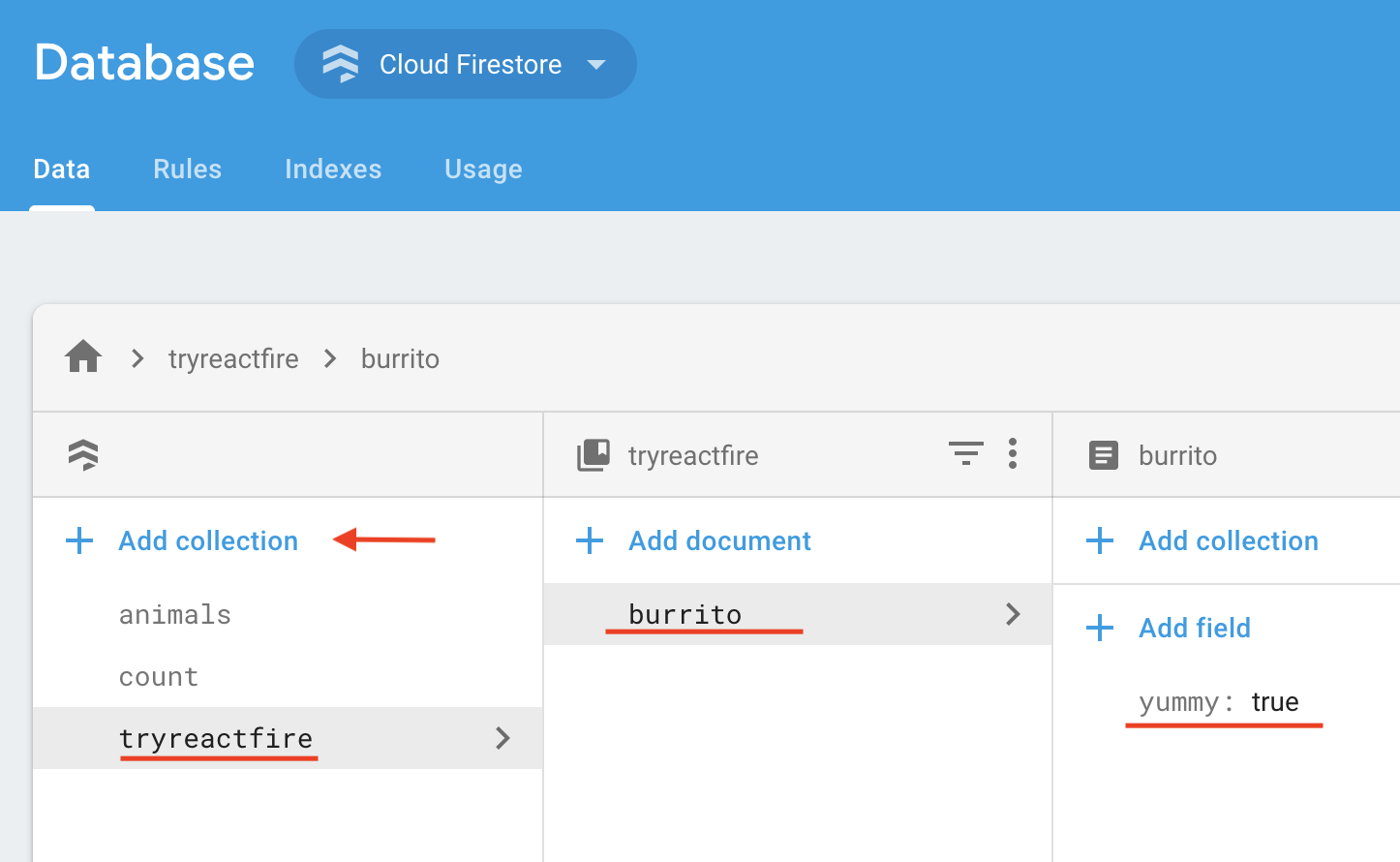
1. In the _Data_ tab of the console, click _Add Collection_
|
|
|
|
1. Name the collection **_tryreactfire_**
|
|
1. Add a document with ID **_burrito_** and boolean field `yummy: true`
|
|
|
|
|
|
|
|
1. Add the following to your security rules and click _Publish_
|
|
|
|
```text
|
|
match /tryreactfire/burrito {
|
|
allow read: if true;
|
|
allow write: if request.auth.uid != null;
|
|
}
|
|
```
|
|
|
|
## 4. Modify `src/index.js`
|
|
|
|
1. Import Firebase and ReactFire
|
|
|
|
```js
|
|
//...
|
|
import { FirebaseAppProvider } from 'reactfire';
|
|
//...
|
|
```
|
|
|
|
1. Wrap your app in a `FirebaseAppProvider` and provide the config object from the Firebase console
|
|
|
|
```jsx
|
|
//...
|
|
const firebaseConfig = {
|
|
/* add your config object from Firebase console */
|
|
};
|
|
ReactDOM.createRoot(document.getElementById('root')).render(
|
|
<FirebaseAppProvider firebaseConfig={firebaseConfig}>
|
|
<App />
|
|
</FirebaseAppProvider>
|
|
);
|
|
//...
|
|
```
|
|
|
|
## 5. Modify `src/App.js`
|
|
|
|
1. Import the `useFirestoreDocData` and `useFirestore` hooks
|
|
|
|
```js
|
|
//...
|
|
import { useFirestoreDocData, useFirestore } from 'reactfire';
|
|
//...
|
|
```
|
|
|
|
1. Add a function component
|
|
|
|
```jsx
|
|
//...
|
|
function Burrito() {
|
|
// lazy load the Firestore SDK and create a document reference
|
|
const burritoRef = useFirestore()
|
|
.collection('tryreactfire')
|
|
.doc('burrito');
|
|
|
|
// subscribe to the doc. just one line!
|
|
const burrito = useFirestoreDocData(burritoRef);
|
|
|
|
// get the value from the doc
|
|
const isYummy = burrito.yummy;
|
|
|
|
return <p>The burrito is {isYummy ? 'good' : 'bad'}</p>;
|
|
}
|
|
//...
|
|
```
|
|
|
|
1. Render your component inside of a `Suspense` tag
|
|
|
|
> We need to do this because `useFirestoreDocData` throws a Promise while it is waiting for a response from Firestore. Suspense will catch the Promise and render `fallback` until the Promise is resolved.
|
|
|
|
Replace the `App` function with the following:
|
|
|
|
```jsx
|
|
//...
|
|
function App() {
|
|
return (
|
|
<div className="App">
|
|
{/*
|
|
SuspenseWithPerf behaves the same as Suspense,
|
|
but also automatically measures load times with the User Timing API
|
|
and reports it to Firebase Performance Monitoring
|
|
*/}
|
|
<SuspenseWithPerf
|
|
fallback={'loading burrito status...'}
|
|
traceId={'load-burrito-status'}
|
|
>
|
|
<Burrito />
|
|
</SuspenseWithPerf>
|
|
</div>
|
|
);
|
|
}
|
|
//...
|
|
```
|
|
|
|
## 6. Run your app!
|
|
|
|
```bash
|
|
yarn start
|
|
# or
|
|
npm run start
|
|
```
|
|
|
|
1. Edit the value of `yummy` in the Firebase console, and watch it update in real time in your app! 🔥🔥🔥
|
|
|
|
## _About Firebase Performance Monitoring_
|
|
|
|
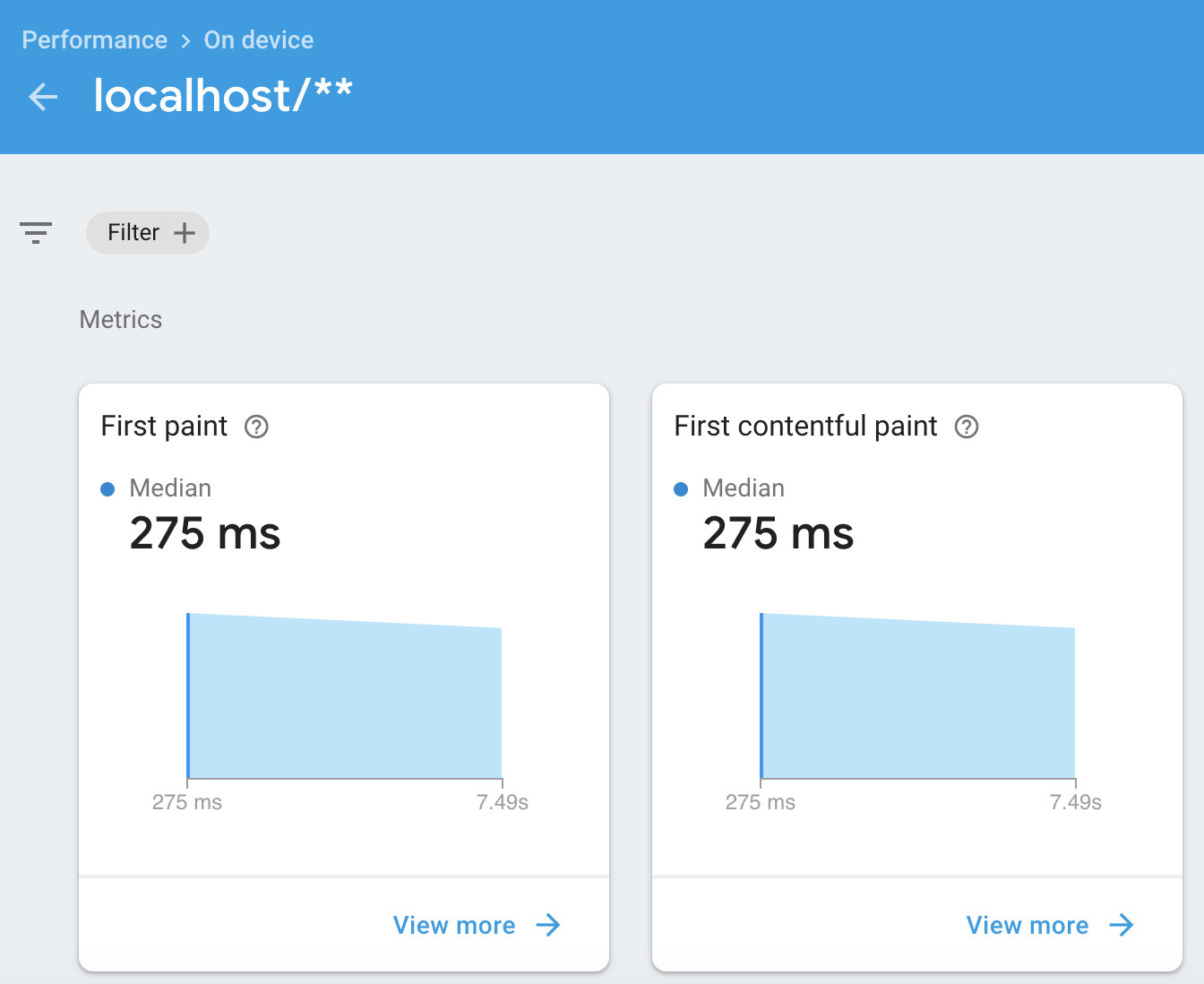
`SuspenseWithPerf` will lazy load the Firebase Performance Monitoring library and report on on our custom trace, `load-burrito-status`, that we set in the `traceId` prop of `SuspenseWithPerf`. In addition, it will automatically measure [common performance stats](https://firebase.google.com/docs/perf-mon/automatic-web)!
|
|
|
|
Note that Firebase Performance Monitoring can take about 12 hours to crunch your data and show it in the _Performance_ tab of the Firebase console.
|
|
|
|
This is an example of some of the stats in the Firebase Performance Monitoring console after 12 hours:
|
|
|
|
|