mirror of
https://github.com/zhigang1992/react-native-super-grid.git
synced 2026-01-12 22:50:58 +08:00

React Native Super Grid
Responsive Grid View for React Native.
Getting Started
This component renders a Grid View that adapts itself to various screen resolutions.
Instead of passing an itemPerRow argument, you pass itemWidth and each item will be rendered with a width equal to or more than (to fill the screen) the given width.
Internally, this component uses the native ListView.
Installing
You can install the package via npm.
npm install react-native-super-grid
Usage
import GridView from 'react-native-super-grid';
<GridView
  itemWidth={130}
  items={[1,2,3,4,5,6]}
  renderItem={item => (<Text>{item}</Text>)}
/>
Properties
| Property | Type | Default Value | Description |
|---|---|---|---|
| renderItem | Function | Function to render each object. Should return a react native component. | |
| items | Array | Items to be rendered. renderItem will be called with each item in this array. | |
| itemWidth | Number | 120 | Minimum width for each item in pixels (virtual). |
| fixed | Boolean | false | If true, the exact itemWidth will be used and won't be adjusted to fit the screen. |
| spacing | Number | 10 | Spacing between each item. |
| style | ListView styles (Object) | Styles for the container. Styles for an item should be applied inside renderItem. |
|
| staticWidth | Number | undefined | Specifies a static width for the GridView container. If your container width is known or can be calculated at runtime (via Dimensions.get('window'), for example), passing this prop will force the grid container to that width and avoid the reflow associated with dynamically calculating the container's width |
Example
import React, { Component } from 'react';
import { StyleSheet, View, Text } from 'react-native';
import GridView from 'react-native-super-grid';

export default class Example extends Component {
  render() {
    // Taken from https://flatuicolors.com/
    const items = [
      { name: 'TURQUOISE', code: '#1abc9c' }, { name: 'EMERALD', code: '#2ecc71' },
      { name: 'PETER RIVER', code: '#3498db' }, { name: 'AMETHYST', code: '#9b59b6' },
      { name: 'WET ASPHALT', code: '#34495e' }, { name: 'GREEN SEA', code: '#16a085' },
      { name: 'NEPHRITIS', code: '#27ae60' }, { name: 'BELIZE HOLE', code: '#2980b9' },
      { name: 'WISTERIA', code: '#8e44ad' }, { name: 'MIDNIGHT BLUE', code: '#2c3e50' },
      { name: 'SUN FLOWER', code: '#f1c40f' }, { name: 'CARROT', code: '#e67e22' },
      { name: 'ALIZARIN', code: '#e74c3c' }, { name: 'CLOUDS', code: '#ecf0f1' },
      { name: 'CONCRETE', code: '#95a5a6' }, { name: 'ORANGE', code: '#f39c12' },
      { name: 'PUMPKIN', code: '#d35400' }, { name: 'POMEGRANATE', code: '#c0392b' },
      { name: 'SILVER', code: '#bdc3c7' }, { name: 'ASBESTOS', code: '#7f8c8d' },
    ];

    return (
      <GridView
        itemWidth={130}
        items={items}
        style={styles.gridView}
        renderItem={item => (
          <View style={[styles.itemContainer, { backgroundColor: item.code }]}>
            <Text style={styles.itemName}>{item.name}</Text>
            <Text style={styles.itemCode}>{item.code}</Text>
          </View>
        )}
      />
    );
  }
}

const styles = StyleSheet.create({
  gridView: {
    paddingTop: 25,
    flex: 1,
  },
  itemContainer: {
    justifyContent: 'flex-end',
    borderRadius: 5,
    padding: 10,
    height: 150,
  },
  itemName: {
    fontSize: 16,
    color: '#fff',
    fontWeight: '600',
  },
  itemCode: {
    fontWeight: '600',
    fontSize: 12,
    color: '#fff',
  },
});
 |
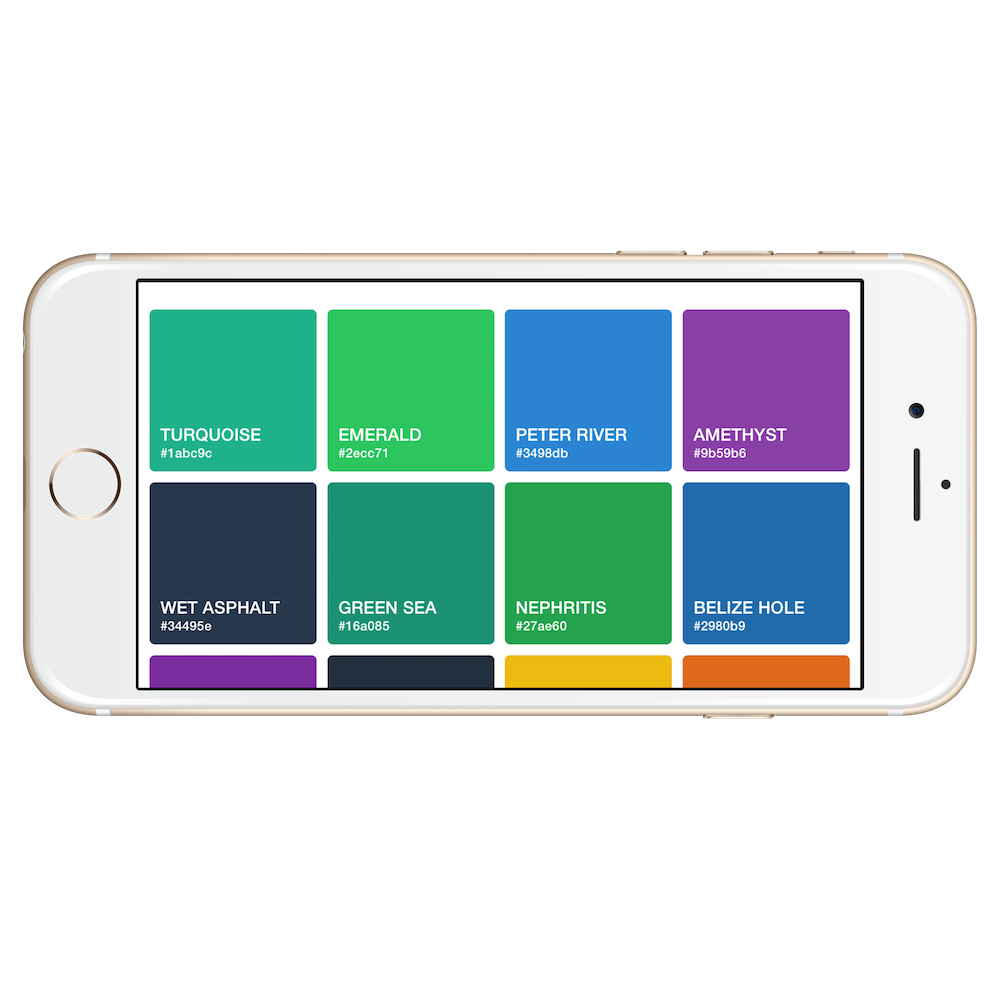 |
|---|---|
| iPhone6 Portrait | iPhone6 Landscape |
 |
 |
|---|---|
| iPad Air 2 Portrait | iPad Air 2 Landscape |
 |
 |
|---|---|
| Android Portrait | Android Landscape |
License
This project is licensed under the MIT License - see the LICENSE.md file for details.
Changelog
[1.0.3] - 2017-06-06
Added
- Pass row index to renderItem @heaversm.
[1.0.4] - 2017-10-09
Added
- Optional staticWidth prop @thejettdurham.
- Use prop-types package instead of deprecated react's PropTypes.
Acknowledgments
Colors in the example from https://flatuicolors.com/.
Screenshot Mockup generated from https://mockuphone.com.