
react-native-popover-view



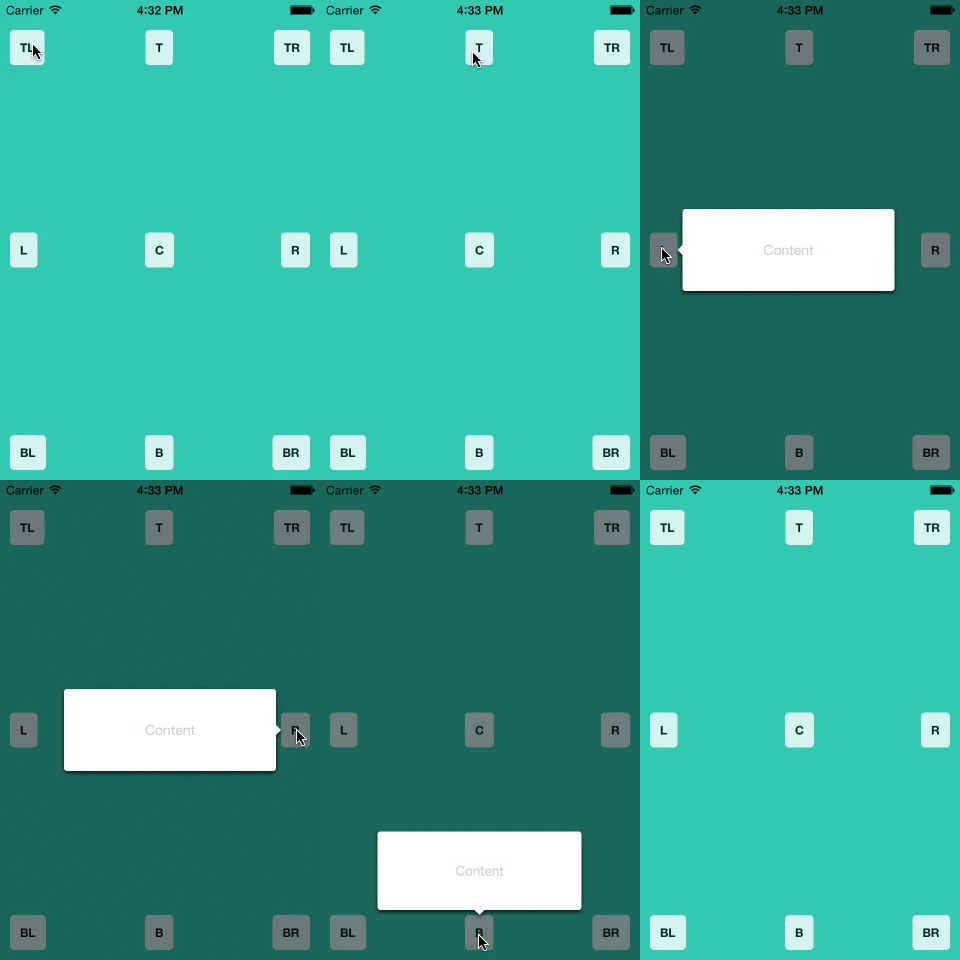
A well-tested, lightweight <Popover> component for react-native. Great for use in Tablets; you can put entire views that you would normally show in a modal (on a smaller device) into a popover, optionally give it an anchor point, and have it float on top of all of the other views.
It is written entirely in JavaScript, but uses React Native's native driver for responsive animations, even when the JS thread is busy.
A Note on Origins
This is a fork of react-native-popover, originally created by Jean Regisser but since abandoned.
Similar forks exist on Github (such as react-native-modal-popover), but this is the first to be published on NPM as far as I know.
Install
npm i --save react-native-popover-view@latest
or
yarn add react-native-popover-view@latest
Standalone Usage
import Popover from 'react-native-popover-view'

...
  render (
    <Popover
      isVisible={this.state.isVisible} />
      <CustomElement />
    </Popover>
  )
Props
| Prop | Type | Optional | Default | Description |
|---|---|---|---|---|
| isVisible | bool | Yes | false | Show/Hide the popover |
| fromRect | rect | Yes | null | Rectangle at which to anchor the popover. If not provided, the popover will appear in the center of the screen. |
| displayArea | rect | Yes | screen rect | Area where the popover is allowed to be displayed |
| placement | string | Yes | 'auto' | How to position the popover - top | bottom | left | right | auto. When 'auto' is specified, it will determine the ideal placement so that the popover is fully visible within displayArea. |
| onClose | function | Yes | Callback to be fired when the user taps the popover | |
| doneClosingCallback | function | Yes | Callback to be fired when the popover is finished closing (after animation) | |
| showInModal | bool | Yes | true | Whether the Popover should be encapsulated in the Modal view from RN, which allows it to show above all other content, or just be present in the view hierarchy like a normal view. |
| showArrow | bool | Yes | true | Whether the arrow that points to the rect (passing in as fromRect) is shown. If fromRect is null, the arrow will never be shown. |
| showBackground | bool | Yes | true | Whether the background behind the popover darkens when the popover is shown. |
rect is an object with the following properties: {x: number, y: number, width: number, height: number}. You can create the object yourself, or import Popover, { Rect } from 'react-native-popover-view and create a rect by calling new Rect(x, y, width, height).
Full Example
import React, { Component } from 'react';
import Popover from 'react-native-popover-view;
import {
  AppRegistry,
  StyleSheet,
  Text,
  TouchableHighlight,
  View,
} from 'react-native';

class PopoverExample extends Component {
  this.state = {
    isVisible: false,
    buttonRect: {},
  }

  showPopover() {
    this.refs.button.measure((ox, oy, width, height, px, py) => {
      this.setState({
        isVisible: true,
        buttonRect: {x: px, y: py, width: width, height: height}
      });
    });
  },

  closePopover() {
    this.setState({isVisible: false});
  },

  render() {
    return (
      <View style={styles.container}>
        <TouchableHighlight ref='button' style={styles.button} onPress={this.showPopover}>
          <Text style={styles.buttonText}>Press me</Text>
        </TouchableHighlight>

        <Popover
          isVisible={this.state.isVisible}
          fromRect={this.state.buttonRect}
          onClose={this.closePopover}>
          <Text>I'm the content of this popover!</Text>
        </Popover>
      </View>
    );
  }
});

var styles = StyleSheet.create({
  container: {
    flex: 1,
    alignItems: 'center',
    justifyContent: 'center',
    backgroundColor: 'rgb(43, 186, 180)',
  },
  button: {
    borderRadius: 4,
    padding: 10,
    marginLeft: 10,
    marginRight: 10,
    backgroundColor: '#ccc',
    borderColor: '#333',
    borderWidth: 1,
  },
  buttonText: {
  }
});

AppRegistry.registerComponent('PopoverExample', () => PopoverExample);
Usage with React Navigation
This can also be integrated with react-navigation's StackNavigator, so that on tablets, views higher up in the stack show in a popover instead of a full-screen modal.
Basic Setup
1) Add HOC around Root Component
In your index file, add:
import { withPopoverNavigationRootWrapper } from 'react-native-popover-view'
...
AppRegistry.registerComponent('AppName', () => withPopoverNavigationRootWrapper(RootComponent));
This simply passes updates in the screen size to Popover components that are currently showing, so that if your app is moved into split screen while a Popover is showing, it can adapt to the new display area.
2) Define when Popover should be shown
You also need to provide a function that returns when a popover should be used instead of a full-screen modal (which is default for react-navigation). This is best done in the constructor of your root component or in global space. Here is an example that uses the isTablet function from react-native-device-info; however, you can provide a function that uses whatever you want to make a distinction.
import DeviceInfo from 'react-native-device-info'

PopoverNavigation.setShouldShowInPopover(() => DeviceInfo.isTablet())
3) Change StackNavigator to PopoverStackNavigator
PopoverStackNavigator is a drop-in replacement for react-navigation's StackNavigator. It assumes the first view in your RouteConfigs is the base view, and every other view should be shown in a Popover when the function you passed to setShouldShowInPopover returns true.
You can pass a few per-screen options through your RouteConfigs:
Option | Type | Default | Description
placement | PLACEMENT_OPTIONS | PLACEMENT_OPTIONS.AUTO | Passed through to Popover.
preferedWidth | number | 380 | The width for the internal view that wraps the Popover. (Default 380)
preferedWidth | number | null (allows view to fill display area vertically) | The height for the internal view that wraps the Popover.
showInModal | boolean | true | Passed through to Popover. If you want to stack multiple Popover's, only the bottom one can be shown in a Modal on iOS.
You can also pass some global options in your StackNavigatorConfig, which are all passed through to each Popover in the stack: showArrow, showBackground, arrowSize. See the Popover props above for details of these.
Example:
let stack = PopoverStackNavigator({
  BaseView: {
    screen: BaseView,
    navigationOptions: ({navigation}) => {{title: 'BaseView', ...otherOptions}}
  },
  ModalView: {
    screen: ModalView,
    navigationOptions: ({navigation}) => {{title: 'ModalView', ...otherOptions}},
    popoverOptions: {
      preferedWidth: 500
    }
  }
},
{
  mode: 'modal',
  popoverOptions: {
    showArrow: false
  }
});
4) (Optional) Update your navigate calls with fromRect Information
If you want certain popovers to show from a rect, you need to pass this in as params to the navigate() call. For Example:
import { Rect } from 'react-native-popover-view`;
this.props.navigation.navigate('NextView`, {fromRect: new Rect(10, 10, 40, 20), ...otherParams});
If the rect uses variables that could change when the display area changes, you should instead use calculateRect, and pass in a function that will return the rect. For example, if your popover originates from a button that is always centered, regardless of screen size, you could use the following:
import { Rect } from 'react-native-popover-view`;
this.props.navigation.navigate('NextView`, {calculateRect: () => new Rect(this.state.width/2 - 20, 50, 40, 20), ...otherParams});
Now, if your app is put into split-screen mode while the popover is still showing, calculateRect will be called again, and the popover will shift to point to the new rect.
Advanced Usage
Custumize Display Area used by Popovers
If you use withPopoverNavigationRootWrapper, the Popovers use a display area of: {x: 10, y: Platform.OS === 'ios' ? 20 : 10, width: APP_WIDTH - 20, height: APP_HEIGHT - (Platform.OS === 'ios' ? 30 : 20)}. If you want to restrict the displayArea of each Popover to a different area, you can set it yourself. Instead of wrapping your root component with withPopoverNavigationRootWrapper, just wrap it instead with a View, and in the onLayout callback, pass a rect to PopoverNavigation.setDisplayArea. For example:
import { PopoverNavigation, Rect } from 'react-native-popover-view'
...
class RootComponent {
  ...
  render() {
    return (
      <View onLayout={event => PopoverNavigation.setDisplayArea(new Rect(event.nativeEvent.layout.width/2 - 50, ...))}>
        <RestOfViews />
      </View>
    )
  }
}

AppRegistry.registerComponent('AppName', () => RootComponent);
Credits
Original codebase created by Jean Regisser jean.regisser@gmail.com (https://github.com/jeanregisser) as react-native-popover, which is now gone stale The code supporting animations was inspired and adapted from @brentvatne's Transition.js mixin.
MIT Licensed