### Motivation

This PR makes clear what is the cause of app crash when user doesn't wrap his components' tree with Provider component.

### Test plan

Render Portal component without wrapping components' tree with Provider component.
Nice error message with link to our docs will be presented.
### Motivation

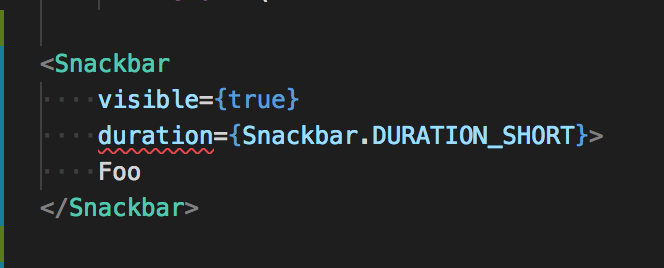
Below `Snackbar` usage has error.

<img width="332" alt="2018-10-18 20 18 21" src="https://user-images.githubusercontent.com/434227/47150896-19790100-d313-11e8-8794-256703ab654b.png">

And error message:

```
path/to/my/component.tsx:131:17 - error TS2322: Type 'string' is not assignable to type 'number | undefined'.

131                 duration={Snackbar.DURATION_SHORT}
                    ~~~~~~~~

  node_modules/react-native-paper/typings/components/Snackbar.d.ts:10:3
    10   duration?: number;
         ~~~~~~~~
    The expected type comes from property 'duration' which is declared here on type 'IntrinsicAttributes & IntrinsicClassAttributes<Snackbar> & Readonly<{ children?: ReactNode; }> & Readonly<SnackbarProps>'
```

Because `duration` was defined as a `string` in the type definition file. I fixed it.

### Test plan

Typecheck for below jsx.

```jsx
<Snackbar
    visible={true}
    duration={Snackbar.DURATION_SHORT}>
    Foo
</Snackbar>
```
While i was trying to update React and Flow versions, i found a small issue in docs. We were trying to access `android` and `ios` properties on wrong object.
### Motivation
Fixes#556. It appears like the default card actions padding is slightly wrong. The issue affects buttons as well.
This is somehow a possibly minor, but breaking change for existing projects, so I'll try to explain what's going on.
### Resources
Cards

According to MD guidelines the card actions padding is 8. The content's padding is 16. Cards use the "compact" buttons with smaller padding - 8 instead of standard 16.
Buttons

The standard horizontal padding is 16. Although it's different for card action buttons. Notice the min-width value, which is 64, but the buttons section doesn't really describe the compact buttons.
### Solution
The example provided by @brunohkbx presented a case where it got caught into the min-width trap. The text was too small and caused a larger button padding. If you run this [expo snack](https://snack.expo.io/HyqcT35KX), it presents the same case, just with different button text. First goes too far to the right, second goes too far to the left.
The first thing to fix was the card actions padding - switch from 4 to 8. It results in:
<img width="377" alt="screen shot 2018-09-27 at 22 21 01" src="https://user-images.githubusercontent.com/7827311/46172934-2a4ecd80-c2a5-11e8-9364-17911a79cce3.png">
So it works for the expo examples case, but not really for the [mentioned issue](#556). It still gives an extra button padding due to too short text (min-width).
After removing the min-width from compact buttons, it seems like it's finally there:
<img width="376" alt="screen shot 2018-09-27 at 22 13 03" src="https://user-images.githubusercontent.com/7827311/46173141-b95be580-c2a5-11e8-88dd-82a15f5981a5.png">
Finally, it also switches the dialog actions to 8 padding, since that's basically the same thing.
### Test plan
https://snack.expo.io/HydBnn5t7
Snapshot tests updated
* feat: initial implementation of banner component.

* feat: add props description.

* refactor: Change the way banner is structured.

* refactor: small refactor of banner component and example.

* refactor: remove some not needed logic from banner and add example.

* refactor: refactor of banner props description and little clean up in component.

* refactor: simplify implementation of banner

* feat: add snapshot tests for banner.

* feat: add banner gif.

* fix: fix example.

* fix: reduce banner gif size.

* fix: reduce gif size even more.
I've noticed that link to the _getting started_ page in the docs seems to not working as expected since `*.html` extension is added anyway and it makes the link broken:
`https://callstack.github.io/react-native-paper/getting-started.html.html`.

### Motivation

The documentation is important part of the library and should be working properly.

### Test plan

Enter `/docs`, install using `yarn` and run it with `yarn start`.

> **NOTE:** _the current version works on localhost and breaks only in the prod env. Suggested change will probably work in both, but needs to be verified by someone who knows the deployment process._
### Motivation

Update documentation with new version `2.0.1` of `react-native-paper`. RadioButton props are quite different from version 1 to 2, so docs needed an update.
### Test plan

See docs.