mirror of
https://github.com/zhigang1992/react-native-firebase.git
synced 2026-05-22 07:52:17 +08:00

182 lines
7.2 KiB
Markdown
182 lines
7.2 KiB
Markdown
---
|
|
title: Quick Start
|
|
description: Getting started with AdMob in React Native Firebase
|
|
---
|
|
|
|
# AdMob Quick Start
|
|
|
|
## Installation
|
|
|
|
This module depends on the `@react-native-firebase/app` module. To get started and install `app`,
|
|
visit the project's <Anchor version={false} group={false} href="/quick-start">quick start</Anchor> guide.
|
|
|
|
Install this module with Yarn:
|
|
|
|
```bash
|
|
yarn add @react-native-firebase/admob
|
|
|
|
# Using iOS
|
|
cd ios/ && pod install
|
|
```
|
|
|
|
**IMPORTANT**: Ensure you update the "Contains ads" settings in the Google Play Store (via Pricing & Distribution tab).
|
|
|
|
> Integrating manually and not via React Native auto-linking? Check the setup instructions for <Anchor version group href="/android">Android</Anchor> & <Anchor version group href="/ios">iOS</Anchor>.
|
|
|
|
## Module usage
|
|
|
|
The AdMob package provides a JavaScript API for integrating event based adverts such as Interstitial Ads and
|
|
React component view adverts such as Banner Ads. It also provides functionality for requesting consent from those users within the EEA, specified by EU ePrivacy Directive & GDPR.
|
|
|
|
Import the AdMob package into your project:
|
|
|
|
```js
|
|
import admob from '@react-native-firebase/admob';
|
|
```
|
|
|
|
The package also provides access to the firebase instance:
|
|
|
|
```js
|
|
import { firebase } from '@react-native-firebase/admob';
|
|
```
|
|
|
|
### Important: Adding your AdMob App ID
|
|
|
|
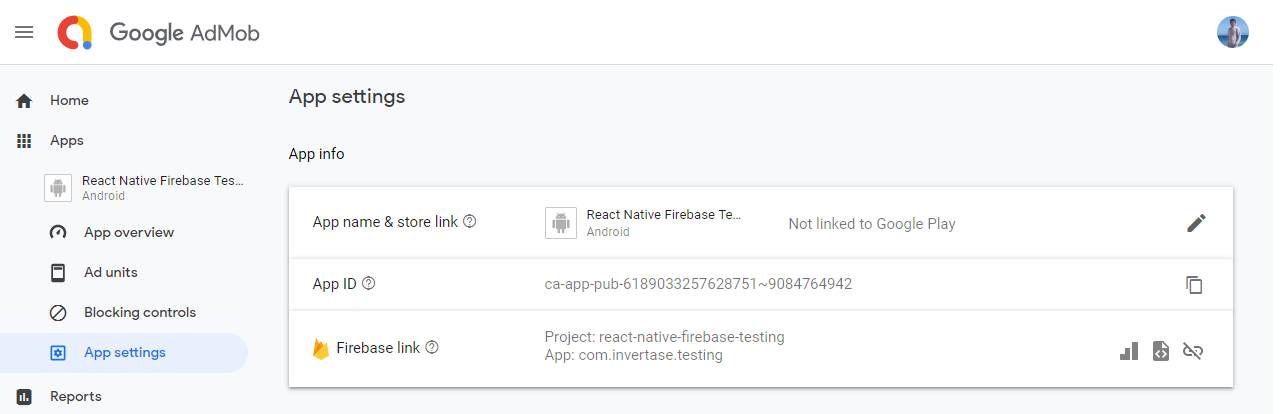
The AdMob module needs to be hooked up to your own Google AdMob account. On [the dashboard](https://apps.admob.com/v2/home), you can add an application via the "Apps" menu item. Once created, under the "App settings" section you will find a custom "App ID". This ID is needed in order for the module to be used.
|
|
|
|
|
|
|
|
> Installing the module without adding a valid App ID will result in a crash during app build.
|
|
|
|
Add the ID to your root level `firebase.json` file under the `react-native` object:
|
|
|
|
```json
|
|
{
|
|
"react-native": {
|
|
"admob_android_app_id": "ca-app-pub-xxxxxxxx~xxxxxxxx",
|
|
"admob_ios_app_id": "ca-app-pub-xxxxxxxx~xxxxxxxx"
|
|
}
|
|
}
|
|
```
|
|
|
|
Ensure you **rebuild** your application for the changes to take effect.
|
|
|
|
### Advert Types
|
|
|
|
The AdMob module supports 3 advert types:
|
|
|
|
<Grid columns="3">
|
|
<Block
|
|
icon="calendar_view_day"
|
|
color="#00bcd4"
|
|
title="Banners"
|
|
to="/reference/bannerad"
|
|
>
|
|
Banner ads are rectangular image or text ads that occupy a spot within an app's layout.
|
|
</Block>
|
|
<Block
|
|
icon="subscriptions"
|
|
color="#009688"
|
|
title="Interstitial"
|
|
to="/reference/interstitialad"
|
|
>
|
|
Interstitials are full-screen ads that cover the interface of an app until closed by the user.
|
|
</Block>
|
|
<Block
|
|
icon="attach_money"
|
|
color="#673ab7"
|
|
title="Rewarded"
|
|
to="reference/rewardedad"
|
|
>
|
|
Rewarded ads are ads that users have the option of interacting with in exchange for in-app rewards.
|
|
</Block>
|
|
</Grid>
|
|
|
|
### European User Consent
|
|
|
|
Out of the box, AdMob does not handle any related regulations which you may need to enforce on your application. It is up to the developer to implement and handle this on a user-by-user basis. For example, you must consent to EEA users being served both personalized and non-personalized adverts before showing them. For more information, see [Requesting Consent from European Users](https://developers.google.com/admob/android/eu-consent).
|
|
|
|
The AdMob module provides a `AdConsent` helper to help developers quickly implement consent flows within their application. See the <Anchor version group href="/european-user-consent">European User Consent</Anchor> page for full examples of
|
|
how to integrate the helper into your application.
|
|
|
|
#### Testing
|
|
|
|
For testing purposes, a test ad unit is provided to always show an example advert. Lets go ahead and setup a new Interstitial using the testing ID, uing the `InterstitialAd` class:
|
|
|
|
```js
|
|
import { InterstitialAd, TestIds } from '@react-native-firebase/admob';
|
|
|
|
// Create a new instance
|
|
const interstitialAd = InterstitialAd.createForAdRequest(TestIds.INTERSTITIAL);
|
|
|
|
// Add event handlers
|
|
interstitialAd.onAdEvent((type, error) => {
|
|
console.log('New advert event: ', type);
|
|
});
|
|
|
|
// Load a new advert
|
|
interstitialAd.load();
|
|
```
|
|
|
|
Once our interstitial has been loaded from the Google AdMob servers, we will start to receive events within our handler (e.g. ad loaded). These events also include user based events such as notifying us when the user has closed the ad, or clicked the ad and left the application. For a full list of events, see the `AdEventType` class.
|
|
|
|
Once the advert has been loaded, we can show it to the user. Listen out for the loaded event, and once ready, show it to the user:
|
|
|
|
```js
|
|
import { AdEventType } from '@react-native-firebase/admob';
|
|
|
|
interstitialAd.onAdEvent((type, error) => {
|
|
if (type === AdEventType.LOADED) {
|
|
interstitialAd.show();
|
|
}
|
|
});
|
|
```
|
|
|
|
Both the `createForAdRequest` and `show` methods take additional configuration options to tailor the ad experience. See the reference documentation for more information.
|
|
|
|
#### Production Ad Units
|
|
|
|
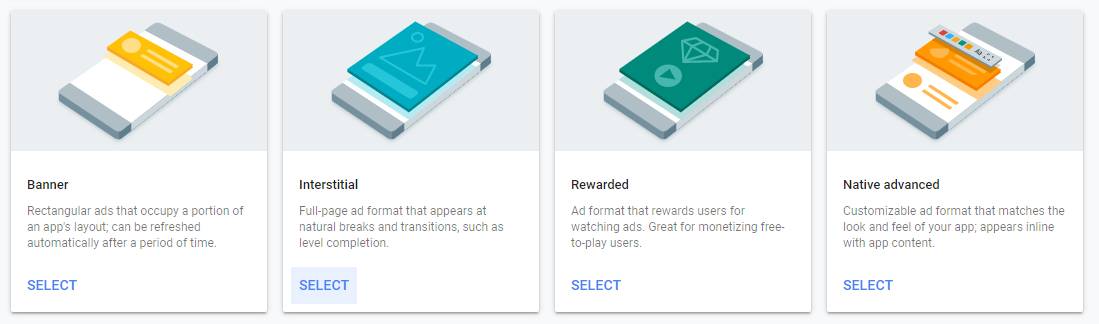
On your Google AdMob dashboard, create a new "Ad Unit" for your application. Select the Interstitial type:
|
|
|
|
|
|
|
|
Once created, you will be provided with a new Ad Unit ID which can be passed over to the AdMob module to show content specificly for this ad unit. You can customise the type of content shown from the dashboard.
|
|
|
|

|
|
|
|
### Configuring Ad Requests
|
|
|
|
The AdMob module provides two ways of filtering and handling ad content within your app.
|
|
|
|
### Global Configuration
|
|
|
|
To comply with various online acts, such as [Children's Online Privacy Protection Act (COPPA)](http://business.ftc.gov/privacy-and-security/children%27s-privacy) and [General Data Protection Regulation (GDPR)](https://eur-lex.europa.eu/legal-content/EN/TXT/?uri=CELEX:32016R0679), it is possible to set targetting preferences across every ad request in your application.
|
|
|
|
Using the `setRequestConfiguration` method, all future ad requests will comply with the `RequestConfiguration` set:
|
|
|
|
```js
|
|
import admob, { MaxAdContentRating } from '@react-native-firebase/admob';
|
|
|
|
await admob().setRequestConfiguration({
|
|
maxAdContentRating: MaxAdContentRating.PG,
|
|
tagForChildDirectedTreatment: true,
|
|
tagForUnderAgeOfConsent: true,
|
|
});
|
|
```
|
|
|
|
For more information on the options available, see the [`RequestConfiguration` documentation](https://firebase.google.com/docs/reference/android/com/google/android/gms/ads/RequestConfiguration).
|
|
|
|
### Ad Specific Configuration
|
|
|
|
It is also possible to set ad specific configuration before the advert is loaded from the server, to help tailor ads to specific situations within your application using `RequestOptions`. For example, to request non-personalized ads only, with specific targetting keywords with an Interstitial, pass the config to the `createForAdRequest` method:
|
|
|
|
```js
|
|
import { InterstitialAd, TestIds } from '@react-native-firebase/admob';
|
|
|
|
// Create a new instance
|
|
const interstitialAd = InterstitialAd.createForAdRequest(TestIds.INTERSTITIAL, {
|
|
requestNonPersonalizedAdsOnly: true,
|
|
keywords: ['fashion', 'clothing'],
|
|
});
|
|
```
|