
14 KiB
react-jsonschema-form

A simple React component capable of building HTML forms out of a JSON schema and using Bootstrap semantics by default.
A live playground is hosted on gh-pages.
Testing powered by BrowserStack

Philosophy
react-jsonschema-form is meant to automatically generate a React form based on a JSON Schema. It is a major component in the kinto-admin project. If you want to generate a form for any data, sight unseen, simply given a JSON schema, react-jsonschema-form may be for you. If you have a priori knowledge of your data and want a toolkit for generating forms for it, you might look elsewhere.
react-jsonschema-form validates that the data conforms to the given schema, but doesn't prevent the user from inputing data that doesn't fit (for example, stripping non-numbers from a number field, or adding values to an array that is already "full").
Installation
Requires React 15.0.0+.
Note: The
masterbranch of the repository reflects ongoing development. Releases are published as tags. You should never blindly install frommaster, but rather check what the available stable releases are.
As a npm-based project dependency
$ npm install react-jsonschema-form --save
Note: While the library renders Bootstrap HTML semantics, you have to build and load the Bootstrap styles on your own.
As a script served from a CDN
<script src="https://unpkg.com/react-jsonschema-form/dist/react-jsonschema-form.js"></script>
Source maps are available at this url.
Note: The CDN version does not embed
reactorreact-dom.
You'll also need to alias the default export property to use the Form component:
const Form = JSONSchemaForm.default;
// or
const {default: Form} = JSONSchemaForm;
Usage
import React, { Component } from "react";
import { render } from "react-dom";

import Form from "react-jsonschema-form";

const schema = {
  title: "Todo",
  type: "object",
  required: ["title"],
  properties: {
    title: {type: "string", title: "Title", default: "A new task"},
    done: {type: "boolean", title: "Done?", default: false}
  }
};

const log = (type) => console.log.bind(console, type);

render((
  <Form schema={schema}
        onChange={log("changed")}
        onSubmit={log("submitted")}
        onError={log("errors")} />
), document.getElementById("app"));
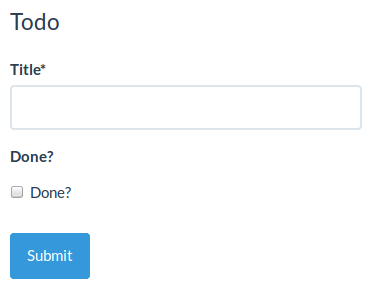
This will generate a form like this (assuming you loaded the standard Bootstrap stylesheet):

Form initialization
Often you'll want to prefill a form with existing data; this is done by passing a formData prop object matching the schema:
const formData = {
  title: "First task",
  done: true
};

render((
  <Form schema={schema}
        formData={formData} />
), document.getElementById("app"));
Note: If your form has a single field, pass a single value to
formData. ex:formData='Charlie'
WARNING: If you have situations where your parent component can re-render, make sure you listen to the
onChangeevent and update the data you pass to theformDataattribute.
Form event handlers
Form submission
You can pass a function as the onSubmit prop of your Form component to listen to when the form is submitted and its data are valid. It will be passed a result object having a formData attribute, which is the valid form data you're usually after:
const onSubmit = ({formData}) => console.log("Data submitted: ",  formData);

render((
  <Form schema={schema}
        onSubmit={onSubmit} />
), document.getElementById("app"));
Form error event handler
To react when submitted form data are invalid, pass an onError handler. It will be passed the list of encountered errors:
const onError = (errors) => console.log("I have", errors.length, "errors to fix");

render((
  <Form schema={schema}
        onError={onError} />
), document.getElementById("app"));
Form data changes
If you plan on being notified every time the form data are updated, you can pass an onChange handler, which will receive the same args as onSubmit any time a value is updated in the form.
Form field blur events
Sometimes you may want to trigger events or modify external state when a field has been touched, so you can pass an onBlur handler, which will receive the id of the input that was blurred and the field value.
Form field focus events
Sometimes you may want to trigger events or modify external state when a field has been focused, so you can pass an onFocus handler, which will receive the id of the input that is focused and the field value.
Submit form programmatically
You can use the reference to get your Form component and call the submit method to submit the form programmatically without a submit button.
This method will dispatch the submit event of the form, and the function, that is passed to onSubmit props, will be called.
const onSubmit = ({formData}) => console.log("Data submitted: ",  formData);
let yourForm;

render((
  <Form schema={schema}
        onSubmit={onSubmit} ref={(form) => {yourForm = form;}}/>
), document.getElementById("app"));

yourForm.submit();
Styling your forms
This library renders form fields and widgets leveraging the Bootstrap semantics. That means your forms will be beautiful by default if you're loading its stylesheet in your page.
You're not necessarily forced to use Bootstrap; while it uses its semantics, it also provides a bunch of other class names so you can bring new styles or override default ones quite easily in your own personalized stylesheet. That's just HTML after all :)
If you're okay with using styles from the Bootstrap ecosystem though, then the good news is that you have access to many themes for it, which are compatible with our generated forms!
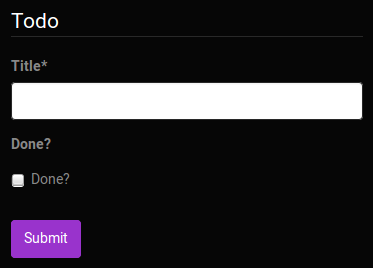
Here are some examples from the playground, using some of the Bootswatch free themes:

Last, if you really really want to override the semantics generated by the lib, you can always create and use your own custom widget, field and/or schema field components.
JSON Schema supporting status
This component follows JSON Schema specs. Due to the limitation of form widgets, there are some exceptions as follows:
-
additionalItemskeyword for arraysThis keyword works when
itemsis an array.additionalItems: trueis not supported because there's no widget to represent an item of any type. In this case it will be treated as no additional items allowed.additionalItemsbeing a valid schema is supported. -
anyOf,allOf, andoneOf, or multipletypes(i.e."type": ["string", "array"])The
anyOfandoneOfkeywords are supported, however, properties declared inside theanyOf/oneOfshould not overlap with properties "outside" of theanyOf/oneOf.You can also use
oneOfwith schema dependencies to dynamically add schema properties based on input data. -
"additionalProperties":falseproduces incorrect schemas when used with schema dependencies. This library does not remove extra properties, which causes validation to fail. It is recommended to avoid setting"additionalProperties":falsewhen you use schema dependencies. See #848 #902 #992
Tips and tricks
- Custom field template: https://jsfiddle.net/hdp1kgn6/1/
- Multi-step wizard: https://jsfiddle.net/sn4bnw9h/1/
- Using classNames with uiSchema: https://jsfiddle.net/gfwp25we/1/
- Conditional fields: https://jsfiddle.net/69z2wepo/88541/
- Advanced conditional fields: https://jsfiddle.net/cowbellerina/zbfh96b1/
- Use radio list for enums: https://jsfiddle.net/f2y3fq7L/2/
- Reading file input data: https://jsfiddle.net/f9vcb6pL/1/
- Custom errors messages with transformErrors: https://jsfiddle.net/revolunet/5r3swnr4/
- 2 columns form with CSS and FieldTemplate: https://jsfiddle.net/n1k0/bw0ffnz4/1/
- Validate and submit form from external control: https://jsfiddle.net/spacebaboon/g5a1re63/
- Custom component for Help text with
ui:help: https://codesandbox.io/s/14pqx97xl7/
Contributing
Coding style
All the JavaScript code in this project conforms to the prettier coding style. A command is provided to ensure your code is always formatted accordingly:
$ npm run cs-format
The cs-check command ensures all files conform to that style:
$ npm run cs-check
Development server
$ npm start
A live development server showcasing components with hot reload enabled is available at localhost:8080.
If you want the development server to listen on another host or port, you can use the RJSF_DEV_SERVER env variable:
$ RJSF_DEV_SERVER=0.0.0.0:8000 npm start
Build documentation
We use mkdocs to build our documentation. To run documentation locally, run:
$ pip install mkdocs==1.0.4
$ mkdocs serve
Documentation will be served by localhost:8000.
Tests
$ npm test
TDD
$ npm run tdd
Releasing
$ edit package.json # update version number
$ git commit -m "Bump version $VERSION"
$ git tag v$VERSION
$ npm run dist
$ npm publish
$ git push --tags origin master
FAQ
Q: Does rjsf support oneOf, anyOf, multiple types in an array, etc.?
A: The anyOf and oneOf keywords are supported, however, properties declared inside the anyOf/oneOf should not overlap with properties "outside" of the anyOf/oneOf.
There is also special cased where you can use oneOf in schema dependencies, If you'd like to help improve support for these keywords, see the following issues for inspiration #329 or #417. See also: #52, #151, #171, #200, #282, #302, #330, #430, #522, #538, #551, #552, or #648.
Q: Will react-jsonschema-form support Material, Ant-Design, Foundation, or [some other specific widget library or frontend style]?
A: Probably not. We use Bootstrap v3 and it works fine for our needs. We would like for react-jsonschema-form to support other frameworks, we just don't want to support them ourselves. Ideally, these frontend styles could be added to react-jsonschema-form with a third-party library. If there is a technical limitation preventing this, please consider opening a PR. See also: #91, #99, #125, #237, #287, #299, #440, #461, #546, #555, #626, and #623.
Q: Is there a way to "collapse" fields, for instance to show/hide individual fields?
A: There's no specific built-in way to do this, but you can write your own FieldTemplate that supports hiding/showing fields according to user input. We don't yet have an example of this use, but if you write one, please add it to the "tips and tricks" section, above. See also: #268, #304, #598, #920.
License
Apache 2