
7.1 KiB
title, description, slug, screenshots, authors, repository, host, stars, updated, installations, organizations
| title | description | slug | screenshots | authors | repository | host | stars | updated | installations | organizations | ||||||||||||
|---|---|---|---|---|---|---|---|---|---|---|---|---|---|---|---|---|---|---|---|---|---|---|
| Release Drafter | Drafts your next release notes as pull requests are merged into master. | release-drafter |
|
|
toolmantim/release-drafter | https://release-drafter.now.sh | 333 | 2019-01-02 21:18:43 UTC | 226 |
|
Usage
- Install the Release Drafter GitHub App into the repositories you wish to create releases in.
- Add a
.github/release-drafter.ymlconfiguration file to each repository.
Example
For example, take the following .github/release-drafter.yml file in a repository:
template: |
  ## What’s Changed

  $CHANGES
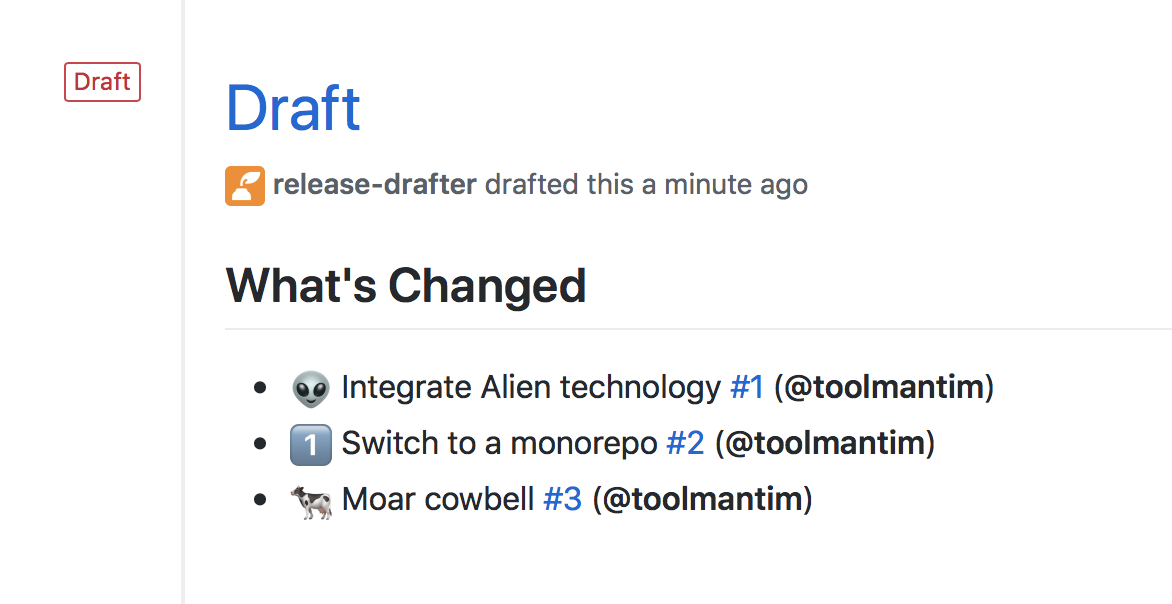
As pull requests are merged, a draft release is kept up-to-date listing the changes, ready to publish when you’re ready:

The following is a more complicated configuration, which categorises the changes into headings, and automatically suggests the next version number:
name-template: v$NEXT_PATCH_VERSION
tag-template: v$NEXT_PATCH_VERSION
categories:
  - title: 🚀 Features
    label: feature
  - title: 🐛 Bug Fixes
    label: fix
  - title: 🧰 Maintenance
    label: chore
tag-template: - $TITLE @$AUTHOR (#$NUMBER)
template: |
  ## Changes

  $CHANGES
Configuration Options
You can configure Release Drafter using the following key in your .github/release-drafter.yml file:
| Key | Required | Description |
|---|---|---|
template |
Required | The template for the body of the draft release. Use template variables to insert values. |
name-template |
Optional | The template for the name of the draft release. For example: "v$NEXT_PATCH_VERSION". |
tag-template |
Optional | The template for the tag of the draft release. For example: "v$NEXT_PATCH_VERSION". |
change-template |
Optional | The template to use for each merged pull request. Use change template variables to insert values. Default: "* $TITLE (#$NUMBER) @$AUTHOR". |
no-changes-template |
Optional | The template to use for when there’s no changes. Default: "* No changes". |
branches |
Optional | The branches to listen for configuration updates to .github/release-drafter.yml and for merge commits. Useful if you want to test the app on a pull request branch. Default is the repository’s default branch. |
categories |
Optional | Categorize pull requests using labels. Refer to Categorize Pull Requests to learn more about this option. |
Release Drafter also supports Probot Config, if you want to store your configuration files in a central repository. This allows you to share configurations between projects, and create a organization-wide configuration file by creating a repository named .github with the file .github/release-drafter.yml.
Template Variables
You can use any of the following variables in your template:
| Variable | Description |
|---|---|
$CHANGES |
The markdown list of pull requests that have been merged. |
$CONTRIBUTORS |
A comma separated list of contributors to this release (pull request authors, commit authors, and commit committers). |
$PREVIOUS_TAG |
The previous releases’s tag. |
Next Version Variables
You can use any of the following variables in your template, name-template and tag-template:
| Variable | Description |
|---|---|
$NEXT_PATCH_VERSION |
The next patch version number. For example, if the last tag or release was v1.2.3, the value would be v1.2.4. This is the most commonly used value. |
$NEXT_MINOR_VERSION |
The next minor version number. For example, if the last tag or release was v1.2.3, the value would be v1.3.0. |
$NEXT_MAJOR_VERSION |
The next major version number. For example, if the last tag or release was v1.2.3, the value would be v2.0.0. |
Change Template Variables
You can use any of the following variables in change-template:
| Variable | Description |
|---|---|
$NUMBER |
The number of the pull request, e.g. 42. |
$TITLE |
The title of the pull request, e.g. Add alien technology. |
$AUTHOR |
The pull request author’s username, e.g. gracehopper. |
Categorize Pull Requests
With the categories option you can categorize pull requests in release notes using labels. For example, append the following to your .github/release-drafter.yml file:
categories:
  - title: 🚀 Features
    label: feature
  - title: 🐛 Bug Fixes
    label: fix
Pull requests with the label "feature" or "fix" will now be grouped together:
