mirror of
https://github.com/zhigang1992/probot.github.io.git
synced 2026-01-12 22:49:53 +08:00

1.4 KiB
1.4 KiB
title, description, slug, screenshots, authors, repository, host, stars, updated, installations, organizations
| title | description | slug | screenshots | authors | repository | host | stars | updated | installations | organizations | ||||
|---|---|---|---|---|---|---|---|---|---|---|---|---|---|---|
| Issue Complete | Marks incomplete issues with a label and comment | issue-complete |
|
|
szeck87/issue-complete | https://issue-complete.glitch.me | 2 | 2018-04-07 04:43:38 UTC | 3 |
|
What It Does
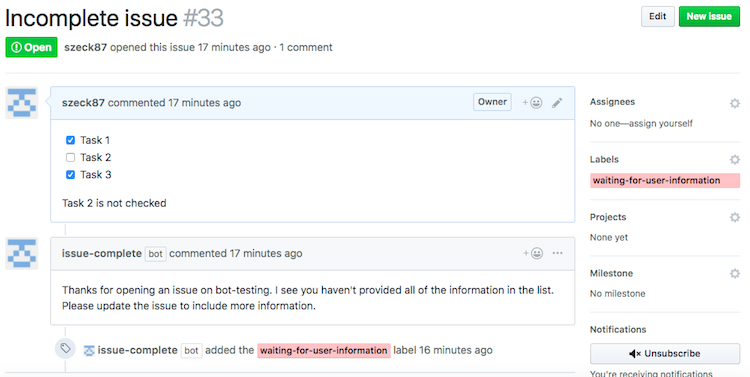
issue-complete looks at the body of an issue and adds a label and comment if it has unchecked boxes in the tasklist and/or has missing keywords.
Setup
- Install the GitHub app
- Create a
.github/issuecomplete.ymlfile in your repository (see issuecomplete.yml for a template). If you don't create this, the app will use defaults.
# The name of the label to apply when an issue does not have all tasks checked
labelName:

# The color of the label in hex format (without #)
labelColor:

# The text of the comment to add to the issue in addition to the label
commentText: >
  Text here.
  More text here.
  And more text here.

# Whether or not to ensure all checkboxes are checked
checkCheckboxes: true

keywords:
  - gist
  - recreate
Deploy
See docs/deploy.md if you would like to run your own instance of this app.