mirror of
https://github.com/zhigang1992/probot.github.io.git
synced 2026-01-12 22:49:53 +08:00

2.3 KiB
2.3 KiB
title, description, slug, screenshots, authors, repository, host, stars, updated, installations, organizations
| title | description | slug | screenshots | authors | repository | host | stars | updated | installations | organizations | ||||||||||||
|---|---|---|---|---|---|---|---|---|---|---|---|---|---|---|---|---|---|---|---|---|---|---|
| helPR | Assigns labels to issues based on the status of the PR associated with it. | helpr |
|
|
rsarky/helpr | https://evening-depths-50399.herokuapp.com | 7 | 2018-04-20 09:11:34 UTC | 28 |
|
helPR
A GitHub App built with Probot that assigns labels to issues based on the status of the PR associated with it.


Usage
Using helpr is pretty straightforward. Just install the app on your repository and you are ready to go. 💯
Consider this open issue :

Now when someone references this issue in a pull request helpr will automatically add the label pr-available :
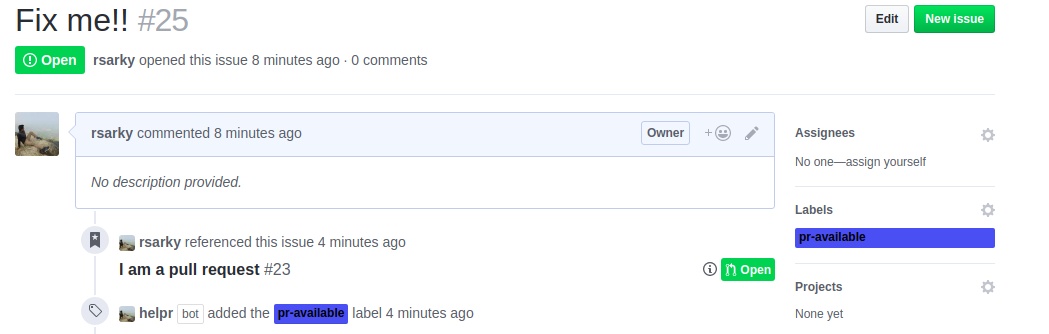
helpr supports 3 labels :
pr-availablewhen a new PR referencing an issue is opened.pr-mergedwhen a PR referencing an issue is merged.pr-rejectedwhen a PR referencing an issue is rejected.
When a PR for an issue is merged or rejected helpr will remove the pr-available label and add the respective merged or rejected label.
Configuring
You can choose label names as per your liking 😄
Add a helpr object in your .github/config.yml file (and make the file if you don't already have it) like this:
helpr:
  opened: 'insert-label-for-pr-opened-here'
  merged: 'insert-label-for-pr-merged-here'
  rejected: 'insert-label-for-pr-rejected-here'
Only override the ones that you want to change!
The defaults are:
opened: 'pr-available'
merged: 'pr-merged'
rejected: 'pr-rejected'