Summary:
This is the next step in moving RN towards standard path-based requires. All the requires in `Libraries` have been rewritten to use relative requires with a few exceptions, namely, `vendor` and `Renderer/oss` since those need to be changed upstream. This commit uses relative requires instead of `react-native/...` so that if Facebook were to stop syncing out certain folders and therefore remove code from the react-native package, internal code at Facebook would not need to change.

See the umbrella issue at https://github.com/facebook/react-native/issues/24316 for more detail.

[General] [Changed] - Migrate "Libraries" from Haste to standard path-based requires
Pull Request resolved: https://github.com/facebook/react-native/pull/24749

Differential Revision: D15258017

Pulled By: cpojer

fbshipit-source-id: a1f480ea36c05c659b6f37c8f02f6f9216d5a323
Summary:
`UITextField` don't have delegate to observe the selection changes of users(multiline text input `UITextView` have it), so we can add a KVO to observe selection changes.

cpojer shergin

[iOS] [Fixed] - Fixes selection of single line text input
Pull Request resolved: https://github.com/facebook/react-native/pull/24714

Differential Revision: D15238379

Pulled By: cpojer

fbshipit-source-id: f149721d6b4df28e90f5a9405c74e01fde7c7d10
Summary:
Closes: https://github.com/facebook/react-native/issues/24016

React Native 0.57 introduced cross-platform `accessibilityRole` and `accessibilityStates` props in order to replace `accessibilityComponentType` (for android) and `accessibilityTraits` (for iOS). With #24095 `accessibilityRole` and `accessibilityStates` will increase, receiving more options, which seems to be a good moment to remove deprecated props.

Remove deprecated `accessibilityComponentType` and `accessibilityTraits` props.

[General] [Removed] - Remove accessibilityComponentType and accessibilityTraits props
Pull Request resolved: https://github.com/facebook/react-native/pull/24344

Reviewed By: rickhanlonii

Differential Revision: D14842214

Pulled By: cpojer

fbshipit-source-id: 279945e503d8a23bfee7a49d42f5db490c5f6069
Summary:
This PR fixes#24229.
Seems currently `opacity` props for Text is being applied twice (one for text color and one for the whole view). This PR disables applying the prop to the text.
[CATEGORY] [TYPE] - Fixed double applying opacity prop for Text
Pull Request resolved: https://github.com/facebook/react-native/pull/24435
Differential Revision: D14932795
Pulled By: cpojer
fbshipit-source-id: f9280fc75f788424cb5f1e42d2e79efdb354d645
Summary:
There is a problem rendering text shadows on iOS. If the offset of the text shadow is `{width:0,height:0}`, the shadow does not display. This prevents you from representing a light directly above the text. This occurs because a text shadow only renders if the offset is a non-zero CGRect `{width:0,height:0}`.

My change checks `textShadowRadius` instead. If `textShadowRadius` is not nan then the user is rendering a text shadow. There are no situations to render a shadow without `textShadowRadius` making it a good variable to check.

This PR fixes this stale issue: https://github.com/facebook/react-native/issues/17277

[iOS] [Fixed] - Text shadow now displays when the textShadowOffset is {width:0,height:0}
Pull Request resolved: https://github.com/facebook/react-native/pull/24398

Differential Revision: D14890768

Pulled By: cpojer

fbshipit-source-id: a43b96a4a04a5603eede466abacd95c010d053e5
Summary:
Potential breaking change: The signature of ReactShadowNode's onBeforeLayout method was changed
  - Before: public void onBeforeLayout()
  - After:  public void onBeforeLayout(NativeViewHierarchyOptimizer nativeViewHierarchyOptimizer)

Implements same feature as this iOS PR: https://github.com/facebook/react-native/pull/7304

Previously, only Text and Image could be nested within Text. Now, any view can be nested within Text. One restriction of this feature is that developers must give inline views a width and a height via the style prop.

Previously, inline Images were supported via FrescoBasedReactTextInlineImageSpan. To get support for nesting views within Text, we create one special kind of span per inline view. This span is called TextInlineViewPlaceholderSpan. It is the same size as the inline view. Its job is just to occupy space -- it doesn't render any visual. After the text is rendered, we query the Android Layout object associated with the TextView to find out where it has positioned each TextInlineViewPlaceholderSpan. We then position the views to be at those locations.

One tricky aspect of the implementation is that the Text component needs to be able to render native children (the inline views) but the Android TextView cannot have children. This is solved by having the native parent of the ReactTextView also host the inline views. Implementation-wise, this was accomplished by extending the NativeViewHierarchyOptimizer to handle this case. The optimizer now handles these cases:
  - Node is not in the native tree. An ancestor must host its children.
  - Node is in the native tree and it can host its own children.
  - (new) Node is in the native tree but it cannot host its own children. An ancestor must host both this node and its children.

I added the `onInlineViewLayout` event which is useful for writing tests for verifying that the inline views are positioned properly.

Limitation: Clipping
----------

If Text's height/width is small such that an inline view doesn't completely fit, the inline view may still be fully visible due to hoisting (the inline view isn't actually parented to the Text which has the limited size. It is parented to an ancestor which may have a different clipping rectangle.). Prior to this change, layout-only views had a similar limitation.
Pull Request resolved: https://github.com/facebook/react-native/pull/23195

Differential Revision: D14014668

Pulled By: shergin

fbshipit-source-id: d46130f3d19cc83ac7ddf423adcc9e23988245d3
Summary:
We want the ability to use Linkify on android text elements. This only adds this property to Text and not TextInput since there are some functional differences with how the types could be used between iOS and android - iOS allows one or many types while Linkify restricted us to providing only one option (using the masks).

Performance is affected ONLY FOR TEXT ELEMENTS USING THIS FEATURE since Linkify is searching for patterns.
Pull Request resolved: https://github.com/facebook/react-native/pull/19216

Differential Revision: D14621883

Pulled By: cpojer

fbshipit-source-id: cb692021d314140b9a92b29e23384afd7fd1b09e
Summary:
Bug comes from #23545, if `allowedLength < 0`, it would crash if `text.length > 1`.

cc. cpojer

[iOS] [Fixed] - Fixed crash when textinput's default value exceeds maxLength
Pull Request resolved: https://github.com/facebook/react-native/pull/24084

Differential Revision: D14562719

Pulled By: cpojer

fbshipit-source-id: 87ed930e35b8fa889d8b04829795fa46b7787b07
Summary:
Fix#23849. When setting a semi-transparent background on text, it becomes obvious that we are drawing the background color twice. Since background color is handled by the view, we should not need to draw the glyph background color too.
| Before | After |
| ------------- |-------------|
|<img src="https://i.imgur.com/8JGpKTC.png" width="300"> | <img src="https://imgur.com/qjKU9Ze.png" width="300">
[iOS] [Fixed] - Semi-transparent backgrounds on text
Pull Request resolved: https://github.com/facebook/react-native/pull/23872
Differential Revision: D14430501
Pulled By: shergin
fbshipit-source-id: 19743415b2d20a3b941b1c80bd7b47144e929458
Summary:
Fixes#21639 , seems we tried to fix this before, please see related `PR` like [D10392176](36507e4a3c), #18627, but they don't solve it totally.
[iOS] [Fixed] - Fix TextInput maxLength when insert characters at begin
Pull Request resolved: https://github.com/facebook/react-native/pull/23472
Reviewed By: mmmulani
Differential Revision: D14366406
Pulled By: ejanzer
fbshipit-source-id: fc983810703997b48824f84f2f9198984afba9cd
Summary:
Keep placeholder paragraph style same with text input.

[iOS] [Fixed] - Keep placeholder paragraph style same with single line text input
Pull Request resolved: https://github.com/facebook/react-native/pull/23765

Differential Revision: D14321255

Pulled By: cpojer

fbshipit-source-id: 2b8cbb7f2c7ceb40a9a2b142065dd6f5eb3d62eb
Summary:
After #23738 , we can add more text attributes to placeholder, so now, let's update the calculation of placeholder size based on placeholder attributes.

[iOS] [Fixed] - Fixed singleline text input placeholder size
Pull Request resolved: https://github.com/facebook/react-native/pull/23745

Differential Revision: D14320630

Pulled By: cpojer

fbshipit-source-id: 2d9e8b59ba70228202add762cfc9c6cbc77e5e95
Summary:
After some refactor of text input attributes, we can now add style attributes  the same as text input's attributes, from https://github.com/facebook/react-native/issues/19002#issuecomment-467171589, user wants placeholder to support line-height , I think we can add it now for multiline text input.

[iOS] [Added] - Added lineHeight support of placeholder for multiline text input
Pull Request resolved: https://github.com/facebook/react-native/pull/23760

Differential Revision: D14320600

Pulled By: cpojer

fbshipit-source-id: ededeaa11560af089ca15ffc188e2e70db2ad7d4
Summary:
After #23738 , we can add more text attributes to placeholder, so now, let's update the calculation of placeholder size based on placeholder attributes.

[iOS] [Fixed] - Fixed multiline text input placeholder size
Pull Request resolved: https://github.com/facebook/react-native/pull/23742

Differential Revision: D14320489

Pulled By: cpojer

fbshipit-source-id: 6b0f07fe7406d5c99c7280d584f8b8e51fc84c00
Summary:
We need to keep placeholder attributes sync with text input's text attributes, like `font`,`kern` ....., to keep style the same.
Also fixes#19002 .
[iOS] [Fixed] - Keep placeholder attributes sync with text input text's attributes
Pull Request resolved: https://github.com/facebook/react-native/pull/23738
Differential Revision: D14298482
Pulled By: cpojer
fbshipit-source-id: 3555091bf3bc01e4b026d5a4cdbe93b4122106e8
Summary:
We have the wrong calculation of placeholder size currently, leads `contentSize` or some things inaccuracy.

[iOS] [Fixed] - Fixed wrong placeholder size calculation in multiline text input mode
Pull Request resolved: https://github.com/facebook/react-native/pull/23682

Differential Revision: D14255932

Pulled By: cpojer

fbshipit-source-id: a1f40e90fc2c848579694965da8316fae9e5c4c5
Summary:
Currently, we pick the max size of text view's contentSize and placeholder's size, actually, if placeholder is be hidden, we should only return text view's contentSize.

[iOS] [Fixed] - Fixed wrong contentSize calculation when placeholder is hidden in multiline text input
Pull Request resolved: https://github.com/facebook/react-native/pull/23683

Differential Revision: D14255915

Pulled By: cpojer

fbshipit-source-id: 198faa7e1c5657371eb920973345194aedf72e41
Summary:
Placeholder's font not consistent with text's font, it leads to cursor dislocation. We need to keep consistent between placeholder and text.

[iOS] [Fixed] - Fixed placeholder font not consistent with text's font when in multiline mode
Pull Request resolved: https://github.com/facebook/react-native/pull/23654

Differential Revision: D14226174

Pulled By: hramos

fbshipit-source-id: 7cfb3b73d8799d22d5cbbfe557df8de3f5fcf034
Summary:
We already only support `iOS9+`, so we can remove all compatible codes now.

[iOS] [Fixed] - Remove compatible system code for iOS8 and before
Pull Request resolved: https://github.com/facebook/react-native/pull/23656

Differential Revision: D14224986

Pulled By: hramos

fbshipit-source-id: cac9ffe6788dd3eaf4f4f5f2b219f325ba78e85f
Summary:
Currently, if we has `defaultValue`, textAttributes like `letterSpacing` can works, but if textinput has not default text, when we typing the text, some attributes not applied.

[iOS] [Fixed] - Fix textAttributes not applied when typing text
Pull Request resolved: https://github.com/facebook/react-native/pull/23585

Differential Revision: D14206568

Pulled By: cpojer

fbshipit-source-id: 7db276d811684bf6e01f8d30287cca80095db87c
Summary:
This PR (https://github.com/facebook/react-native/pull/22546) broke single line text inputs. After inputting some text and tapping away, the text input reverts back to default text.

Revert solved the issue.

Reviewed By: cpojer

Differential Revision: D14185897

fbshipit-source-id: cc7f0f2ebfb0494062afbc628c4fe27ad27fb1c6
Summary:
This is a fix for #5859, based on the feedback in #18587. Instead of using `didSetProps` it uses a setter. I will also note that setting to `nil` no longer works (crashes) so setting it to a blank string then back to the original works fine.

[iOS] [Fixed] - Toggling secureTextEntry correctly places cursor.
Pull Request resolved: https://github.com/facebook/react-native/pull/23524

Differential Revision: D14143028

Pulled By: cpojer

fbshipit-source-id: 5f3203d56b1329eb7359465f8ab50eb4f4fa5507
Summary:
Throw error warning when build Text module, we can add tvOS available check to remove error.

[iOS] [Fixed] - Fix build error warning of Text module
Pull Request resolved: https://github.com/facebook/react-native/pull/23586

Differential Revision: D14181198

Pulled By: cpojer

fbshipit-source-id: 6a62c831ba119ddcbc6effa0b24f22bd4588b982
Summary:
This PR implements the first part of [RFC0004: CocoaPods Support Improvements](353d44f649/proposals/0004-cocoapods-support-improvements.md), splitting the `React.podspec` into separate podspecs to more closely match the structure of Xcode projects.

The new structure aims to have one to one mapping between Xcode projects and podspecs. The only places where we differ from this mapping are:
* `React/React-DevSupport.podspec`: `DevSupport` is a part of `React.xcodeproj`, which corresponds to the `React-Core` pod. However, we can't include it in the `React-Core` pod because `DevSupport` depends on `React-RCTWebSocket`, which depends on `React-Core`. Pods may not have circular dependencies.
* The new pods under `ReactCommon/` don't have a corresponding `xcodeproj` because there are no `xcodproj` files in `ReactCommon/`. Those C++ modules are included in `React.xcodeproj`.

*Next steps (not in scope of this PR):*
- Start submitting the Podspecs to CocoaPods on a deploy (or turn the React Native repo into a spec repo): this is important in order to make the experience nicer for library consumers, so that it's not necessary to specify the local path of each Podspec in `Podfile`, you can just add `pod 'React', <version>`.
- Add `Podfile` to the default project template (I have a PR ready for this, but because of bugs related to subspecs, it's blocked on this PR)

[iOS] [Changed] - Split React.podspec into separate podspecs for each Xcode project
Pull Request resolved: https://github.com/facebook/react-native/pull/23559

Differential Revision: D14179326

Pulled By: cpojer

fbshipit-source-id: 397a9c30b6b5d24f86c790057c71f0d403f56c3d
Summary:
This is an updated version of #22579 which uses compile conditionals to prevent `use of undeclared identifier` errors when compiling on older versions of Xcode.

--------

Currently the only `textContentType` values that work are: `username`, `password`, `location`, `name` and `nickname`. This is due to the strings provided by React Native not matching up with the underlying string constants used in iOS (with the exception of the aforementioned types). Issue #22578 has more detail examples/explanation.
Pull Request resolved: https://github.com/facebook/react-native/pull/22611

Differential Revision: D13460949

Pulled By: cpojer

fbshipit-source-id: e6d1108422b850ebc3aea05693ed05118b77b5de
Summary:
If we change the text attributes dynamically, for example, change the textColor, it not works in iOS, Android works fine.

[iOS] [fixed] - Fixed textInput appearance not update when text attributes changed
Pull Request resolved: https://github.com/facebook/react-native/pull/23533

Differential Revision: D14146700

Pulled By: cpojer

fbshipit-source-id: 4a7c84d6e7f818acb712242bea6484b177a775c6
Summary:
I found the TextInput can't control input length when default value's length > maxLength.
for example:
1.Set the value in special cases
```
<TextInput value={'12345678'} maxLength={6}/>
```
2.Quickly press the keyboard with multiple fingers

```
// RCTBaseTextInputView.m
……
if (_maxLength) {
    NSUInteger allowedLength = _maxLength.integerValue - backedTextInputView.attributedText.string.length + range.length;
    if (text.length > allowedLength) {
……
```
when value's length > maxLength,the allowedLength not a negative number.it was transformed into a big number,because it is type NSUInteger.so the `text.length > allowedLength` always false.

[iOS][Fixed] - fix the TextInput can't control input length when value's length > maxLength
Pull Request resolved: https://github.com/facebook/react-native/pull/23545

Differential Revision: D14146581

Pulled By: cpojer

fbshipit-source-id: f53b1312ae55fad9fc10430ab94784c1a9ad4723
Summary:
Fixes#21243.
Fixes#20908.
Credit goes to superandrew213 who provided the patch based on 0.56; this commit merges and resolved the conflict introduced in 0.57.
Pull Request resolved: https://github.com/facebook/react-native/pull/21951
Differential Revision: D13980799
Pulled By: cpojer
fbshipit-source-id: 6b9f1a1ae54ad9dba043005d683d6a221472c729
Summary:
Make Text prop types exact to catch tons of errors, including typos like in https://fb.workplace.com/groups/rn.support/permalink/2306953619353240/.

I tried to fix things when it was totally obvious what the intent was, but otherwise tried to keep the existing behavior the same, even if it meant that usage of some props was getting ignored, like `hitSlop`.

Reviewed By: TheSavior

Differential Revision: D13892999

fbshipit-source-id: 5003508a648287e4eca8055fb59da5f03bd066cc
Summary:
Follow-up to https://github.com/facebook/react-native/pull/19809
This fix generalizes the `setAttributedString:` fix to single-line text fields.
Fixes#19339
_Pull requests that expand test coverage are more likely to get reviewed. Add a test case whenever possible!_
Pull Request resolved: https://github.com/facebook/react-native/pull/22546
Differential Revision: D13948951
Pulled By: shergin
fbshipit-source-id: 67992c02b32f33f6d61fac4554e4f46b973262c1
Summary: This diff switches `Text.style` from `DangerouslyImpreciseStyle` to `TextStyleProps` and fixes/ignores the related flow issues

Reviewed By: TheSavior

Differential Revision: D13568053

fbshipit-source-id: b4b6f8c22323faf9592ef13697043bb181c77423
Summary:
Fixes#22578
Currently the only `textContentType` values that work are: `username`, `password`, `location`, `name` and `nickname`. This is due to the strings provided by React Native not matching up with the underlying string constants used in iOS (with the exception of the aforementioned types). Issue #22578 has more detail examples/explanation.
Pull Request resolved: https://github.com/facebook/react-native/pull/22579
Differential Revision: D13402177
Pulled By: shergin
fbshipit-source-id: 55f4a2029cd3ea1fb4834e9f56d2df5a05b31b4e
Summary:
iOS-specific.
For languages with complex input (such as Japanese or Chinese), a user has to type multiple characters that are then merged into a single one.
If `-[UITextView setAttributedString:]` is used while the user is still typing, it resets the input and characters are not being treated as typed together.
This PR avoids calling this method if possible, replacing it by just copying the attributes if the string has not been changed. That preserves the state and user can continue to type Korean or Chinese characters.
Fixes#19339
<!--
Required: Write your motivation here.
If this PR fixes an issue, type "Fixes #issueNumber" to automatically close the issue when the PR is merged.
-->
<!--
Required: Write your test plan here. If you changed any code, please provide us with
clear instructions on how you verified your changes work. Bonus points for screenshots and videos!
-->
Essentially, the steps to reproduce are described in [the issue](https://github.com/facebook/react-native/issues/19339):
1. Type some Korean characters in TextInput, such as "하늘" (buttons `ㅎ`,`ㅏ`,`ㄴ`,`ㅡ`,`ㄹ`).
2. Then move the cursor to the beginning of the text, type "파란" (buttons `ㅍ`,`ㅏ`,`ㄹ`,`ㅏ`,`ㄴ`) this time.
**Behaviour before this fix (broken)**
Actual text: `ㅍㅏㄹㅏㄴ하늘`.
Expected text: `파란하늘`.
Characters aren't combined properly.

**Behaviour after this fix (correct)**
Actual text: `파란하늘`.
Expected text: `파란하늘`.
Characters are combined, the same behaviour is in vanilla iOS `UITextView`.

<!--
Does this PR require a documentation change?
Create a PR at https://github.com/facebook/react-native-website and add a link to it here.
-->
<!--
Required.
Help reviewers and the release process by writing your own release notes. See below for an example.
-->
[IOS] [BUGFIX] [TextView] - Fix Korean/Chinese/Japanese input for multiline TextView on iOS.
<!--
**INTERNAL and MINOR tagged notes will not be included in the next version's final release notes.**
CATEGORY
[----------] TYPE
[ CLI ] [-------------] LOCATION
[ DOCS ] [ BREAKING ] [-------------]
[ GENERAL ] [ BUGFIX ] [ {Component} ]
[ INTERNAL ] [ ENHANCEMENT ] [ {Filename} ]
[ IOS ] [ FEATURE ] [ {Directory} ] |-----------|
[ ANDROID ] [ MINOR ] [ {Framework} ] - | {Message} |
[----------] [-------------] [-------------] |-----------|
EXAMPLES:
[IOS] [BREAKING] [FlatList] - Change a thing that breaks other things
[ANDROID] [BUGFIX] [TextInput] - Did a thing to TextInput
[CLI] [FEATURE] [local-cli/info/info.js] - CLI easier to do things with
[DOCS] [BUGFIX] [GettingStarted.md] - Accidentally a thing/word
[GENERAL] [ENHANCEMENT] [Yoga] - Added new yoga thing/position
[INTERNAL] [FEATURE] [./scripts] - Added thing to script that nobody will see
-->
Pull Request resolved: https://github.com/facebook/react-native/pull/19809
Differential Revision: D13326614
Pulled By: shergin
fbshipit-source-id: 6a5cab3f7290f0f623a6f4c29353a573eb321b0b
Summary:
Related to #22100

Turn on Flow strict mode for TextProps.
I used ResponseHandlers type definition defined in Text.js.

I wanted to move ResponseHandlers type to TextProps and reuse it inside the file.
I know I could use $Shape<> to maybe keys but how do I elegantly maybe every values ?
Unless having a straightforward solution, I found it clearer to copy paste these types.

- All flow tests succeed.

[GENERAL] [ENHANCEMENT] [TextProps.js] - Flow strict mode
Pull Request resolved: https://github.com/facebook/react-native/pull/22122

Reviewed By: TheSavior

Differential Revision: D13055759

Pulled By: RSNara

fbshipit-source-id: 230b43c7c94d7f82f5727ad11541b0cb98bc5e3a
Summary:
If text is truncated and an inline view appears after the truncation point, the user should not see the inline view. Instead, we have a bug such that the inline view is always visible at the end of the visible text.
This commit fixes this by marking the inline view as hidden if it appears after the truncation point.
This appears to be a regression. React Native used to have logic similar to what this commit is adding: 1e2a924ba6/Libraries/Text/RCTShadowText.m (L186-L192)
**Before fix**
Inline view (blue square) is visible even though it appears after the truncation point:

The full text being rendered was:
```
<Text numberOfLines={1}>
Lorem ipsum dolor sit amet, consectetur adipiscing elit,
sed do eiusmod tempor incididunt ut labore et dolore magna
<View style={{width: 50, height: 50, backgroundColor: 'steelblue'}} />
</Text>
```
**After fix**
Inline view is properly truncated:
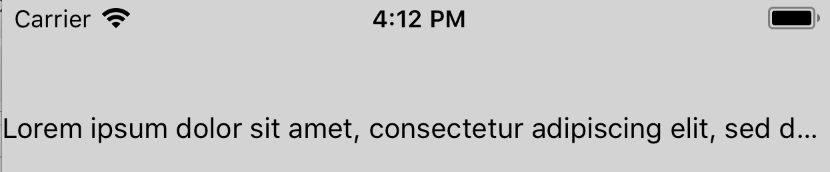
**Test Plan**
Tested that the inline view is hidden if it appears after the truncation point when `numberOfLines` is 1 and 2. Similarly, verified that the inline view is visible if it appears before the truncation point.
**Release Notes**
[IOS] [BUGFIX] [Text] - Fix case where inline view is visible even though it should have been truncated
Adam Comella
Microsoft Corp.
Pull Request resolved: https://github.com/facebook/react-native/pull/21456
Differential Revision: D10182991
Pulled By: shergin
fbshipit-source-id: a5bddddb1bb8672b61d4feaa04013a92c8224155
Summary:
If a view inside of an inline view became dirty (e.g. its top/left prop changed), its position would not update on screen. This is because Yoga didn't know the view needed to be relaid out because Yoga's dirty signal didn't propagate all the way up to the root.

The problem is that inline views don't have a parent in the Yoga tree causing Yoga's dirtiness signal propagation to get cut off early. The fix is, when an inline views gets dirty, mark the parent Text's Yoga node as dirty. This will cause Yoga's dirtiness signal to propagate all the way up to the root node.

Yoga has a hook to inform you when your node is marked as dirty: `YGNodeSetDirtiedFunc`. We leverage this to find out when an inline view's Yoga node gets dirtied.

React Native almost handled this case. Everything worked fine as long as the inline view was nested inside of a virtual text node like this:

```
<Text>
  <Text>
    <InlineView />
  </Text>
</Text>
```

However, the bug repros when the inline view is nested in a non-virtual text node:

```
<Text>
  <InlineView />
</Text>
```

The fix is to move the special dirtiness propagation logic from `RCTVirtualTextShadowView` to `RCTBaseTextShadowView`.

**Test Plan**

Created an inline view. Tested the following kinds of updates on the inline view's content:
  - Moved the content
  - Removed the content
  - Added the content

Tested this for an inline view that is directly inside of a text node as well as one that is nested under a virtual text node.

Here's the code I used for the inline view that moved its content after 2 seconds:

```
const RN = require('react-native');
const React = require('react');

export default class InlineView extends React.Component {
  constructor(props, context) {
    super(props, context);
    this.state = { posBottom: false };
  }

  componentDidMount() {
    super.componentDidMount && super.componentDidMount();
    setTimeout(() => { this.setState({ posBottom: true }); }, 2000);
  }

  render() {
    const pos = this.state.posBottom ? 25 : 0;
    const color = this.state.posBottom ? 'pink' : 'green';
    return (
      <RN.View style={{ width: 50, height: 50, backgroundColor: 'steelblue'}}>
        <RN.View style={{ width: 25, height: 25, top: pos, left: pos, backgroundColor: color }} />
      </RN.View>
    );
  }
}
```

**Release Notes**

[IOS] [BUGFIX] [Text] - Fix case where content of inline views didn't get relaid out

Adam Comella
Microsoft Corp.
Pull Request resolved: https://github.com/facebook/react-native/pull/21968

Differential Revision: D12873795

Pulled By: shergin

fbshipit-source-id: bbc9f5d3ef25063b0015cec8c4aaf2e41ecd60a8
Summary:
Adds the displayName prop to `View` and `Text` components. Because these now use `React.forwardRef`, they were showing as `Component` instead of their actual names.
Thanks to ljharb for helping to pinpoint the source of the issue!
Fixes#21937
Pull Request resolved: https://github.com/facebook/react-native/pull/21950
Differential Revision: D12827060
Pulled By: TheSavior
fbshipit-source-id: d812cae14d53ad821ab5873e737db63ad1a989e3
Summary:
1. The user inserts a character ('0') at index 0. Because the range matches 0, 0, predictedText is set to that character that was inserted.
2. In textInputDidChange, it discovers a mismatch between the rendered text ('1234') and predicted text ('0')
3. This triggers textInputShouldChangeTextInRange to be called again with the 'new' text that it thinks was just added ('1234')
4. It goes to insert this text, but runs into the maxLength limit, so it gets truncated and then inserted.

(I'm not totally sure why only happens if maxLength is set - I need to look into that.)

One fix for this is to just get rid of the range check, but that'll regress #18374. I decided to just check and see if the rendered text is empty instead of checking the range where text could be inserted, since that seems like it should properly handle both cases.

Reviewed By: shergin

Differential Revision: D10392176

fbshipit-source-id: 84fb3b6cac9b0aa25b3c1a127d43f9cdc5a1c6a8
Summary:
This fixes#19193
Characters of different languages may have different height and different baseline, even with a same font and same font-size. When they mixed together, iOS will adjust their baselines automatically, to display a suitable view of text.
The problem is the behavior of dealing with the text-style property 'lineHeight'.
It once to be a right way at version 0.52.3, to setting a base-line-offset attribute for the whole range of the string. However, in current version, it enumerated the string, and set a different base-line-offset for different font-height characters.
And this behavior broke the baseline adjustment made by the iOS. It just make every character's baseline aligned to a same line. But it is not supposed to displaying characters of different languages like that. Chinese characters' baseline is the bottom of each, however, it is not for English characters.
So maybe it is the better way to give a same value of base-line-offset attribute for the whole string. And this PR just did that: found the biggest value of font-height in the text, and calculate the offset with that biggest value, then set to the whole string. This will keep the origin baseline adjustment for different languages' chars made by iOS.
Since I always got an error when running the snapshot test locally, I can't even pass the them with the unmodified code in master branch.
The error is "Nesting of \<View\> within \<Text\> is not currently supported."
After I comment all of the check of that error from the source code, I got a different snapshot from the reference ones. It seems that all components which will cause that error are not rendered in the reference images.
Since this PR changed the behavior of 'lineHeight' property, it's better to add a new snapshot case for the situation of different-language-characters' mixture. So maybe somebody could help me with that or maybe it should be a issue?
[IOS] [BUGFIX] [Text] - fix the baseline issue when displaying a mixture of different-language characters
Pull Request resolved: https://github.com/facebook/react-native/pull/19653
Differential Revision: D10140131
Pulled By: shergin
fbshipit-source-id: 646a9c4046d497b78a980d82a015168cf940646b



