Summary:
👋 Hello! Thanks for react-native, it’s a great project.

I was digging into the Android implementation in _ReactAndroid_ and noticed a couple typos in the documentation. I went through and tried to fix all the typos I could find using [aspell](http://aspell.net).

Not applicable: these changes are only to comments, and CI should be skipped.

[ANDROID][ENHANCEMENT][*] - Correct comment and docblock typos
Closes https://github.com/facebook/react-native/pull/17049

Differential Revision: D6472182

Pulled By: shergin

fbshipit-source-id: 7e62cab118609596b483d1cf16c3abf651d6753b
Summary:
This feature was disabled for multiline textinputs in D3528202 ... seems without a good reason.
The broken autoscroll-to-cursor feature is terribly harmful and counter-intuitive in ALL cases.
I also add a contentSize tracking in the example app to make sure that it is unaffected by this change.
https://pxl.cl/9RHPhttps://github.com/facebook/react-native/issues/12799https://github.com/facebook/react-native/issues/15778
Special thanks to konradkierus!
Reviewed By: sahrens
Differential Revision: D6405985
fbshipit-source-id: 337a390a9db7b3528200ef66c4a079b87608294e
Summary:
There's a crash-inducing bug with `Image.blurRadius` on Android.

`blurRadius` is specified in JavaScript as a `float`, but it's cast to `int` before being passed to the `IterativeBoxBlurPostProcessor`. However, in `IterativeBoxBlurPostProcessor`, there is an argument precondition requiring the integer `blurRadius` to be non-zero.

Because the `== 0` condition is evaluated on the `float`, it's possible for a `blurRadius` in the range of `(0, 1)` (non-inclusive) to pass the conditional, and then be truncated to `0` and passed as an argument to `IterativeBoxBlurPostProcessor`, which will fail its precondition and crash the app.

This change works in our app, which was previously crashing.

[ANDROID] [BUGFIX] [Image] Fixed crash when specifying an Image.blurRadius between (0, 1)
Closes https://github.com/facebook/react-native/pull/16845

Differential Revision: D6387416

Pulled By: shergin

fbshipit-source-id: d5191aa97e949ffd41e6d68c96b3c7bcbc82a52e
Summary:
`Canvas.clipPath` isn't supported with hardware acceleration in APIs below 18. The rounded border rendering logic for Android relies on this method. Therefore, rounded borders do not render correctly on such devices.

**Screenshot of Nexus 5 running API 17 (Before these changes):**
https://pxl.cl/9rsf

**The fix**: If the API version is less than 18 and we're rendering rounded borders, I disable hardware acceleration. Otherwise, I enable it. I'm going to check to see if this has perf regressions by running a CT-Scan.

With this change, rounded borders render correctly on Android devices running versions of Android between Honeycomb to JellyBean MR2.

**Screenshot of Nexus 5 running API 17 (After these changes):**
https://pxl.cl/9rrk

Reviewed By: xiphirx

Differential Revision: D6153087

fbshipit-source-id: 16e35be096051ac817c8b8bcdd132ecff3b4b167
Summary:
React Native 0.43 added additional functionality to setSelectionColor that also tints the cursor drawable of the View. However, some views may not have a cursor drawable set in which case, the code will crash when attempting to load a drawable with resource id 0.

We encountered this in our RN 0.45 upgrade in the Airbnb app.

lelandrichardson
Closes https://github.com/facebook/react-native/pull/14789

Differential Revision: D6386076

Pulled By: shergin

fbshipit-source-id: faa5a1edb3be8d08988f46205c0f22d17b63b5bc
Summary:
We noticed that on Android the lineHeight behaviour is different from iOS for built in fonts and custom fonts. The problem becomes visible when the lineHeight approaches the fontSize, showing a cut-off on the bottom of the TextView. This issue has been raised before in #10712. There is a mention of a PR with a fix in that issue, which has not been merged yet. This implementation is a less intrusive fix leaving the current lineHeight approach in place and fixing the discrepancy only.
This proposed change prioritises ascent over descent for reduction, making the lineHeight functionality behave identical to iOS.
There is no existing test covering the lineHeight property and its behaviour in the CustomLineHeightSpan. This PR contains new unit tests that covers the various scenario's for the lineHeight calculations.
The original behaviour, before the change can against these unit tests. The case that fails is `shouldReduceAscentThird`, which can be made to succeed on the old code by changing the asserts to:
```
assertThat(fm.top).isEqualTo(-5);
assertThat(fm.ascent).isEqualTo(-5);
assertThat(fm.descent).isEqualTo(-4);
assertThat(fm.bottom).isEqualTo(-4);
```
The unit test succeeds for the current implementation, which has the values for ascent and descent inverted.
Below screenshots show before, after and iOS:
BEFORE
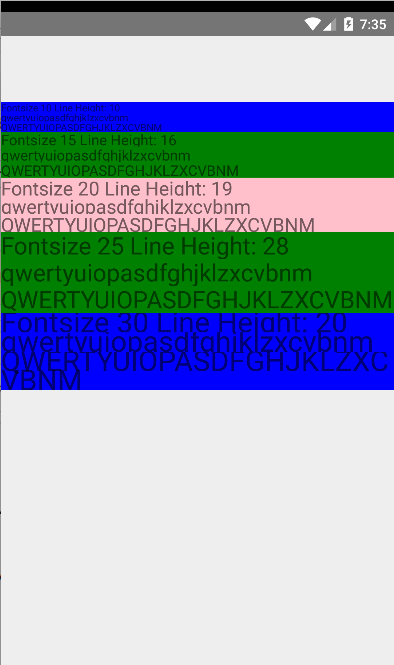
AFTER
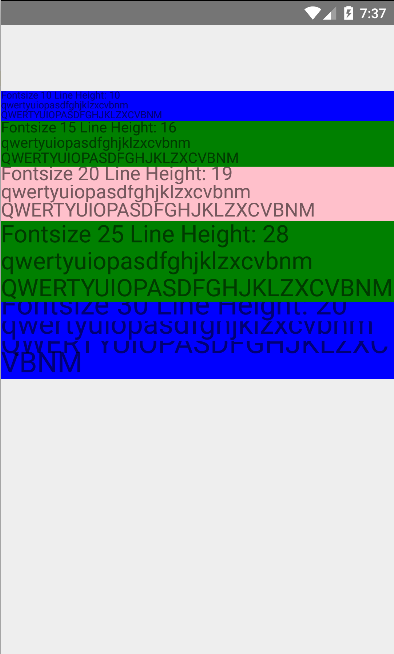
iOS
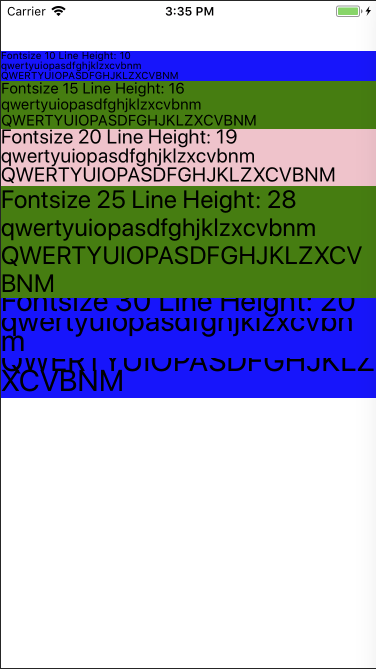
[ANDROID] [BUGFIX] [Text] - Fix the lineHeight behaviour on Android to match iOS
Closes https://github.com/facebook/react-native/pull/16448
Differential Revision: D6221854
Pulled By: andreicoman11
fbshipit-source-id: 7292f0f05f212d79678ac9d73e8a46bf93f1a7c6
Summary:
`visible-password` represents a very basic keyboard, typically only
letters and numbers.  Backed by InputType.TYPE_TEXT_VARIATION_VISIBLE_PASSWORD,
it is useful for things like password and code entry fields. It can also be more
effective than autoCorrect={false} for disabling autocompletion on some keyboards
(like Gboard).

Note `secureTextEntry` also affects `TYPE_TEXT_VARIATION_*` flags internally, so there
may be some undefined behavior when combining `secureTextEntry` with
`keyboardType="visible-password"`

Also, while here, improve the documentation on TextInput to explicitly enumerate
which keyboardType applies to Android vs. iOS (since this is the first android-specific)

Reviewed By: shergin

Differential Revision: D6005353

fbshipit-source-id: 13af90c96353f714c0e106dd0fde90184a476533
Summary:
Motivation:

(SUDDENLY) There is a thing on Android called SpanWather, and their purpose is to notify "the watcher" about span-related changes in SpannableString. The idea is: some special kind of span can have some logic to prevent or tweak interleaving with some another kind of spans. To do so, it has to implement SpanWather interface.
So, EditText uses this to control internal spannable object (!) and SUDDENLY (#><) calls internal "layout" method as a reaction to adding new spans. So, when we are cloning SpannableString, we are (re)applying same span objects to a new spannable instance, and it causes notifying other spans in the string, and they notify EditText, and the EditText does relayout and... BOOM!
So, the solution is, easy, we should use SpannableStringBuilder instead of SpannableString because it does not notify SpanWather during cloning.

See:
https://android.googlesource.com/platform/frameworks/base/+/master/core/java/android/text/SpannableStringBuilder.java#101
(the first argument is `false`).
https://android.googlesource.com/platform/frameworks/base/+/master/core/java/android/text/SpannableStringBuilder.java#678
Compare with:
https://android.googlesource.com/platform/frameworks/base/+/master/core/java/android/text/SpannableStringInternal.java#43

Why? I believe because SpannableStringBuilder objects are "unfinished" by design, and documentation said: "it is the caller's responsibility to restore invariants [among spans]". As we do an exact clone of the string, that's perfectly okay to assume that all invariants were already satisfied for original string.

Reviewed By: achen1

Differential Revision: D5970940

fbshipit-source-id: 590ca0e3aede4470b809c7db527c5d55ddf5edb4
Summary:
After this diff the intrinsic content size of <TextInput> reflects the size of text inside EditText,
it means that if there is no additional style constraints, <TextInput> will grow with containing text.
If you want to constraint minimum or maximum height, just do it via Yoga styling.

Reviewed By: achen1

Differential Revision: D5828366

fbshipit-source-id: eccd0cb4ccf724c7096c947332a64a0a1e402673
Summary:
Fixes https://github.com/facebook/react-native/issues/15863 on master. Behavior of `onSubmitEditing` is now consistent between iOS and Android. Tapping the submit button in a TextInput dispatches the event precisely when doing so does not make a newline (when blurOnSubmit is true or multiline is false).

1. Run this app on iOS and Android:
```
// flow

import React, { Component } from 'react';
import {
  StyleSheet,
  TextInput,
  View
} from 'react-native';

type State = {
  toggled: boolean
};

type Props = {
  blurOnSubmit: boolean,
  multiline: boolean
};

class ToggleColorInput extends Component<Props, State> {
  state: State = {
    toggled: false
  };

  props: Props;

  toggle = () => {
    this.setState({
      toggled: !this.state.toggled
    });
  }

  render() {
    return (
      <TextInput
        blurOnSubmit={this.props.blurOnSubmit}
        multiline={this.props.multiline}
        onSubmitEditing={this.toggle}
        style={[styles.textInput, {backgroundColor: this.state.toggled ? 'blue' : 'azure'}]}
        underlineColorAndroid='transparent'
      />
    )
  }
}

export default class App extends Component<{}> {
  render() {
    return (
      <View>
        <ToggleColorInput blurOnSubmit={true} multiline={true} />
        <ToggleColorInput blurOnSubmit={true} multiline={false} />
        <ToggleColorInput blurOnSubmit={false} multiline={true} />
        <ToggleColorInput blurOnSubmit={false} multiline={false} />
      </View>
    );
  }
}

const styles = StyleSheet.create({
  textInput: {
    height: 75,
    borderWidth: 1,
    borderColor: 'black'
  }
});
```
2. You see four TextInputs, with each combination of the `blurOnSubmit` and `multiline` properties. For each TextInput, type some text and tap the submit button.
3. The TextInputs in this test will toggle background color when they emit an `onSubmitEditing` event. Verify the following behavior on each platform:
 * blurOnSubmit && isMultiline => Submit event emitted, blurred, no newline inserted
 * blurOnSubmit && !isMultiline => Submit event emitted, blurred
 * !blurOnSubmit && isMultiline => Submit event emitted, newline inserted
 * !blurOnSubmit && !isMultiline => Submit event emitted
Closes https://github.com/facebook/react-native/pull/16040

Differential Revision: D5877401

Pulled By: shergin

fbshipit-source-id: 741bcc06d8b69d7025f2cb42dd0bee4fa01cd88e
Summary:
When we convert nested <Text> components to Spannable object we must enforce the order of spans somehow,
otherwise we will have Spannable object with unpredictable order of spans, which will produce unpredictalbe text layout.
We can do it only using `Spannable.SPAN_PRIORITY` feature because Spannable objects do not maintain the order of spans internally.

We also have to fix this to implement autoexpandable <TextInput>.

Reviewed By: achen1

Differential Revision: D5811172

fbshipit-source-id: 5bc68b869e58aba27d6986581af9fe3343d116a7
Summary:
**Problem:**

It was observed that in [this code path](https://github.com/facebook/react-native/blob/master/ReactAndroid/src/main/java/com/facebook/react/views/scroll/ReactHorizontalScrollView.java#L292) (i.e. horizontal, paging-enabled scroll view) if you tried to programmatically call the scrollTo method within ~1s of the onMomentumScrollEnd event (which should only be called after all scrolling has ended), the scrollView would scroll to the new location, and then scroll BACK to the original location.

For example, assume you had released the scrollView at location B, and the nearest page boundary is A. Then, 1000ms later, you call scrollTo position C. The order of operations would be:

1. Begin scrolling to A from position B (as it is the nearest page boundary)
2. Reach position A
3. Fire onMomentumScrollEnd
4. 1000ms later call scrollTo C
5. scrollView scrolls to C
6. scrollView scrolls BACK to position A (for no apparent reason).

**Reason:**

I suspect this is because the [smoothlyScrollTo](https://github.com/facebook/react-native/blob/master/ReactAndroid/src/main/java/com/facebook/react/views/scroll/ReactHorizontalScrollView.java#L292) will continue to animate towards A, but the [scrollEvents will not fire](f954f3d9b6/ReactAndroid/src/main/java/com/facebook/react/views/scroll/OnScrollDispatchHelper.java (L45)) as they are too close to each other. So the true order of events is:

1. Begin scrolling to A from position B (as it is the nearest page boundary)

[begin smoothlyScrollTo]
[scroll towards position A]
[mActivelyScrolling is true]

2. Reach position A

[mActivelyScrolling is true]
[scroll towards position A]
[mActivelyScrolling is false, as there is another scrollEvent, but because it is close enough to the same location it is ignored]

3. Fire onMomentumScrollEnd
4. 1000ms later call scrollTo C

[scroll towards position C]

5. scrollView scrolls to C

[scroll towards position A as the original smoothlyScrollTo animation was never completed]

6. scrollView scrolls BACK to position A.

This is an untested hypothesis, but seems to explain the behavior, and the solution is more semantically correct anyway. If there is an easy way to rebuild the android binaries happy to test it myself! Just let me know!

**Solution:**

 Move the mActivelyAnimating outside the mOnScrollDispatchHelper.onScrollChanged helper, because the HorizontalScrollView event should be considered to be animating so long as onScrollChanged events are being fired.
Closes https://github.com/facebook/react-native/pull/15146

Reviewed By: AaaChiuuu

Differential Revision: D5792026

Pulled By: tomasreimers

fbshipit-source-id: 9654fda038d4a687cc32f4c32dc312baa34627ed
Summary:
Abstract class `ReactBaseTextShadowNode` was decoupled from `ReactTextShadowNode` to separate two goals/roles:
 * `ReactBaseTextShadowNode` represents spanned `<Text>` nodes, which can bear text attributes (both `RCTText` and `RCTVirtualText`);
 * `ReactTextShadowNode` represents anchor `<Text>` view in Yoga terms, which can bear layout attributes (`RCTText` and `RCTTextInput`).

`ReactVirtualTextShadowNode` now inherits `ReactBaseTextShadowNode`.
The same architectural changes was applited to view managers.

Why?
 * This is just a better architecture which represents the nature of this objects.
 * Bunch of "negative" logic which turn off excessive features for some suclasses was removed.
 * Memory efficiency.
 * Now we can improve `<TextInput>` component using right inheritance. Yay!

Reviewed By: achen1

Differential Revision: D5715830

fbshipit-source-id: ecc0764a03b5b7586fe77ad31f149cd840f4da41
Summary:
ReactRawTextShadowNode represents "raw" text node (aka textContent), so it cannot have layout or styling, it is just a line of text, a pure string.
So, we must not interit it from HUGE ReactTextShadowNode (which represents <Text> node with ReactRawTextShadowNode instance inside).
We need this change to make future fancy (and valuable from product perspective) refactoring possible. Stay tuned!

Reviewed By: achen1

Differential Revision: D5712961

fbshipit-source-id: 009e48046bdf34ddfd40b93175934969af64b98b






