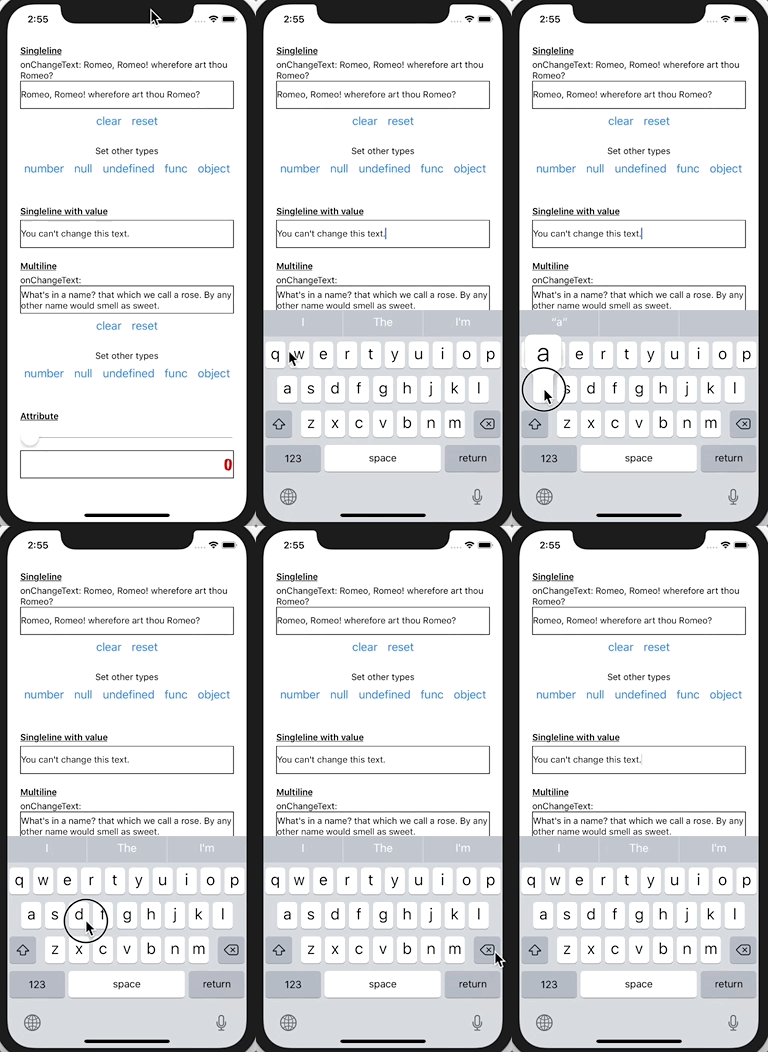
Summary:
Bug comes from #23545, if `allowedLength < 0`, it would crash if `text.length > 1`.

cc. cpojer

[iOS] [Fixed] - Fixed crash when textinput's default value exceeds maxLength
Pull Request resolved: https://github.com/facebook/react-native/pull/24084

Differential Revision: D14562719

Pulled By: cpojer

fbshipit-source-id: 87ed930e35b8fa889d8b04829795fa46b7787b07
Summary:
Fixes#21639 , seems we tried to fix this before, please see related `PR` like [D10392176](36507e4a3c), #18627, but they don't solve it totally.
[iOS] [Fixed] - Fix TextInput maxLength when insert characters at begin
Pull Request resolved: https://github.com/facebook/react-native/pull/23472
Reviewed By: mmmulani
Differential Revision: D14366406
Pulled By: ejanzer
fbshipit-source-id: fc983810703997b48824f84f2f9198984afba9cd
Summary:
Keep placeholder paragraph style same with text input.

[iOS] [Fixed] - Keep placeholder paragraph style same with single line text input
Pull Request resolved: https://github.com/facebook/react-native/pull/23765

Differential Revision: D14321255

Pulled By: cpojer

fbshipit-source-id: 2b8cbb7f2c7ceb40a9a2b142065dd6f5eb3d62eb
Summary:
After #23738 , we can add more text attributes to placeholder, so now, let's update the calculation of placeholder size based on placeholder attributes.

[iOS] [Fixed] - Fixed singleline text input placeholder size
Pull Request resolved: https://github.com/facebook/react-native/pull/23745

Differential Revision: D14320630

Pulled By: cpojer

fbshipit-source-id: 2d9e8b59ba70228202add762cfc9c6cbc77e5e95
Summary:
After some refactor of text input attributes, we can now add style attributes  the same as text input's attributes, from https://github.com/facebook/react-native/issues/19002#issuecomment-467171589, user wants placeholder to support line-height , I think we can add it now for multiline text input.

[iOS] [Added] - Added lineHeight support of placeholder for multiline text input
Pull Request resolved: https://github.com/facebook/react-native/pull/23760

Differential Revision: D14320600

Pulled By: cpojer

fbshipit-source-id: ededeaa11560af089ca15ffc188e2e70db2ad7d4
Summary:
After #23738 , we can add more text attributes to placeholder, so now, let's update the calculation of placeholder size based on placeholder attributes.

[iOS] [Fixed] - Fixed multiline text input placeholder size
Pull Request resolved: https://github.com/facebook/react-native/pull/23742

Differential Revision: D14320489

Pulled By: cpojer

fbshipit-source-id: 6b0f07fe7406d5c99c7280d584f8b8e51fc84c00
Summary:
We need to keep placeholder attributes sync with text input's text attributes, like `font`,`kern` ....., to keep style the same.
Also fixes#19002 .
[iOS] [Fixed] - Keep placeholder attributes sync with text input text's attributes
Pull Request resolved: https://github.com/facebook/react-native/pull/23738
Differential Revision: D14298482
Pulled By: cpojer
fbshipit-source-id: 3555091bf3bc01e4b026d5a4cdbe93b4122106e8
Summary:
We have the wrong calculation of placeholder size currently, leads `contentSize` or some things inaccuracy.

[iOS] [Fixed] - Fixed wrong placeholder size calculation in multiline text input mode
Pull Request resolved: https://github.com/facebook/react-native/pull/23682

Differential Revision: D14255932

Pulled By: cpojer

fbshipit-source-id: a1f40e90fc2c848579694965da8316fae9e5c4c5
Summary:
Currently, we pick the max size of text view's contentSize and placeholder's size, actually, if placeholder is be hidden, we should only return text view's contentSize.

[iOS] [Fixed] - Fixed wrong contentSize calculation when placeholder is hidden in multiline text input
Pull Request resolved: https://github.com/facebook/react-native/pull/23683

Differential Revision: D14255915

Pulled By: cpojer

fbshipit-source-id: 198faa7e1c5657371eb920973345194aedf72e41
Summary:
Placeholder's font not consistent with text's font, it leads to cursor dislocation. We need to keep consistent between placeholder and text.

[iOS] [Fixed] - Fixed placeholder font not consistent with text's font when in multiline mode
Pull Request resolved: https://github.com/facebook/react-native/pull/23654

Differential Revision: D14226174

Pulled By: hramos

fbshipit-source-id: 7cfb3b73d8799d22d5cbbfe557df8de3f5fcf034
Summary:
We already only support `iOS9+`, so we can remove all compatible codes now.

[iOS] [Fixed] - Remove compatible system code for iOS8 and before
Pull Request resolved: https://github.com/facebook/react-native/pull/23656

Differential Revision: D14224986

Pulled By: hramos

fbshipit-source-id: cac9ffe6788dd3eaf4f4f5f2b219f325ba78e85f
Summary:
Currently, if we has `defaultValue`, textAttributes like `letterSpacing` can works, but if textinput has not default text, when we typing the text, some attributes not applied.

[iOS] [Fixed] - Fix textAttributes not applied when typing text
Pull Request resolved: https://github.com/facebook/react-native/pull/23585

Differential Revision: D14206568

Pulled By: cpojer

fbshipit-source-id: 7db276d811684bf6e01f8d30287cca80095db87c
Summary:
This PR (https://github.com/facebook/react-native/pull/22546) broke single line text inputs. After inputting some text and tapping away, the text input reverts back to default text.

Revert solved the issue.

Reviewed By: cpojer

Differential Revision: D14185897

fbshipit-source-id: cc7f0f2ebfb0494062afbc628c4fe27ad27fb1c6
Summary:
This is a fix for #5859, based on the feedback in #18587. Instead of using `didSetProps` it uses a setter. I will also note that setting to `nil` no longer works (crashes) so setting it to a blank string then back to the original works fine.

[iOS] [Fixed] - Toggling secureTextEntry correctly places cursor.
Pull Request resolved: https://github.com/facebook/react-native/pull/23524

Differential Revision: D14143028

Pulled By: cpojer

fbshipit-source-id: 5f3203d56b1329eb7359465f8ab50eb4f4fa5507
Summary:
Throw error warning when build Text module, we can add tvOS available check to remove error.

[iOS] [Fixed] - Fix build error warning of Text module
Pull Request resolved: https://github.com/facebook/react-native/pull/23586

Differential Revision: D14181198

Pulled By: cpojer

fbshipit-source-id: 6a62c831ba119ddcbc6effa0b24f22bd4588b982
Summary:
This is an updated version of #22579 which uses compile conditionals to prevent `use of undeclared identifier` errors when compiling on older versions of Xcode.

--------

Currently the only `textContentType` values that work are: `username`, `password`, `location`, `name` and `nickname`. This is due to the strings provided by React Native not matching up with the underlying string constants used in iOS (with the exception of the aforementioned types). Issue #22578 has more detail examples/explanation.
Pull Request resolved: https://github.com/facebook/react-native/pull/22611

Differential Revision: D13460949

Pulled By: cpojer

fbshipit-source-id: e6d1108422b850ebc3aea05693ed05118b77b5de
Summary:
If we change the text attributes dynamically, for example, change the textColor, it not works in iOS, Android works fine.

[iOS] [fixed] - Fixed textInput appearance not update when text attributes changed
Pull Request resolved: https://github.com/facebook/react-native/pull/23533

Differential Revision: D14146700

Pulled By: cpojer

fbshipit-source-id: 4a7c84d6e7f818acb712242bea6484b177a775c6
Summary:
I found the TextInput can't control input length when default value's length > maxLength.
for example:
1.Set the value in special cases
```
<TextInput value={'12345678'} maxLength={6}/>
```
2.Quickly press the keyboard with multiple fingers

```
// RCTBaseTextInputView.m
……
if (_maxLength) {
    NSUInteger allowedLength = _maxLength.integerValue - backedTextInputView.attributedText.string.length + range.length;
    if (text.length > allowedLength) {
……
```
when value's length > maxLength,the allowedLength not a negative number.it was transformed into a big number,because it is type NSUInteger.so the `text.length > allowedLength` always false.

[iOS][Fixed] - fix the TextInput can't control input length when value's length > maxLength
Pull Request resolved: https://github.com/facebook/react-native/pull/23545

Differential Revision: D14146581

Pulled By: cpojer

fbshipit-source-id: f53b1312ae55fad9fc10430ab94784c1a9ad4723
Summary:
Fixes#21243.
Fixes#20908.
Credit goes to superandrew213 who provided the patch based on 0.56; this commit merges and resolved the conflict introduced in 0.57.
Pull Request resolved: https://github.com/facebook/react-native/pull/21951
Differential Revision: D13980799
Pulled By: cpojer
fbshipit-source-id: 6b9f1a1ae54ad9dba043005d683d6a221472c729
Summary:
Follow-up to https://github.com/facebook/react-native/pull/19809
This fix generalizes the `setAttributedString:` fix to single-line text fields.
Fixes#19339
_Pull requests that expand test coverage are more likely to get reviewed. Add a test case whenever possible!_
Pull Request resolved: https://github.com/facebook/react-native/pull/22546
Differential Revision: D13948951
Pulled By: shergin
fbshipit-source-id: 67992c02b32f33f6d61fac4554e4f46b973262c1
Summary:
Fixes#22578
Currently the only `textContentType` values that work are: `username`, `password`, `location`, `name` and `nickname`. This is due to the strings provided by React Native not matching up with the underlying string constants used in iOS (with the exception of the aforementioned types). Issue #22578 has more detail examples/explanation.
Pull Request resolved: https://github.com/facebook/react-native/pull/22579
Differential Revision: D13402177
Pulled By: shergin
fbshipit-source-id: 55f4a2029cd3ea1fb4834e9f56d2df5a05b31b4e
Summary:
iOS-specific.
For languages with complex input (such as Japanese or Chinese), a user has to type multiple characters that are then merged into a single one.
If `-[UITextView setAttributedString:]` is used while the user is still typing, it resets the input and characters are not being treated as typed together.
This PR avoids calling this method if possible, replacing it by just copying the attributes if the string has not been changed. That preserves the state and user can continue to type Korean or Chinese characters.
Fixes#19339
<!--
Required: Write your motivation here.
If this PR fixes an issue, type "Fixes #issueNumber" to automatically close the issue when the PR is merged.
-->
<!--
Required: Write your test plan here. If you changed any code, please provide us with
clear instructions on how you verified your changes work. Bonus points for screenshots and videos!
-->
Essentially, the steps to reproduce are described in [the issue](https://github.com/facebook/react-native/issues/19339):
1. Type some Korean characters in TextInput, such as "하늘" (buttons `ㅎ`,`ㅏ`,`ㄴ`,`ㅡ`,`ㄹ`).
2. Then move the cursor to the beginning of the text, type "파란" (buttons `ㅍ`,`ㅏ`,`ㄹ`,`ㅏ`,`ㄴ`) this time.
**Behaviour before this fix (broken)**
Actual text: `ㅍㅏㄹㅏㄴ하늘`.
Expected text: `파란하늘`.
Characters aren't combined properly.

**Behaviour after this fix (correct)**
Actual text: `파란하늘`.
Expected text: `파란하늘`.
Characters are combined, the same behaviour is in vanilla iOS `UITextView`.

<!--
Does this PR require a documentation change?
Create a PR at https://github.com/facebook/react-native-website and add a link to it here.
-->
<!--
Required.
Help reviewers and the release process by writing your own release notes. See below for an example.
-->
[IOS] [BUGFIX] [TextView] - Fix Korean/Chinese/Japanese input for multiline TextView on iOS.
<!--
**INTERNAL and MINOR tagged notes will not be included in the next version's final release notes.**
CATEGORY
[----------] TYPE
[ CLI ] [-------------] LOCATION
[ DOCS ] [ BREAKING ] [-------------]
[ GENERAL ] [ BUGFIX ] [ {Component} ]
[ INTERNAL ] [ ENHANCEMENT ] [ {Filename} ]
[ IOS ] [ FEATURE ] [ {Directory} ] |-----------|
[ ANDROID ] [ MINOR ] [ {Framework} ] - | {Message} |
[----------] [-------------] [-------------] |-----------|
EXAMPLES:
[IOS] [BREAKING] [FlatList] - Change a thing that breaks other things
[ANDROID] [BUGFIX] [TextInput] - Did a thing to TextInput
[CLI] [FEATURE] [local-cli/info/info.js] - CLI easier to do things with
[DOCS] [BUGFIX] [GettingStarted.md] - Accidentally a thing/word
[GENERAL] [ENHANCEMENT] [Yoga] - Added new yoga thing/position
[INTERNAL] [FEATURE] [./scripts] - Added thing to script that nobody will see
-->
Pull Request resolved: https://github.com/facebook/react-native/pull/19809
Differential Revision: D13326614
Pulled By: shergin
fbshipit-source-id: 6a5cab3f7290f0f623a6f4c29353a573eb321b0b
Summary:
1. The user inserts a character ('0') at index 0. Because the range matches 0, 0, predictedText is set to that character that was inserted.
2. In textInputDidChange, it discovers a mismatch between the rendered text ('1234') and predicted text ('0')
3. This triggers textInputShouldChangeTextInRange to be called again with the 'new' text that it thinks was just added ('1234')
4. It goes to insert this text, but runs into the maxLength limit, so it gets truncated and then inserted.

(I'm not totally sure why only happens if maxLength is set - I need to look into that.)

One fix for this is to just get rid of the range check, but that'll regress #18374. I decided to just check and see if the rendered text is empty instead of checking the range where text could be inserted, since that seems like it should properly handle both cases.

Reviewed By: shergin

Differential Revision: D10392176

fbshipit-source-id: 84fb3b6cac9b0aa25b3c1a127d43f9cdc5a1c6a8
Summary: This change drops the year from the copyright headers and the LICENSE file.

Reviewed By: yungsters

Differential Revision: D9727774

fbshipit-source-id: df4fc1e4390733fe774b1a160dd41b4a3d83302a
Summary:
On iOS, it is not possible to select a range of text using a `Text` component (see #13938). Because of how the `Text` component is implemented on iOS, this will not work without a complete re-write. On Android however, this is not an issue.

As the `TextInput` component has evolved, it can more or less be used as a drop-in replacement on iOS by setting `multiline={true}` and `editable={false}`. Except for one detail: the text input field has scrolling activated and it's not possible to turn off. (See #1391 and #15962).

This pull request addresses that issue, simply by exposing the `scrollEnabled` property:

```
<TextInput
    multiline
    editable={false}
    scrollEnabled={false}
  />
```

1. Create a multiline `TextInput` component, with the attributes presented above.
2. Run on iOS
3. The `TextInput` field should not be able to scroll

facebook/react-native-website#367

[IOS] [FEATURE] [TextInput] - Made it possible to turn off scrolling on a multiline TextInput component
Pull Request resolved: https://github.com/facebook/react-native/pull/19330

Differential Revision: D9235061

Pulled By: hramos

fbshipit-source-id: 99d278004fc236b47dde7e61d74c71e8a3b9d170
Summary:
@public
This should fix#18403.
When the user is inputting in Chinese/Japanese with <TextInput> in a controlled manner, the RCTBaseTextInputView will compare the JS-generated attributed string against the TextInputView attributed string and repeatedly overwrite the TextInputView one. This is because the native TextInputView will provide extra styling to show that some text is provisional.
My solution is to do a plain text string comparison at this point, like how we do for dictation.
Expected behavior when typing in a language that has "multistage" text input: For instance, in Chinese/Japanese it's common to type out the pronunciation for a word and then choose the appropriate word from above the keyboard. In this model, the "pronunciation" shows up in the text box first and then is replaced with the chosen word.
Using the word Japan which is written 日本 but first typed as にほん. It takes 4 key-presses to get to 日本, since に, ほ, ん, are all typed and then 日本 is selected. So here is what should happen:
1. enter に, onChange fires with 'に', markedTextRange covers 'に'
2. enter ほ, onChange fires with 'にほ', markedTextRange covers 'にほ'
3. enter ん, onChange fires with 'にほん', markedTextRange covers 'にほん'
4. user selects 日本 from the menu above the keyboard (provided by the keyboard/OS), onChange fires with '日本', markedTextRange is removed
previously we were overwriting the attributed text which would remove the markedTextRange, preventing the user from selecting 日本 from above the keyboard.
Cheekily, I've also fixed an issue with secure text entry as it's the same type of problem.
Reviewed By: PeteTheHeat
Differential Revision: D9002295
fbshipit-source-id: 7304ede055f301dab9ce1ea70f65308f2a4b4a8f
Summary:
These lines were causing erros with the e2e tests on ios.
There are some methods that are not going to be called, and some definitions that are not correct.

needed for #19574.

we will run the e2e tests.

[INTERNAL] [MINOR] [Tests] - Fix some definitions.
Closes https://github.com/facebook/react-native/pull/19790

Differential Revision: D8509228

Pulled By: hramos

fbshipit-source-id: 78650e347db52305a587e3461ac56877e3c79062
Summary:
Potential fixes for 18890. The issue was that when the setAttributedText method in RCTBaseTextInputView.m is called it does two main things:

Check that the attributed text that it receives is equal to the existing attributed text in the underlying backed up view ( backedTextInputView)
If not set the attributed text of the backed up view to the value passed into the method. This kills the dictation as it is effectively the equivalent of typing in the backed up text view.
    self.backedTextInputView.attributedText = attributedText;
is the problem. It kills the dictation. It may have other effects as well.

In all cases I have seen the underlying text of the attributed string that is passed in the same as the text in the backedTextInputView, what was said to the dictation; however the attributes are different, which causes the isEqualToAttributedString: check to fail and thus the update happens, and the keyboard is killed.

Fix is to test for the underlying string equality not the attributed string equality when the input mode is dictation.

By necessity this had to be an integration test on an existing application. To test I enabled the keyboard and started the dictation. It worked with this fixes and not without. Will upload videos later.

This might break attributes on dictation, as it is happening. However anything set on the existing underlying text view should hold.

[IOS] [BUG] [Textinput] fixed an issue where the keyboard dictation ended abruptly.
Closes https://github.com/facebook/react-native/pull/19687

Differential Revision: D8450590

Pulled By: hramos

fbshipit-source-id: f97084131f98e9e0ed1f32111afc0f9f510f3b3b
Summary:
The bug #18374 was caused by the loose condition to execute `stringByReplacingCharactersInRange` in the method `textInputShouldChangeTextInRange` . As a result, `findMismatch` wrongly returning `true` which ends up the Backspace event being fired in another `textInputShouldChangeTextInRange` call in `textInputDidChange`.

<!--
  Required: Write your motivation here.
  If this PR fixes an issue, type "Fixes #issueNumber" to automatically close the issue when the PR is merged.
-->

1. Pass all the tests by `yarn run test`
2. Run the following code and type any text. (This code is brought from #18374. Thank you michalpetrov!!) And then verify that 'Backspace' events are not emitted after clearing text
and entering any letters.

```javascript
type Props = {};
type State = {
  text: string,
  keys: string
};
export default class App extends Component<Props, State> {
  state = {text: '', keys: ''}
  render() {
    return (
      <View style={styles.container}>
        <TextInput style={styles.textInput} value={this.state.text} onChangeText={this.onChangeText} onKeyPress={this.onKeyPress}/>
        <Button title="Clear" onPress={this.onClear}/>
        <Text>Text: {this.state.text}</Text>
        <Text>Keys: {this.state.keys}</Text>
      </View>
    );
  }

  onChangeText = (text: string) => {
    this.setState({text})
  }

  onKeyPress = ({ nativeEvent }: Object) => {
    this.setState({keys: this.state.keys + nativeEvent.key + ', '})
  }

  onClear = () => {
    this.setState({text: '', keys: ''})
  }
}
```

<!--
  Does this PR require a documentation change?
  Create a PR at https://github.com/facebook/react-native-website and add a link to it here.
-->

<!--
  Required.
  Help reviewers and the release process by writing your own release notes. See below for an example.
-->

[IOS] [BUGFIX] [TextInput] - Fixed the bug where Backspace event was emitted when entering a character after clearing a text in TextInput by an empty string

<!--
  **INTERNAL and MINOR tagged notes will not be included in the next version's final release notes.**

    CATEGORY
  [----------]      TYPE
  [ CLI      ] [-------------]    LOCATION
  [ DOCS     ] [ BREAKING    ] [-------------]
  [ GENERAL  ] [ BUGFIX      ] [ {Component} ]
  [ INTERNAL ] [ ENHANCEMENT ] [ {Filename}  ]
  [ IOS      ] [ FEATURE     ] [ {Directory} ]   |-----------|
  [ ANDROID  ] [ MINOR       ] [ {Framework} ] - | {Message} |
  [----------] [-------------] [-------------]   |-----------|

 EXAMPLES:

 [IOS] [BREAKING] [FlatList] - Change a thing that breaks other things
 [ANDROID] [BUGFIX] [TextInput] - Did a thing to TextInput
 [CLI] [FEATURE] [local-cli/info/info.js] - CLI easier to do things with
 [DOCS] [BUGFIX] [GettingStarted.md] - Accidentally a thing/word
 [GENERAL] [ENHANCEMENT] [Yoga] - Added new yoga thing/position
 [INTERNAL] [FEATURE] [./scripts] - Added thing to script that nobody will see
-->
Closes https://github.com/facebook/react-native/pull/18627

Differential Revision: D8436331

Pulled By: hramos

fbshipit-source-id: ec75a6ca926061cbf7cb106db652f2b4a71c9a0c
Summary:
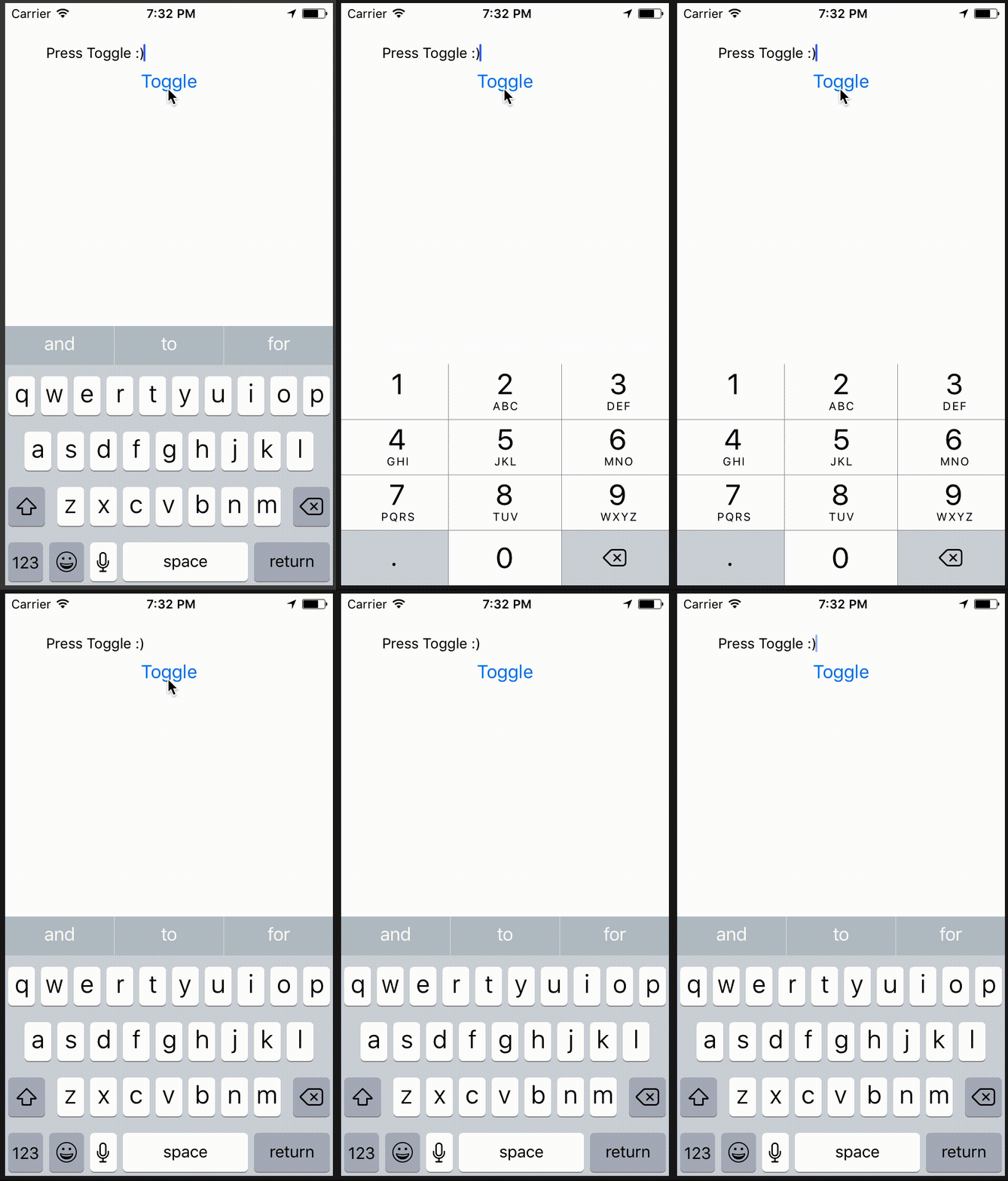
This PR makes sure that changing the `keyboardType` props of `<TextInput>` is reflected while the text field has focus. It is something that is also discusses in #13782. The workaround mentioned in that issue using `key` causes the TextInput to re-render itself which has some undesired side-effects.
Fixes#13782
```javascript
export default class KeyboardTypeApp extends Component {
state = { keyboardType: 'default' };
toggleKeyboardType = () => {
this.setState({
keyboardType: this.state.keyboardType === 'default' ? 'numeric' : 'default'
});
}
render() {
return (
<View style={{ padding: 40 }}>
<TextInput autoFocus value="Press Toggle :)" keyboardType={this.state.keyboardType} />
<Button title="Toggle" onPress={this.toggleKeyboardType} />
</View>
);
}
}
```
<!--
Does this PR require a documentation change?
Create a PR at https://github.com/facebook/react-native-website and add a link to it here.
-->
[IOS] [ENHANCEMENT] [TextInput] - Keyboard layout now updates when changing `keyboardType` while it has focus
<!--
**INTERNAL and MINOR tagged notes will not be included in the next version's final release notes.**
CATEGORY
[----------] TYPE
[ CLI ] [-------------] LOCATION
[ DOCS ] [ BREAKING ] [-------------]
[ GENERAL ] [ BUGFIX ] [ {Component} ]
[ INTERNAL ] [ ENHANCEMENT ] [ {Filename} ]
[ IOS ] [ FEATURE ] [ {Directory} ] |-----------|
[ ANDROID ] [ MINOR ] [ {Framework} ] - | {Message} |
[----------] [-------------] [-------------] |-----------|
EXAMPLES:
[IOS] [BREAKING] [FlatList] - Change a thing that breaks other things
[ANDROID] [BUGFIX] [TextInput] - Did a thing to TextInput
[CLI] [FEATURE] [local-cli/info/info.js] - CLI easier to do things with
[DOCS] [BUGFIX] [GettingStarted.md] - Accidentally a thing/word
[GENERAL] [ENHANCEMENT] [Yoga] - Added new yoga thing/position
[INTERNAL] [FEATURE] [./scripts] - Added thing to script that nobody will see
-->
Closes https://github.com/facebook/react-native/pull/19027
Differential Revision: D8416007
Pulled By: PeteTheHeat
fbshipit-source-id: c4f89ab3dc0819bca52feddbc9c7a9f62fd96794
Summary:
Setting `textContentType` will provide the keyboard and system with semantic meaning for inputs. Should enable password/username autofill in apps running on iOS 11+ as demonstrated here: https://developer.apple.com/videos/play/wwdc2017/206/
Also gives you the ability to disable autofill by setting `textContentType="none"`: https://stackoverflow.com/questions/48489479/react-native-disable-password-autofill-option-on-ios-keyboard
Adding `textContentType` equal to `username` or `password` should give you an autofill-bar over the keyboard which will let you fill in values from the device Keychain:
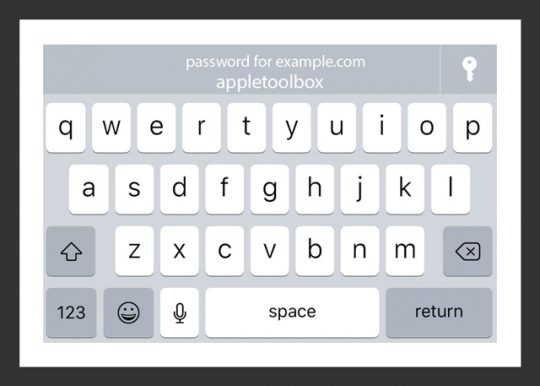
Setting the appropriate `textContentType` will fill in the correct value in the `TextInput`.
I have only been able to get this to work on device, and not simulator.
Usage:
```jsx
<TextInput
value={this.state.username}
onChangeText={this.setUserName}
textContentType="username"
/>
```
```jsx
<TextInput
value={this.state.password}
onChangeText={this.setPassword}
secureTextEntry={true}
textContentType="password"
/>
```
To disable:
```jsx
<TextInput
value={this.state.password}
onChangeText={this.setPassword}
secureTextEntry={true}
textContentType="none"
/>
```
This will set `textContentType` to an empty string: https://stackoverflow.com/a/46474180/5703116
<!--
Does this PR require a documentation change?
Create a PR at https://github.com/facebook/react-native-website and add a link to it here.
-->
Docs PR coming up.
[IOS] [MINOR] [TextInput] - Added `textContentType` prop for iOS 10+. Will enable password autofill for iOS 11+.
Closes https://github.com/facebook/react-native/pull/18526
Differential Revision: D7469630
Pulled By: hramos
fbshipit-source-id: 852a9749be98d477ecd82154c0a65a7c084521c1
Summary:
<!--
Thank you for sending the PR! We appreciate you spending the time to work on these changes.

Help us understand your motivation by explaining why you decided to make this change.

You can learn more about contributing to React Native here: http://facebook.github.io/react-native/docs/contributing.html

Happy contributing!

-->

The caret/cursor did not appear when the TextInput was empty. Found that the cause was because the frame of the TextInput had an height of 0

Just fill and clear a TextInput and the caret/cursor will always appear there.

<!--
Help reviewers and the release process by writing your own release notes

**INTERNAL and MINOR tagged notes will not be included in the next version's final release notes.**

  CATEGORY
[----------]        TYPE
[ CLI      ]   [-------------]      LOCATION
[ DOCS     ]   [ BREAKING    ]   [-------------]
[ GENERAL  ]   [ BUGFIX      ]   [-{Component}-]
[ INTERNAL ]   [ ENHANCEMENT ]   [ {File}      ]
[ IOS      ]   [ FEATURE     ]   [ {Directory} ]   |-----------|
[ ANDROID  ]   [ MINOR       ]   [ {Framework} ] - | {Message} |
[----------]   [-------------]   [-------------]   |-----------|

[CATEGORY] [TYPE] [LOCATION] - MESSAGE

 EXAMPLES:

 [IOS] [BREAKING] [FlatList] - Change a thing that breaks other things
 [ANDROID] [BUGFIX] [TextInput] - Did a thing to TextInput
 [CLI] [FEATURE] [local-cli/info/info.js] - CLI easier to do things with
 [DOCS] [BUGFIX] [GettingStarted.md] - Accidentally a thing/word
 [GENERAL] [ENHANCEMENT] [Yoga] - Added new yoga thing/position
 [INTERNAL] [FEATURE] [./scripts] - Added thing to script that nobody will see
-->
[IOS] [BUGFIX] [TextInput] - This was causing the cursor/caret to not appear since the size of the frame had an height of 0.
Closes https://github.com/facebook/react-native/pull/18355

Differential Revision: D7319723

Pulled By: shergin

fbshipit-source-id: b0249ab5493b6ac310d1898ff20c0bad78cf82c9
Summary:
<!--
Thank you for sending the PR! We appreciate you spending the time to work on these changes.

Help us understand your motivation by explaining why you decided to make this change.

You can learn more about contributing to React Native here: http://facebook.github.io/react-native/docs/contributing.html

Happy contributing!

-->

There is currently no way to disable to context menu that automatically appears over a TextInput. This is especially troublesome if you would like to disable the user from pasting text into certain fields. This PR adds a `contextMenuHidden` property to TextInput that will hide it.

I'm not sure if testing is necessary here. I would be happy to investigate further on how this would be tested, if deemed necessary!

https://github.com/facebook/react-native-website/pull/95

<!--
Help reviewers and the release process by writing your own release notes

**INTERNAL and MINOR tagged notes will not be included in the next version's final release notes.**

  CATEGORY
[----------]        TYPE
[ CLI      ]   [-------------]      LOCATION
[ DOCS     ]   [ BREAKING    ]   [-------------]
[ GENERAL  ]   [ BUGFIX      ]   [-{Component}-]
[ INTERNAL ]   [ ENHANCEMENT ]   [ {File}      ]
[ IOS      ]   [ FEATURE     ]   [ {Directory} ]   |-----------|
[ ANDROID  ]   [ MINOR       ]   [ {Framework} ] - | {Message} |
[----------]   [-------------]   [-------------]   |-----------|

[CATEGORY] [TYPE] [LOCATION] - MESSAGE

 EXAMPLES:

 [IOS] [BREAKING] [FlatList] - Change a thing that breaks other things
 [ANDROID] [BUGFIX] [TextInput] - Did a thing to TextInput
 [CLI] [FEATURE] [local-cli/info/info.js] - CLI easier to do things with
 [DOCS] [BUGFIX] [GettingStarted.md] - Accidentally a thing/word
 [GENERAL] [ENHANCEMENT] [Yoga] - Added new yoga thing/position
 [INTERNAL] [FEATURE] [./scripts] - Added thing to script that nobody will see
-->

[FEATURE][TextInput] - Added `contextMenuHidden` property
Closes https://github.com/facebook/react-native/pull/18125

Differential Revision: D7101888

Pulled By: hramos

fbshipit-source-id: fe36603a3fbdcefbd644251a7ea894ac7e23e5b8
Summary:
Includes React Native and its dependencies Fresco, Metro, and Yoga. Excludes samples/examples/docs.

find: ^(?:( *)|( *(?:[\*~#]|::))( )? *)?Copyright (?:\(c\) )?(\d{4})\b.+Facebook[\s\S]+?BSD[\s\S]+?(?:this source tree|the same directory)\.$
replace: $1$2$3Copyright (c) $4-present, Facebook, Inc.\n$2\n$1$2$3This source code is licensed under the MIT license found in the\n$1$2$3LICENSE file in the root directory of this source tree.

Reviewed By: TheSavior, yungsters

Differential Revision: D7007050

fbshipit-source-id: 37dd6bf0ffec0923bfc99c260bb330683f35553e
Summary: Letting them fire on whatever queue we get the notification from throws an assert.

Reviewed By: shergin

Differential Revision: D7002789

fbshipit-source-id: 669474af1a07f0df6784b69b54afe0152c1ba3c4