Summary:
On Android, LayoutAnimation directly updates the layout since a generic
scaling animation is more difficult to implement. This causes a problem
if the layout is updated during an animation, as the previous layout is
stored with the animation and is not updated. As a result the view gets
the old layout instead once the animation completes.

This commit fixes this issue by storing the layout handling animations
while those animations are active, and updating the animations on the
fly if one of the views receives a new layout. The resulting behaviour
mirrors what iOS currently does.

This bug has real world consequences, for example if a LayoutAnimation
happens right after a VirtualizedList has mounted, it’s possible that
some list rows are mounted while the animation is active, making the
list content view bigger. If the content view is being animated, the
new size will not take effect and it becomes impossible to scroll to
the end of the list.

I wrote a minimal test case to verify the bug, which I’ve also added to
RNTester. You can find the standalone app here:

<https://gist.github.com/lnikkila/18096c15b2fb99b232795ef59f8fb0cd>

The app creates a 100x300 view that gets animated to 200x300 using
LayoutAnimation. In the middle of that animation, the view’s dimensions
are updated to 300x300.

The expected result (which is currently exhibited by iOS) is that the
view’s dimensions after the animation would be 300x300. On Android the
view keeps the 200x300 dimensions since the animation overrides the
layout update.

The test app could probably be turned into an integration test by
measuring the view through UIManager after the animation, however I
don’t have time to do that right now...

Here are some GIFs to compare, click to expand:

<details>
  <summary><b>Current master (iOS vs Android)</b></summary>
  <p></p>
  <img src="https://user-images.githubusercontent.com/1291143/38191325-f1aeb3d4-3670-11e8-8aca-14e7b24e2946.gif" height="400" /><img src="https://user-images.githubusercontent.com/1291143/38191337-f643fd8c-3670-11e8-9aac-531a32cc0a67.gif" height="400" />
</details><p></p>

<details>
  <summary><b>With this patch (iOS vs Android, fixed)</b></summary>
  <p></p>
  <img src="https://user-images.githubusercontent.com/1291143/38191325-f1aeb3d4-3670-11e8-8aca-14e7b24e2946.gif" height="400" /><img src="https://user-images.githubusercontent.com/1291143/38191355-07f6e972-3671-11e8-8ad2-130d06d0d64d.gif" height="400" />
</details><p></p>

No documentation changes needed.

[ANDROID] [BUGFIX] [LayoutAnimation] - View layout is updated correctly during an ongoing LayoutAnimation, mirroring iOS behaviour.
Closes https://github.com/facebook/react-native/pull/18651

Differential Revision: D7604698

Pulled By: hramos

fbshipit-source-id: 4d114682fd540419b7447e999910e05726f42b39
Summary:
Android apps play a touch sound on press, as long as you have "Touch sounds" enabled in the settings. As and Android user, when building my app using React Native, one of the first things I noticed was that there were not any touch sounds. This is missing from React Native and there have been multiple PRs to have this implemented, but no success.

This PR iterates over [#6825](https://github.com/facebook/react-native/pull/6825) and [#11136](https://github.com/facebook/react-native/pull/11136)

This PR keeps it simple by only implementing the enhancement for Android, as iOS apps typically do not use touch sounds, and follows the users' system settings for whether or not the sound is played.

I have manually tested this on multiple devices and emulators with zero problems

[ANDROID] [ENHANCEMENT] [UIManagerModule.java]- Adds Android click sound to touchables

[ANDROID] [ENHANCEMENT] [Touchable] - Adds Android click sound to touchables
Closes https://github.com/facebook/react-native/pull/17183

Differential Revision: D7560327

Pulled By: hramos

fbshipit-source-id: ce1094c437541bc677c7d64b0dba343dd9574422
Summary: There can be a race when loading JS from rootview for the first time vs touching rootview before JS is ready. This may cause redbox on the JS side.

Reviewed By: mdvacca

Differential Revision: D7531334

fbshipit-source-id: 36ffa1e5ff205f60b95e0a1d1016301ea76936aa
Summary:
This pull request implements Image.defaultSource property on Android, using Fresco (http://frescolib.org/docs/placeholder-failure-retry.html), which will show placeholder image (local asset) while loading remote image. Implementation code is almost same with loadingIndicatorSource, but without rotation.

This requires release or production to bundle local images in an APK file.

This provides feature parity with iOS.

Set Image.defaultSource on Android, and will show it while loading Image.source.

```JSX
<Image
  defaultSource={require('<path to image>')}
  source={{uri: '<url to remote image>'}}
  style={{ height: 300, width: 300 }}
/>
```

[ANDROID] [FEATURE] [IMAGE] - Image.defaultSource will show local image as placeholder while loading remote Image.source.
Closes https://github.com/facebook/react-native/pull/18588

Differential Revision: D7540489

Pulled By: himabindugadupudi

fbshipit-source-id: 908ceb659b3416e517bba64c76a31879d965ec09
Summary:
<!--
  Required: Write your motivation here.
  If this PR fixes an issue, type "Fixes #issueNumber" to automatically close the issue when the PR is merged.
-->
`snapToAlignment` is available on iOS but not android yet. This PR is to add support for `snapToAlignment` on android as `snapToInterval` was recently added to android and they are very useful together.

Make a `Flatlist` in android with `pagingEnabled`, `horizontal`, `snapToInterval` and `snapToAlignment` set and see how adjusting between the three values of `snapToAlignment` aligns just like it does in iOS.

<!--
  Required.
  Help reviewers and the release process by writing your own release notes. See below for an example.
-->

[ANDROID] [MINOR] [ScrollView] - On Android, **ScrollView** now takes snapToAlignment like iOS

<!--
  **INTERNAL and MINOR tagged notes will not be included in the next version's final release notes.**

    CATEGORY
  [----------]      TYPE
  [ CLI      ] [-------------]    LOCATION
  [ DOCS     ] [ BREAKING    ] [-------------]
  [ GENERAL  ] [ BUGFIX      ] [ {Component} ]
  [ INTERNAL ] [ ENHANCEMENT ] [ {Filename}  ]
  [ IOS      ] [ FEATURE     ] [ {Directory} ]   |-----------|
  [ ANDROID  ] [ MINOR       ] [ {Framework} ] - | {Message} |
  [----------] [-------------] [-------------]   |-----------|

 EXAMPLES:

 [IOS] [BREAKING] [FlatList] - Change a thing that breaks other things
 [ANDROID] [BUGFIX] [TextInput] - Did a thing to TextInput
 [CLI] [FEATURE] [local-cli/info/info.js] - CLI easier to do things with
 [DOCS] [BUGFIX] [GettingStarted.md] - Accidentally a thing/word
 [GENERAL] [ENHANCEMENT] [Yoga] - Added new yoga thing/position
 [INTERNAL] [FEATURE] [./scripts] - Added thing to script that nobody will see
-->
Closes https://github.com/facebook/react-native/pull/18648

Differential Revision: D7473762

Pulled By: mdvacca

fbshipit-source-id: ad4778b83f9fd1352455b2ed28a5f37229d9d8c7
Summary:
Thank you for sending the PR! We appreciate you spending the time to work on these changes.
Help us understand your motivation by explaining why you decided to make this change.

Include geolocation error types in error, and provide feature parity with iOS.

If error occurs when you call getCurrentPosition, then error object includes PERMISSION_DENIED, POSITION_UNAVAILABLE, TIMEOUT keys with error codes. It should be used to compare with error.code value.

This is minor fix that provides feature parity with iOS.
Closes https://github.com/facebook/react-native/pull/18533

Differential Revision: D7396586

Pulled By: mdvacca

fbshipit-source-id: bd698b80a3d075456738a3d4e48b572ae819ee3d
Summary:
Fixes#18474
This allows use clip as ellipsize mode for truncated text on android
Added a test to RNTester, so it can be tested from there:
1. Run RNTester project
2. Navigate to `<Text>` tests
3. Scroll down to "Ellipsize mode" examples
4. Check the default behavior being applied when the value is set to "clip"
<!--
Required.
Help reviewers and the release process by writing your own release notes. See below for an example.
-->
[ANDROID] [BUGFIX] [Text] - Prevents android crash due to unsupported "clip" ellipsize mode
<!--
**INTERNAL and MINOR tagged notes will not be included in the next version's final release notes.**
CATEGORY
[----------] TYPE
[ CLI ] [-------------] LOCATION
[ DOCS ] [ BREAKING ] [-------------]
[ GENERAL ] [ BUGFIX ] [ {Component} ]
[ INTERNAL ] [ ENHANCEMENT ] [ {Filename} ]
[ IOS ] [ FEATURE ] [ {Directory} ] |-----------|
[ ANDROID ] [ MINOR ] [ {Framework} ] - | {Message} |
[----------] [-------------] [-------------] |-----------|
EXAMPLES:
[IOS] [BREAKING] [FlatList] - Change a thing that breaks other things
[ANDROID] [BUGFIX] [TextInput] - Did a thing to TextInput
[CLI] [FEATURE] [local-cli/info/info.js] - CLI easier to do things with
[DOCS] [BUGFIX] [GettingStarted.md] - Accidentally a thing/word
[GENERAL] [ENHANCEMENT] [Yoga] - Added new yoga thing/position
[INTERNAL] [FEATURE] [./scripts] - Added thing to script that nobody will see
-->
Closes https://github.com/facebook/react-native/pull/18540
Differential Revision: D7396379
Pulled By: mdvacca
fbshipit-source-id: 6c4b223731143c5081b3d12a3c740d1e375bd586
Summary:
<!--
  Required: Write your motivation here.
  If this PR fixes an issue, type "Fixes #issueNumber" to automatically close the issue when the PR is merged.
-->

Commit 7891805d22 broke the previous behavior of `ReadableNativeMap.toHashMap()` for nested maps and arrays. Previously, all nested `ReadableNativeMap`s and `ReadableNativeArray`s were recursively converted to `HashMap`s and `ArrayList`s, but this is lost when only `getLocalMap()` is returned.

<!--
  Required: Write your test plan here. If you changed any code, please provide us with
  clear instructions on how you verified your changes work. Bonus points for screenshots and videos!
-->

Call `ReadableNativeMap.toHashMap()` on a map with values of type `ReadableNativeMap` and `ReadableNativeArray`. Verify the returned hash map has these converted to `HashMap` and `ArrayList`, respectively.

<!--
  Does this PR require a documentation change?
  Create a PR at https://github.com/facebook/react-native-website and add a link to it here.
-->

<!--
  Required.
  Help reviewers and the release process by writing your own release notes. See below for an example.
-->

[ANDROID] [BUGFIX] [ReadableNativeMap] - Fix toHashMap() for nested maps and arrays

<!--
  **INTERNAL and MINOR tagged notes will not be included in the next version's final release notes.**

    CATEGORY
  [----------]      TYPE
  [ CLI      ] [-------------]    LOCATION
  [ DOCS     ] [ BREAKING    ] [-------------]
  [ GENERAL  ] [ BUGFIX      ] [ {Component} ]
  [ INTERNAL ] [ ENHANCEMENT ] [ {Filename}  ]
  [ IOS      ] [ FEATURE     ] [ {Directory} ]   |-----------|
  [ ANDROID  ] [ MINOR       ] [ {Framework} ] - | {Message} |
  [----------] [-------------] [-------------]   |-----------|

 EXAMPLES:

 [IOS] [BREAKING] [FlatList] - Change a thing that breaks other things
 [ANDROID] [BUGFIX] [TextInput] - Did a thing to TextInput
 [CLI] [FEATURE] [local-cli/info/info.js] - CLI easier to do things with
 [DOCS] [BUGFIX] [GettingStarted.md] - Accidentally a thing/word
 [GENERAL] [ENHANCEMENT] [Yoga] - Added new yoga thing/position
 [INTERNAL] [FEATURE] [./scripts] - Added thing to script that nobody will see
-->
Closes https://github.com/facebook/react-native/pull/18455

Reviewed By: kathryngray

Differential Revision: D7347344

Pulled By: mdvacca

fbshipit-source-id: af2bca9dec6c0cb8a7da099b6757434fcc3ac785
Summary:
Nested scrolling in scrollViews, listViews and flatLists are enabled on iOS by default, but needs to be enabled manually on Android. This PR introduces a `nestedScrollEnabled` property to ScrollViews to support nested scrolling on Android 21 and above.

Enabling nested scroll will resolve issues with coordinator layout in android and required to support a collapsing toolbar.

Tested on the test app. We are also using this property in our app currently to support scrolling behaviour required by coordinator layouts.

[ANDROID] [ENHANCEMENT] [ScrollView] - Added a prop to enable nested scrolling
Closes https://github.com/facebook/react-native/pull/18299

Reviewed By: sahrens

Differential Revision: D7256604

Pulled By: mdvacca

fbshipit-source-id: fb8b7f1b5bed39837a2066db7f2a8798d52a3fd6
Summary:
In native Android apps, like the YouTube app, context menus are closed when the device orientation changes.

In React Native apps instead, when having a [PopupMenu](https://developer.android.com/reference/android/widget/PopupMenu.html) open and rotating the device, the PopupMenu is not dismissed and appears in a wrong position on the screen.

This PR exposes a `dismissPopupMenu` method to allow the application to dismiss any open PopupMenu:

```(javascript)
UIManager.dismissPopupMenu()
```
Closes https://github.com/facebook/react-native/pull/15636

Differential Revision: D6837663

Pulled By: hramos

fbshipit-source-id: 7b0f4f04341129ad45c703a50897e17d93651974
Summary:
<!--
Thank you for sending the PR! We appreciate you spending the time to work on these changes.
Help us understand your motivation by explaining why you decided to make this change.
You can learn more about contributing to React Native here: http://facebook.github.io/react-native/docs/contributing.html
Happy contributing!
-->
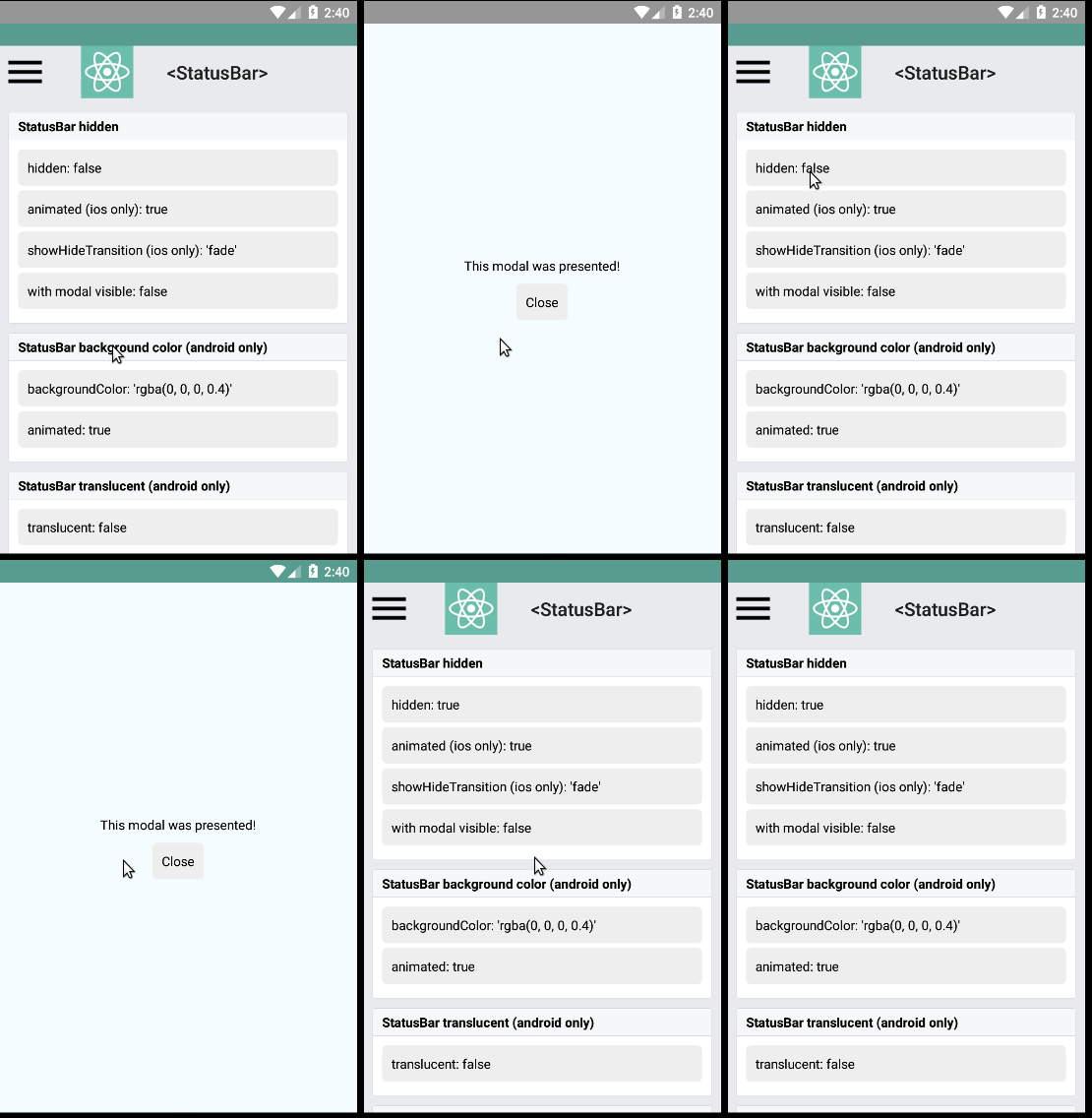
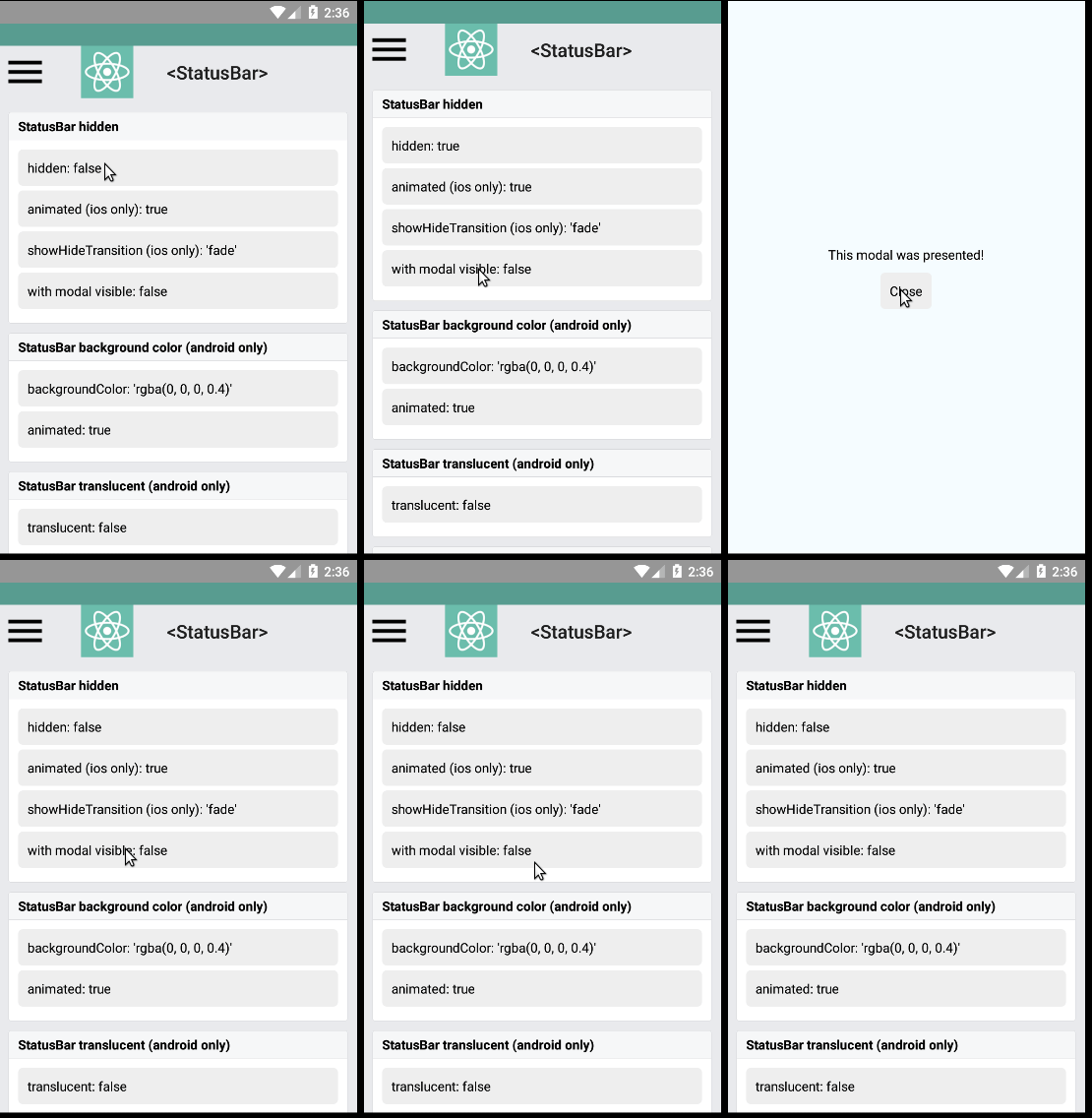
Closes the old #7474, keeping the status bar hidden when displaying a modal
or dialog, this is accomplished by verifying if the activity status bar is hidden or not.
Added a test to [RNTester](https://github.com/facebook/react-native/tree/master/RNTester), so it can be tested from there:
1. Run [RNTester](https://github.com/facebook/react-native/tree/master/RNTester) project
2. Go to <StatusBar> tests
3. Set `hidden: true` in the *StatusBar hidden* samples
4. Set `modal visible: true` and see the result
Here are some gifs to help see the results:
none
<!--
Help reviewers and the release process by writing your own release notes
**INTERNAL and MINOR tagged notes will not be included in the next version's final release notes.**
CATEGORY
[----------] TYPE
[ CLI ] [-------------] LOCATION
[ DOCS ] [ BREAKING ] [-------------]
[ GENERAL ] [ BUGFIX ] [-{Component}-]
[ INTERNAL ] [ ENHANCEMENT ] [ {File} ]
[ IOS ] [ FEATURE ] [ {Directory} ] |-----------|
[ ANDROID ] [ MINOR ] [ {Framework} ] - | {Message} |
[----------] [-------------] [-------------] |-----------|
[ GENERAL ] [ BUGFIX ] [ [StatusBar] - Prevent show a hidden status bar when opening modals
EXAMPLES:
[IOS] [BREAKING] [FlatList] - Change a thing that breaks other things
[ANDROID] [BUGFIX] [TextInput] - Did a thing to TextInput
[CLI] [FEATURE] [local-cli/info/info.js] - CLI easier to do things with
[DOCS] [BUGFIX] [GettingStarted.md] - Accidentally a thing/word
[GENERAL] [ENHANCEMENT] [Yoga] - Added new yoga thing/position
[INTERNAL] [FEATURE] [./scripts] - Added thing to script that nobody will see
-->
[ GENERAL ] [ BUGFIX ] [StatusBar] - Prevent show a hidden status bar when opening modals
Closes https://github.com/facebook/react-native/pull/18004
Differential Revision: D7307564
Pulled By: hramos
fbshipit-source-id: 47e481ead78204865811ddf2ef3d27da77ad8b8f




