Summary:
`letterSpacing` is completely missing from RN Android at the moment.

I've reviewed the `letterSpacing` implementations in #13199, #13877 and #16801 (that all seem to have stalled) and managed to put together an improved one based on #13199, updated to merge cleanly post 6114f863c3, that resolves the [issues](https://github.com/facebook/react-native/pull/13199#issuecomment-354568863) I've identified with that code.

I believe this is the closest PR yet to a correct implementation of this feature, with a few caveats:

- As with the other PRs, this only works on Android >= 5.0 (silently falling back to no letter spacing on older versions). Is this acceptable for a RN feature, in general? Would a dev mode warning be desirable?
- The other PRs seem to have explored the space of potential solutions to the layout issue ([Android renders space _around_ glyphs](https://issuetracker.google.com/issues/37079859), iOS to the _right_ of each one) and come up empty, so I've opted to merely document the difference.
- I have neither updated nor tested the "Flat" UI implementation - everything compiles but I've taken [this comment](https://github.com/facebook/react-native/issues/12770#issuecomment-294052694) to mean there's no point in trying to wade through it on my own right now; I'm happy to tackle it if given some pointers.
- The implementation in `ReactEditText` is only there to handle the placeholder text, as `ReactBaseTextShadowNode` already affects the input control's contents correctly.
  - I'm not sure whether `<TextInput>` is meant to respect `allowFontScaling`; I've taken my cue here from `ReactTextInputManager.setFontSize()`, and used the same units (SP) to interpret the value in `ReactEditText.setLetterSpacingPt()`.
  - I'm not sure whether `<TextInput>` is even meant to support `letterSpacing` - it doesn't actually work on iOS. I'm not going to be able to handle the Objective-C side of this, not as part of this PR at least.
- I have not added unit tests to `ReactTextTest` - is this desirable? I see that some other props such as `lineHeight` aren't covered there (unless I'm not looking in the right place).
- Overall, I'm new to this codebase, so it's likely I've missed something not mentioned here.

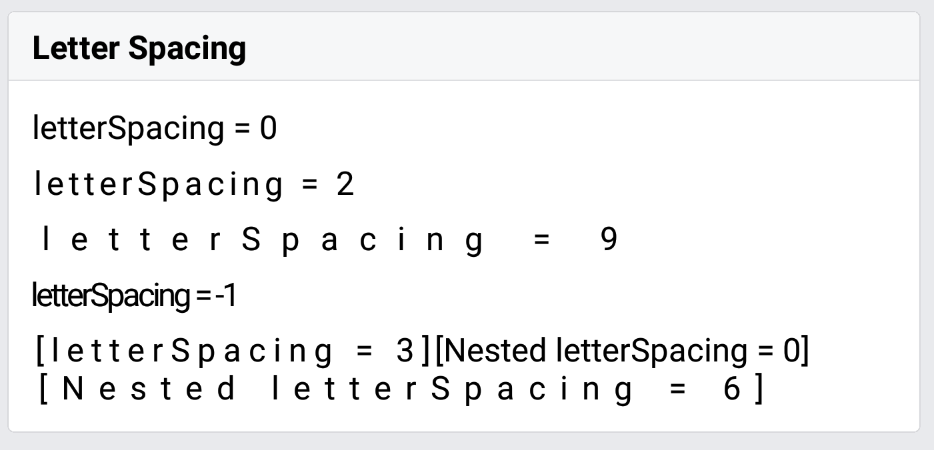
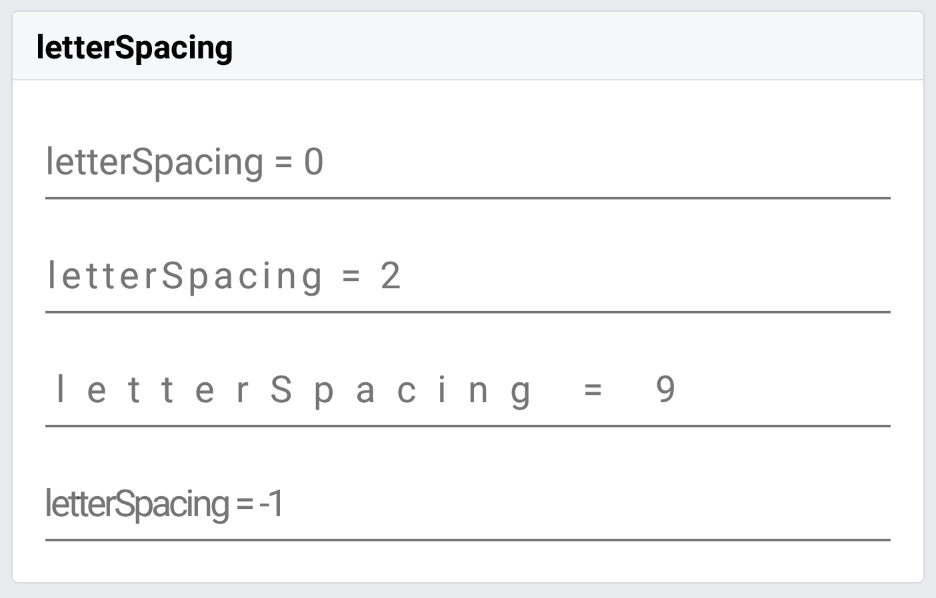
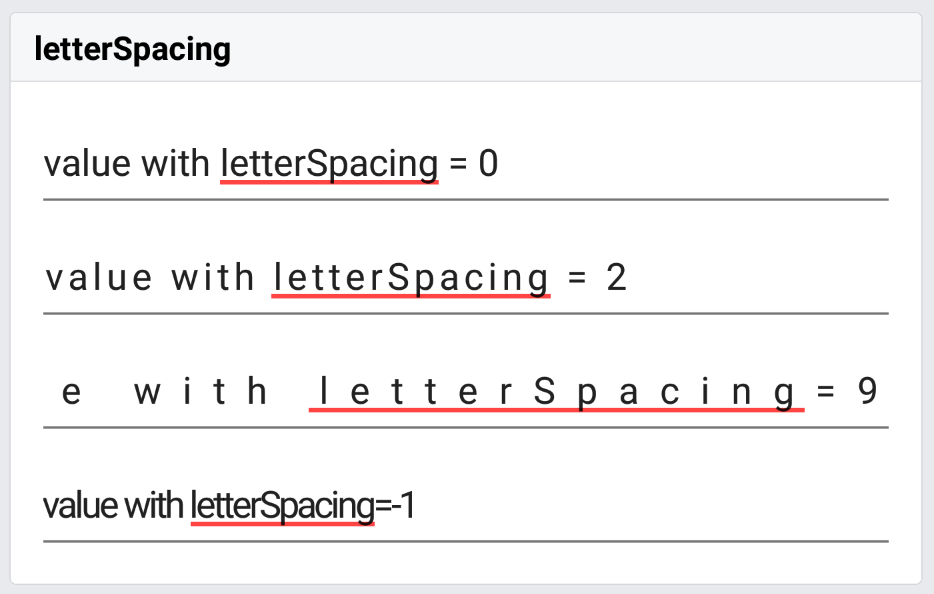
Note comment re: unit tests above; RNTester screenshots follow.

| iOS (existing functionality, amended test) | Android (new functionality & test) |
| - | - |
| <img src=https://user-images.githubusercontent.com/2246565/34458459-c8d59498-edcb-11e7-8c8f-e7426f723886.png width=300> | <img src=https://user-images.githubusercontent.com/2246565/34458473-2a1ca368-edcc-11e7-9ce6-30c6d3a48660.png width=300> |

| iOS _(not implemented, test not in this branch)_ | Android (new functionality & test) |
| - | - |
| <img src=https://user-images.githubusercontent.com/2246565/34458481-6c60a36e-edcc-11e7-9af5-9734dd722ced.png width=300> | <img src=https://user-images.githubusercontent.com/2246565/34458486-8b3cdcf8-edcc-11e7-974b-25c6085fa674.png width=300> |

| iOS _(not implemented, test not in this branch)_ | Android (new functionality & test) |
| - | - |
| <img src=https://user-images.githubusercontent.com/2246565/34458492-d69a77be-edcc-11e7-896f-21212621dbee.png width=300> | <img src=https://user-images.githubusercontent.com/2246565/34458490-b3a1139e-edcc-11e7-88c8-79d4430d1514.png width=300> |

https://github.com/facebook/react-native-website/pull/105 - this docs PR is edited slightly from what's in `TextStylePropTypes` here; happy to align either one to the other after a review.

[ANDROID] [FEATURE] [Text] - Implemented letterSpacing
Closes https://github.com/facebook/react-native/pull/17398

Reviewed By: mdvacca

Differential Revision: D6837718

Pulled By: hramos

fbshipit-source-id: 5c9d49e9cf4af6457b636416ce5fe15315aab72c
Summary:
Includes React Native and its dependencies Fresco, Metro, and Yoga. Excludes samples/examples/docs.

find: ^(?:( *)|( *(?:[\*~#]|::))( )? *)?Copyright (?:\(c\) )?(\d{4})\b.+Facebook[\s\S]+?BSD[\s\S]+?(?:this source tree|the same directory)\.$
replace: $1$2$3Copyright (c) $4-present, Facebook, Inc.\n$2\n$1$2$3This source code is licensed under the MIT license found in the\n$1$2$3LICENSE file in the root directory of this source tree.

Reviewed By: TheSavior, yungsters

Differential Revision: D7007050

fbshipit-source-id: 37dd6bf0ffec0923bfc99c260bb330683f35553e
Summary:
Overview -

This PR resolves the issue described in #14606. This PR makes Text components take into account the includeFontPadding property when calculating their size.

Background -

Currently, on Android, when includeFontPadding is set to false, the React Text component does not adjust its height. This makes it difficult to lay out other components at a precise spacing relative to a Text component.

iOS calculates the height of a UILabel based on the font's descent + ascent.

Android lets you choose whether to calculate the height of a TextView based on the font's top + bottom (includeFontPadding=true) or ascent + descent (includeFontPadding=false).

In order for a text component to be the same size on iOS and Android (relative to the rest of the layout in points and dips), one should set includeFontPadding=false on Android - but the React Text component needs to take this property into account when sizing itself for this to work.

Please see this stack overflow post for a visual explanation of the difference between a font's ascent/descent and top/bottom - https://stackoverflow.com/questions/27631736/meaning-of-top-ascent-baseline-descent-bottom-and-leading-in-androids-font

Testing -

Please see the attached screenshots to see the height difference of a Text component with this PR when includeFontPadding is true vs false.

The font I am using has an ascent + descent = em-size so that the height of the Text component will be equal to the font-size for a single line of text. This is to clearly show the additional height that includeFontPadding=true adds to the Text component.

For Text components that are styled in the same way,

When includeFontPadding=true, height = ~29.714 dips
When includeFontPadding=false, height= 24 dips

<img width="342" alt="includefontpaddingtrue" src="https://user-images.githubusercontent.com/1437344/27299391-3eec9de0-54fa-11e7-81d5-d0aeb40e8e27.png">

<img width="346" alt="includefontpaddingfalse" src="https://user-images.githubusercontent.com/1437344/27299401-45c95248-54fa-11e7-98d7-17dd152d3cb8.png">
Closes https://github.com/facebook/react-native/pull/14609

Reviewed By: AaaChiuuu

Differential Revision: D5587602

Pulled By: achen1

fbshipit-source-id: 6d2f12ba72ec7462676645519cd27820279278eb
Summary:
Make more views collapse on Android by designating FLEX_BASIS, FLEX_GROW and FLEX_SHRINK as "layout-only" props.

Relies on existing layout tests.

See Issue #13622
Closes https://github.com/facebook/react-native/pull/13868

Reviewed By: astreet

Differential Revision: D5035864

Pulled By: javache

fbshipit-source-id: d2c9e0b33b07e51b19afc383ef913ac41b70415c
Summary:
This diff adds display:none support to React Native. This enables hiding components which still calling their render method and keeping them within the state of your application. This enables preserving state in a component even though the component is not visible. Previously this was often implemented by rendering a component off screen as a work around. See below playground for usage.

```
class Playground extends React.Component {
  render() {
    return (
      <View style={{width: '100%', height: '100%', flexDirection: 'row', backgroundColor: 'white'}}>
        <View style={{width: 100, height: 100, display: 'none', backgroundColor: 'red'}}/>
        <View style={{width: 100, height: 100, backgroundColor: 'blue'}}/>
      </View>
    );
  }
}
```

Reviewed By: astreet

Differential Revision: D4611771

fbshipit-source-id: 0dbe0494d989df42994ab9ad5125d47f3233cc5a
Summary:
Android has a text API called breakStrategy for controlling how paragraphs are broken up into lines. For example, some modes support automatically hyphenating words so a word can be split across lines while others do not.

One source of complexity is that Android provides different defaults for `breakStrategy` for `TextView` vs `EditText`. `TextView`'s default is `BREAK_STRATEGY_HIGH_QUALITY` while `EditText`'s default is `BREAK_STRATEGY_SIMPLE`.

In addition to exposing `textBreakStrategy`, this change also fixes a couple of rendering glitches with `Text` and `TextInput`. `TextView` and `EditText` have different default values for `breakStrategy` and `hyphenationFrequency` than `StaticLayout`. Consequently, we were using different parameters for measuring and rendering. Whenever measuring and rendering parameters are inconsistent, it can result in visual glitches such as the text taking up too much space or being clipped.

This change fixes these inconsistencies by setting `breakStrategy` and `hyphenat
Closes https://github.com/facebook/react-native/pull/11007

Differential Revision: D4227495

Pulled By: lacker

fbshipit-source-id: c2d96bd0ddc7bd315fda016fb4f1b5108a2e35cf
Summary:
The reason for this change is to implement `allowFontScaling` on the Android's React Native Text component.  Prior to this PR `allowFontScaling` only works for iOS.

The following link contains images of `allowFontScaling` working in Android on small, normal, large, and huge system fonts (from native Android display settings)

http://imgur.com/a/94bF1

The following link is a video of the same thing working on an Android emulator

https://youtu.be/1jTlZhPdj9Y

Here is the sample code snippet driving the video/images
```
render() {
    const size = [12, 14, 16, 18];
    return (
      <View style={{backgroundColor: 'white', flex: 1}}>
        <Text>
          Default size no allowFontScaling prop (default true)
        </Text>
        <Text allowFontScaling={true}>
          Default size allowFontScaling: true
        </Text>
        <Text style={{ marginBottom: 10, }} allowFontScaling={false}>
          Default size allowFontScaling: false
        </Text>

        { size.map(
Closes https://github.com/facebook/react-native/pull/10898

Differential Revision: D4335190

Pulled By: lacker

fbshipit-source-id: 0480809c44983644ff2abfcaf4887569b2bfede5
Summary:
Expose aspectRatio style prop from css-layout to React Native.

This means the following will now work:

    <View style={{backgroundColor: 'blue', aspectRatio: 1}}/>

Reviewed By: javache

Differential Revision: D4226472

fbshipit-source-id: c8709a7c0abbf77089a4e867879b42dcd9116f65
Summary:
This fixes measuring of items in the main axis of a container. Previously items were in a lot of cases measured with UNSPECIFIED instead of AT_MOST. This was to support scrolling containers. The correct way to handle scrolling containers is to instead provide them with their own overflow value to activate this behavior. This is also similar to how the web works.

This is a breaking change. Most of your layouts will continue to function as before however some of them might not. Typically this is due to having a `flex: 1` style where it is currently a no-op due to being measured with an undefined size but after this change it may collapse your component to take zero size due to the implicit `flexBasis: 0` now being correctly treated. Removing the bad `flex: 1` style or changing it to `flexGrow: 1` should solve most if not all layout issues your see after this diff.

Reviewed By: majak

Differential Revision: D3876927

fbshipit-source-id: 81ea1c9d6574dd4564a3333f1b3617cf84b4022f
Summary:
This adds support for sticky headers on Android. The implementation if based primarily on the iOS one (https://github.com/facebook/react-native/blob/master/React/Views/RCTScrollView.m#L272) and adds some stuff that was missing to be able to handle z-index, view clipping, view hierarchy optimization and touch handling properly.

Some notable changes:
- Add `ChildDrawingOrderDelegate` interface to allow changing the `ViewGroup` drawing order using `ViewGroup#getChildDrawingOrder`. This is used to change the content view drawing order to make sure headers are drawn over the other cells. Right now I'm only reversing the drawing order as drawing only the header views last added a lot of complexity especially because of view clipping and I don't think it should cause issues.

- Add `collapsableChildren` prop that works like `collapsable` but applies to every child of the view. This is needed to be able to reference sticky headers by their indices otherwise some subviews can get optimized out and break indexes.
Closes https://github.com/facebook/react-native/pull/9456

Differential Revision: D3827366

Pulled By: fred2028

fbshipit-source-id: d346068734c5b987518794ab23e13914ed13b5c4
Summary:
This adds support for sticky headers on Android. The implementation if based primarily on the iOS one (https://github.com/facebook/react-native/blob/master/React/Views/RCTScrollView.m#L272) and adds some stuff that was missing to be able to handle z-index, view clipping, view hierarchy optimization and touch handling properly.

Some notable changes:
- Add `ChildDrawingOrderDelegate` interface to allow changing the `ViewGroup` drawing order using `ViewGroup#getChildDrawingOrder`. This is used to change the content view drawing order to make sure headers are drawn over the other cells. Right now I'm only reversing the drawing order as drawing only the header views last added a lot of complexity especially because of view clipping and I don't think it should cause issues.

- Add `collapsableChildren` prop that works like `collapsable` but applies to every child of the view. This is needed to be able to reference sticky headers by their indices otherwise some subviews can get optimized out and break indexes.
Closes https://github.com/facebook/react-native/pull/9456

Differential Revision: D3827366

fbshipit-source-id: cab044cfdbe2ccb98e1ecd3e02ed3ceaa253eb78
Summary: Introduce `overflow:scroll` so that scrolling can be implemented without the current overflow:visible hackiness. Currently we use AT_MOST to measure in the cross axis but not in the main axis. This was done to enable scrolling containers where children are not constraint in the main axis by their parent. This caused problems for non-scrolling containers though as it meant that their children cannot be measured correctly in the main axis. Introducing `overflow:scroll` fixes this.

Reviewed By: astreet

Differential Revision: D3855801

fbshipit-source-id: 3c365f9e6ef612fd9d9caaaa8c650e9702176e77
Summary: Introduce `overflow:scroll` so that scrolling can be implemented without the current overflow:visible hackiness. Currently we use AT_MOST to measure in the cross axis but not in the main axis. This was done to enable scrolling containers where children are not constraint in the main axis by their parent. This caused problems for non-scrolling containers though as it meant that their children cannot be measured correctly in the main axis. Introducing `overflow:scroll` fixes this.

Reviewed By: astreet

Differential Revision: D3855801

fbshipit-source-id: 6077b0bcb68fe5ddd4aa22926acab40ff4d83949
Summary:
Here's a little background. Resizing is inferior to scaling. See http://frescolib.org/docs/resizing-rotating.html#_

Currently, React Native has a heuristic to use resize when the image is likely to be from the device's camera. However, there may be other cases where a developer wants to use resize. For example, when the developer knows they'll be downloading a large image from a service but the image will be rendered at a small size on the device.

This change adds a `resizeMethod` prop to the `Image` component so developers can choose how Fresco resizes the image. The options are 'auto', 'resize', or 'scale'. When 'auto' is specified, a heuristic is used to choose between 'resize' and 'scale'. The default value is 'auto'.

**Test plan (required)**

In a small test app, verified that the `resizeMethod` prop properly influences the mechanism that is used to resize the image (e.g. resize or scale).

Adam Comella
Microsoft Corp.
Closes https://github.com/facebook/react-native/pull/9652

Differential Revision: D3841322

Pulled By: foghina

fbshipit-source-id: 6c78b5c75ea73053aa10386afd4cbff45f5b8ffe
Summary:
There are a couple of buggy behaviors in the current implementation of the `ellipsizeMode` prop on Android:
  - Setting the `numberOfLines` prop stomps on whatever value you provided for `ellipsizeMode` earlier.
  - The value you've provided for `ellipsizeMode` is used even if you've configured your view to have an unlimited size (i.e. `numberOfLines` is 0 or unspecified).

This change fixes these issues which makes Android's `ellipsizeMode` prop more consistent with iOS's. Additionally, it renames LineBreakMode to EllipsizeMode in a couple of places.

**Test plan (required)**

Verified that the `numberOfLines` and `ellipsizeMode` props work correctly in an Android test app.

Adam Comella
Microsoft Corp.
Closes https://github.com/facebook/react-native/pull/9594

Differential Revision: D3810166

Pulled By: foghina

fbshipit-source-id: 229c9bfc3ef10670a1090311ea9d095cb2c1121a
Summary:
The make current RCTShadowView support RTL layout.
1 Change all left/right to start/end for margin, padding, boarder and position
2 Calculate position in the same way as margin, padding and boarder

Reviewed By: fkgozali

Differential Revision: D3619292

fbshipit-source-id: eaaa6faeee93c964d59bb6f498d89effc09ed567
Summary:
lineBreakMode only in rc so I think we can replace property without any deprecation warnings. satya164
Closes https://github.com/facebook/react-native/pull/9008

Differential Revision: D3614901

fbshipit-source-id: 724227c0a89192825a24850b930b80884571a51f
Summary:
This is a cut down version of a previous pull request with just the 4 corners catered for.
Closes https://github.com/facebook/react-native/pull/4252

Reviewed By: svcscm

Differential Revision: D2911959

Pulled By: androidtrunkagent

fb-gh-sync-id: 7ddcd684d90d4d92ccefed906c0126e92818dcde
Summary:
change `setTextAlign` and `setTextAlignVertical` to receive argument of type `String` (the same as in `StyleSheet`), so that native props and stylesheet props are calling the same ReactMethod

- add demo (may not be necessary)
Closes https://github.com/facebook/react-native/pull/4481

Reviewed By: svcscm

Differential Revision: D2823456

Pulled By: mkonicek

fb-gh-sync-id: 349d17549f419b5bdc001d70b583423ade06bfe8
Summary: public

We're seeing related crashes. The diff has no tests, the perf tests weren't conclusive, and the person who'd be supporting it no longer is available to work on it. We can try this again later in a less rushed manner with proper perf testing.

Reviewed By: davidaurelio

Differential Revision: D2696615

fb-gh-sync-id: 3b6814ac12af19516146d5c42d2add8321b10db5
Summary: public
Native view recycling implementation based on limited pools of views.

In this diff I introduced new UIManager method: dropViews. Instead of removing views from tag->view maps when they are detached we keep them there until we get a call to dropViews with the appropriate tag. JS may keep a pool of object and selectively decide not to enqueue drop for certain views. Then instead of removing those views it may decide to reuse tag that has been previously allocated for a view that is no longer in use.

Special handling is required for layout-only nodes as they only can transition from layout-only to non-layout-only (reverse transition hasn't been implemented). Because of that we'd loose benefits of view flattening if we decide to recycle existing non-layout-only view as a layout-only one.

This diff provides only a simple and manual method for configuring pools by calling `ReactNativeViewPool.configure` with a dict from native view name to the view count. Note that we may not want recycle all the views (e.g. when we render mapview we don't want to keep it in memory after it's detached)

Reviewed By: davidaurelio

Differential Revision: D2677289

fb-gh-sync-id: 29f44ce5b01db3ec353522af051b6a50924614a2
This is an early release and there are several things that are known
not to work if you're porting your iOS app to Android.

See the Known Issues guide on the website.

We will work with the community to reach platform parity with iOS.