Summary:
Nested scrolling in scrollViews, listViews and flatLists are enabled on iOS by default, but needs to be enabled manually on Android. This PR introduces a `nestedScrollEnabled` property to ScrollViews to support nested scrolling on Android 21 and above.

Enabling nested scroll will resolve issues with coordinator layout in android and required to support a collapsing toolbar.

Tested on the test app. We are also using this property in our app currently to support scrolling behaviour required by coordinator layouts.

[ANDROID] [ENHANCEMENT] [ScrollView] - Added a prop to enable nested scrolling
Closes https://github.com/facebook/react-native/pull/18299

Reviewed By: sahrens

Differential Revision: D7256604

Pulled By: mdvacca

fbshipit-source-id: fb8b7f1b5bed39837a2066db7f2a8798d52a3fd6
Summary:
In native Android apps, like the YouTube app, context menus are closed when the device orientation changes.

In React Native apps instead, when having a [PopupMenu](https://developer.android.com/reference/android/widget/PopupMenu.html) open and rotating the device, the PopupMenu is not dismissed and appears in a wrong position on the screen.

This PR exposes a `dismissPopupMenu` method to allow the application to dismiss any open PopupMenu:

```(javascript)
UIManager.dismissPopupMenu()
```
Closes https://github.com/facebook/react-native/pull/15636

Differential Revision: D6837663

Pulled By: hramos

fbshipit-source-id: 7b0f4f04341129ad45c703a50897e17d93651974
Summary:
<!--
Thank you for sending the PR! We appreciate you spending the time to work on these changes.
Help us understand your motivation by explaining why you decided to make this change.
You can learn more about contributing to React Native here: http://facebook.github.io/react-native/docs/contributing.html
Happy contributing!
-->
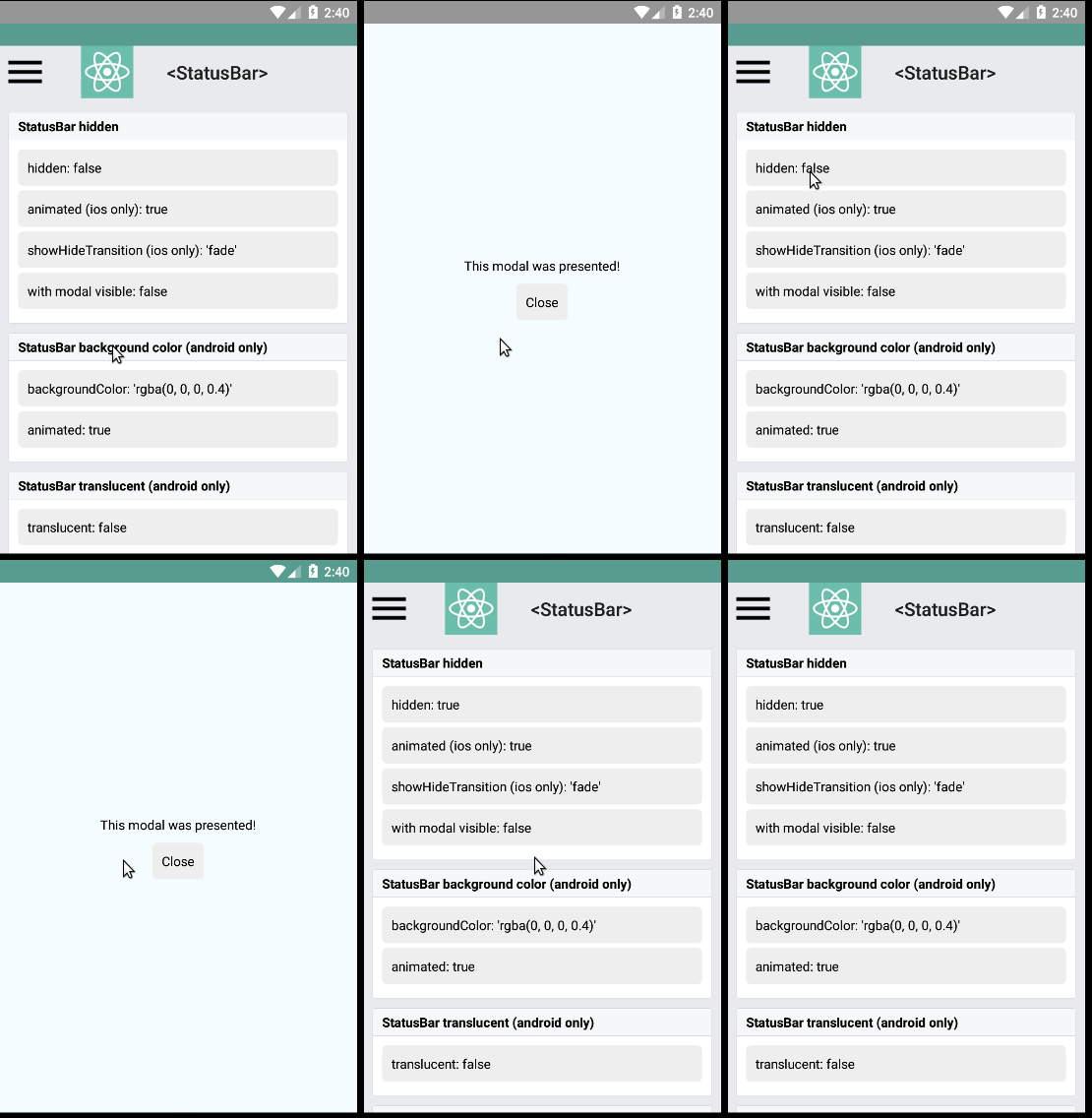
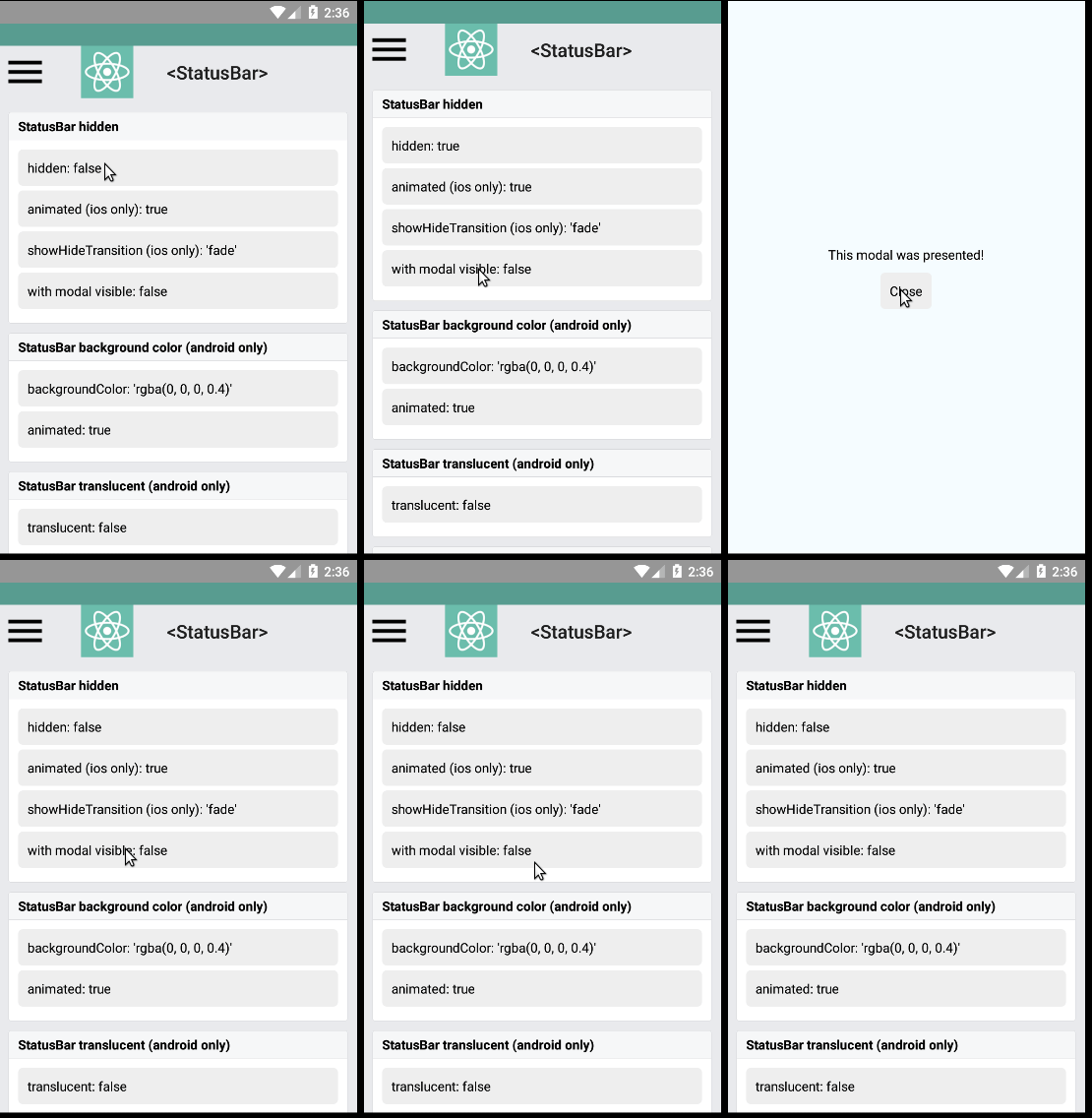
Closes the old #7474, keeping the status bar hidden when displaying a modal
or dialog, this is accomplished by verifying if the activity status bar is hidden or not.
Added a test to [RNTester](https://github.com/facebook/react-native/tree/master/RNTester), so it can be tested from there:
1. Run [RNTester](https://github.com/facebook/react-native/tree/master/RNTester) project
2. Go to <StatusBar> tests
3. Set `hidden: true` in the *StatusBar hidden* samples
4. Set `modal visible: true` and see the result
Here are some gifs to help see the results:
none
<!--
Help reviewers and the release process by writing your own release notes
**INTERNAL and MINOR tagged notes will not be included in the next version's final release notes.**
CATEGORY
[----------] TYPE
[ CLI ] [-------------] LOCATION
[ DOCS ] [ BREAKING ] [-------------]
[ GENERAL ] [ BUGFIX ] [-{Component}-]
[ INTERNAL ] [ ENHANCEMENT ] [ {File} ]
[ IOS ] [ FEATURE ] [ {Directory} ] |-----------|
[ ANDROID ] [ MINOR ] [ {Framework} ] - | {Message} |
[----------] [-------------] [-------------] |-----------|
[ GENERAL ] [ BUGFIX ] [ [StatusBar] - Prevent show a hidden status bar when opening modals
EXAMPLES:
[IOS] [BREAKING] [FlatList] - Change a thing that breaks other things
[ANDROID] [BUGFIX] [TextInput] - Did a thing to TextInput
[CLI] [FEATURE] [local-cli/info/info.js] - CLI easier to do things with
[DOCS] [BUGFIX] [GettingStarted.md] - Accidentally a thing/word
[GENERAL] [ENHANCEMENT] [Yoga] - Added new yoga thing/position
[INTERNAL] [FEATURE] [./scripts] - Added thing to script that nobody will see
-->
[ GENERAL ] [ BUGFIX ] [StatusBar] - Prevent show a hidden status bar when opening modals
Closes https://github.com/facebook/react-native/pull/18004
Differential Revision: D7307564
Pulled By: hramos
fbshipit-source-id: 47e481ead78204865811ddf2ef3d27da77ad8b8f
Summary:
On Android there's no number-pad but numeric instead, for my use-case I need number only (without decimal and sign, for PIN input)

I write it so there's no breaking change for those already using the `TextInput` Component

None

[ANDROID][ENHANCEMENT][Component] Add number-pad keyboardType
Closes https://github.com/facebook/react-native/pull/18350

Reviewed By: achen1

Differential Revision: D7269721

Pulled By: mdvacca

fbshipit-source-id: 82571dce948e0cf2e4354dc46c69198ec69ba65a
Summary:
The project at large switched to MIT last month. A PR that was opened prior to the change was merged, this PR updates the file to use the correct license.

None, trivial PR

[ANDROID] [MINOR] [Image] Update license
Closes https://github.com/facebook/react-native/pull/18343

Differential Revision: D7252836

Pulled By: hramos

fbshipit-source-id: b7c207c782f4bf19c12d121e86f394e52326a5ab
Summary:
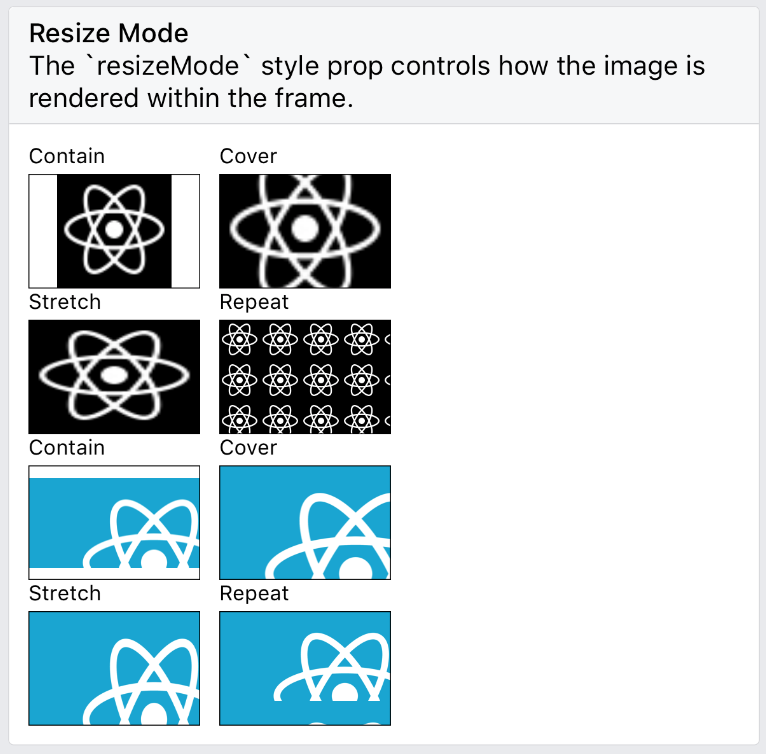
`<Image resizeMode="repeat" />` for Android, matching the iOS implementation (#7968). (Non-goal: changing the component's API for finer-grained control / feature parity with CSS - this would be nice in the future)

As requested in e.g. #14158.

Given https://github.com/facebook/fresco/issues/1575, and lacking the context to follow the specific recommendations in https://github.com/facebook/fresco/issues/1575#issuecomment-267004303, I've opted for a minimal change within RN itself.

It's likely that performance can be improved by offloading this work to Fresco in some clever way; but I'm assuming that the present naive approach is still an improvement over a userland implementation with `onLayout` and multiple `<Image>` instances.

- Picking up on a TODO note in the existing code, I implemented `MultiPostprocessor` to allow arbitrary chaining of Fresco-compatible postprocessors inside `ReactImageView`.
- Rather than extensively refactor `ImageResizeMode`, `ReactImageManager` and `ReactImageView`, I mostly preserved the existing API that maps `resizeMode` values to [`ScaleType`](http://frescolib.org/javadoc/reference/com/facebook/drawee/drawable/ScalingUtils.ScaleType.html) instances, and simply added a second mapping, to [`TileMode`](https://developer.android.com/reference/android/graphics/Shader.TileMode.html).
- To match the iOS rendering exactly for oversized images, I found that scaling with a custom `ScaleType` was required - a kind of combination of `CENTER_INSIDE` and `FIT_START` which Fresco doesn't provide - so I implemented that as `ScaleTypeStartInside`. (This is, frankly, questionable as the default behaviour on iOS to begin with - but I am aiming for parity here)
- `resizeMode="repeat"` is therefore unpacked by the view manager to the effect of:
  ```js
     view.setScaleType(ScaleTypeStartInside.INSTANCE);
     view.setTileMode(Shader.TileMode.REPEAT);
   ```
  And the added postprocessing in the view (in case of a non-`CLAMP` tile mode) consists of waiting for layout, allocating a destination bitmap and painting the source bitmap with the requested tile mode and scale type.

Note that as in https://github.com/facebook/react-native/pull/17398#issue-285235247, I have neither updated nor tested the "Flat" UI implementation - everything compiles but I've taken [this comment](https://github.com/facebook/react-native/issues/12770#issuecomment-294052694) to mean there's no point in trying to wade through it on my own right now; I'm happy to tackle it if given some pointers.

Also, I'm happy to address any code style issues or other feedback; I'm new to this codebase and a very infrequent Android/Java coder.

Tested by enabling the relevant case in RNTester on Android.

| iOS | Android |
|-|-|
| <img src=https://user-images.githubusercontent.com/2246565/34461897-4e12008e-ee2f-11e7-8581-1dc0cc8f2779.png width=300>| <img src=https://user-images.githubusercontent.com/2246565/34461894-40b2c8ec-ee2f-11e7-8a8f-96704f3c8caa.png width=300> |

Docs update: https://github.com/facebook/react-native-website/pull/106

[ANDROID] [FEATURE] [Image] - Implement resizeMode=repeat
Closes https://github.com/facebook/react-native/pull/17404

Reviewed By: achen1

Differential Revision: D7070329

Pulled By: mdvacca

fbshipit-source-id: 6a72fcbdcc7c7c2daf293dc1d8b6728f54ad0249
Summary:
<!--
Thank you for sending the PR! We appreciate you spending the time to work on these changes.
Help us understand your motivation by explaining why you decided to make this change.
You can learn more about contributing to React Native here: http://facebook.github.io/react-native/docs/contributing.html
Happy contributing!
-->
* To be on par with Apple TV support, this makes it possible to run React Native apps on Android TV devices (See also: https://react-native.canny.io/feature-requests/p/android-tv-support)
* These changes also make it possible to navigate through the app using D-PAD buttons that are present on some mobile devices
* Since these changes affect, among others, `ReactRootView.java` and `Touchable.js` code and are closely related to Apple TV implementation, it makes sense for them to be included in the core
- React native apps can be launched on Android TV devices and properly render their content
- Navigation is possible using left, right, top, bottom arrows from the remote (or D-PAD)
- Touchable components can handle D-PAD center button press events and correctly fire their `onPress` handlers
- Touchable components will receive `onPressIn` and `onPressOut` events and can react to focus/blur changes appropriately (just like on Apple TV)
- `Platform` constants allow to check if the react-native app is running on TV (`Platform.isTV`)
- `ScrollView`s behave correctly (same as native implementation) when switching to view outside bounds – that is, the container would scroll such that the newly focused element is fully visible
- Native "clicking" sounds are played when moving between focusable elements
- Play/Pause click event is send to `TVEventHandler`
- Rewind and FastForward events are send to `TVEventHandler`
- Back button behaves as a normal Android back button
- Diagonal buttons work correctly on Android TV, e.g. if there is no button directly to the right from the focused one, but there is one to the right but a bit higher/lower it will grab focus
- Dev menu can be accessed by long pressing fast forward button
A demo showing RNTester app running on Android TV device (Amazon Fire TV Stick) can be found here:
[](http://www.youtube.com/watch?v=EzIQErHhY20)
- `TextInput` will not work on Android TV devices. There's an issue with native `ReactEditText` implementation that prevents it from receiving focus. This makes it impossible to navigate to `TextInput`.
This will be fixed next, but will be included in a separate Pull Request
- ~Overlay permissions cannot be granted on Android TV devices running Android version >= 6.0
This is because the overlay permission can only be granted by firing an Intent to open settings page (`ACTION_MANAGE_OVERLAY_PERMISSION`). Since this page does not exist on TV devices the permission cannot be requested. This will make the app crash when trying to open dev menu (⌘+M) or displaying a redbox error.
Note: This does not affect devices running Android version < 6.0 (for example Amazon Fire TV Stick)~
This is now fixed by: https://github.com/facebook/react-native/pull/16596
* Launch the RNTester app on Android TV device.
* Ensure it launches without a crash
* Ensure basic navigation is possible
* Ensure Touchable components can receive select events
* Ensure the changes do not break current Android and iOS mobile devices functionality.
* Ensure the changes do not break current Apple TV functionality.
[RNAndroidTVDemo video](http://img.youtube.com/vi/EzIQErHhY20/0.jpg)
* Added `ReactAndroidTVViewManager` that handles TV `KeyEvent`s and dispatches events to JS - This is the core that enables basic navigation functionality on Android TV devices
* Following the above change we copy `TVEventHandler.ios.js` into `TVEventHandler.android.js` to enable JS to pick up those native navigation events and dispatch them further to subscribed views. (Note: We do not have a native `TVNavigationEventEmitter` implementation on Android, thus this file is slightly modified, e.g. it does pass `null` to `NativeEventEmitter` constructor)
* Added `uiMode` to `AndroidInfoModule`. (**Note**: This required changing `extends BaseJavaModule` to `extends ReactContextBaseJavaModule` to be able to use `getSystemService` which requires `Context` instance!
* Added `isTV` constants to both `Platform.ios.js` (keeping the deprecated `isTVOS` as well) and `Platform.android.js`
* Changed condition check on `Touchable.js` to use the newly added `isTV` flag to properly handle TV navigation events on Android as well
* Added `LEANBACK_LAUNCHER` to `RNTester` `intent-filter` so that it is possible to launch it on Android TV devices.
* See also a PR to `react-native-website` repo with updated docs for Android TV: https://github.com/facebook/react-native-website/pull/59
- [ ] Fix `TextInput` components handling by allowing them to be focused and making a proper navigation between them (and/or other components) possible. One thing to note here that the default behavior to immediately open software keyboard when focused on `TextInput` field will need to be adjusted on Android TV as well)
- [x] Fix overlay permissions issue by changing the way redbox/dev menu are displayed (see: https://github.com/facebook/react-native/pull/16596)
- [ ] Adjust placement of TV-related files (e.g. the `TVEventHandler.js` file is placed inside `AppleTV` directory which is not accurate, since it does handle Android TV events as well)
Previous discussion: https://github.com/SoftwareMansion/react-native/pull/1
<!--
Help reviewers and the release process by writing your own release notes
**INTERNAL and MINOR tagged notes will not be included in the next version's final release notes.**
CATEGORY
[----------] TYPE
[ CLI ] [-------------] LOCATION
[ DOCS ] [ BREAKING ] [-------------]
[ GENERAl ] [ BUGFIX ] [-{Component}-]
[ INTERNAL ] [ ENHANCEMENT ] [ {File} ]
[ IOS ] [ FEATURE ] [ {Directory} ] |-----------|
[ ANDROID ] [ MINOR ] [ {Framework} ] - | {Message} |
[----------] [-------------] [-------------] |-----------|
[CATEGORY] [TYPE] [LOCATION] - MESSAGE
EXAMPLES:
[IOS] [BREAKING] [FlatList] - Change a thing that breaks other things
[ANDROID] [BUGFIX] [TextInput] - Did a thing to TextInput
[CLI] [FEATURE] [local-cli/info/info.js] - CLI easier to do things with
[DOCS] [BUGFIX] [GettingStarted.md] - Accidentally a thing/word
[GENERAL] [ENHANCEMENT] [Yoga] - Added new yoga thing/position
[INTERNAL] [FEATURE] [./scripts] - Added thing to script that nobody will see
-->
[ANDROID] [FEATURE] [TV] - Added support for Android TV devices
Closes https://github.com/facebook/react-native/pull/16500
Differential Revision: D6536847
Pulled By: hramos
fbshipit-source-id: 17bbb11e8583b97f195ced5fd9762f8902fb8a3d
Summary:
See the "broken" video attached to really understand the problem easily.

On Android after navigating to any other screen using wix navigation library, the native viewpager would lose the settling page behaviour which is quite annoying for the users.

This is caused by the onAttachedToWindow that resets mFirstLayout to true inside ViewPager. By request another layout pass, everything works as expected.

Working video is the application with patched RN.

[broken.mp4](https://github.com/facebook/react-native/files/1128028/broken.mp4.zip)
[working.mp4](https://github.com/facebook/react-native/files/1128032/working.mp4.zip)
Closes https://github.com/facebook/react-native/pull/14867

Differential Revision: D7154981

Pulled By: hramos

fbshipit-source-id: 2b3570800a5320ed2c12c488748d9e1358936c84
Summary:
Some files have crept into the repo with the old license header. These are usually from PRs that were opened prior to the re-licensing of the project.

Let the script run, prior to fixing the errant files. The script outputs the following:

```
PATENTS crept into some new files?
 --- /dev/fd/63	2018-03-01 01:42:48.250153746 +0000
+++ /dev/fd/62	2018-03-01 01:42:48.250153746 +0000
@@ -1 +1,9 @@
+Libraries/NativeAnimation/Nodes/RCTTrackingAnimatedNode.h
+Libraries/NativeAnimation/Nodes/RCTTrackingAnimatedNode.m
+ReactAndroid/src/main/java/com/facebook/react/animated/TrackingAnimatedNode.java
+ReactAndroid/src/main/java/com/facebook/react/views/text/CustomLetterSpacingSpan.java
+ReactCommon/yoga/yoga/YGLayout.cpp
+ReactCommon/yoga/yoga/YGLayout.h
+ReactCommon/yoga/yoga/YGStyle.cpp
+ReactCommon/yoga/yoga/YGStyle.h
 scripts/circleci/check_license.sh
Exited with code 1
```

Fix the headers in these files and run the script again. No output, exit code 0.
Closes https://github.com/facebook/react-native/pull/18143

Reviewed By: sophiebits

Differential Revision: D7119356

Pulled By: hramos

fbshipit-source-id: d238e4d4a3ae320a2c8e625c2fa29690057a4814
Summary:
<!--
Thank you for sending the PR! We appreciate you spending the time to work on these changes.

Help us understand your motivation by explaining why you decided to make this change.

You can learn more about contributing to React Native here: http://facebook.github.io/react-native/docs/contributing.html

Happy contributing!

-->

There is currently no way to disable to context menu that automatically appears over a TextInput. This is especially troublesome if you would like to disable the user from pasting text into certain fields. This PR adds a `contextMenuHidden` property to TextInput that will hide it.

I'm not sure if testing is necessary here. I would be happy to investigate further on how this would be tested, if deemed necessary!

https://github.com/facebook/react-native-website/pull/95

<!--
Help reviewers and the release process by writing your own release notes

**INTERNAL and MINOR tagged notes will not be included in the next version's final release notes.**

  CATEGORY
[----------]        TYPE
[ CLI      ]   [-------------]      LOCATION
[ DOCS     ]   [ BREAKING    ]   [-------------]
[ GENERAL  ]   [ BUGFIX      ]   [-{Component}-]
[ INTERNAL ]   [ ENHANCEMENT ]   [ {File}      ]
[ IOS      ]   [ FEATURE     ]   [ {Directory} ]   |-----------|
[ ANDROID  ]   [ MINOR       ]   [ {Framework} ] - | {Message} |
[----------]   [-------------]   [-------------]   |-----------|

[CATEGORY] [TYPE] [LOCATION] - MESSAGE

 EXAMPLES:

 [IOS] [BREAKING] [FlatList] - Change a thing that breaks other things
 [ANDROID] [BUGFIX] [TextInput] - Did a thing to TextInput
 [CLI] [FEATURE] [local-cli/info/info.js] - CLI easier to do things with
 [DOCS] [BUGFIX] [GettingStarted.md] - Accidentally a thing/word
 [GENERAL] [ENHANCEMENT] [Yoga] - Added new yoga thing/position
 [INTERNAL] [FEATURE] [./scripts] - Added thing to script that nobody will see
-->

[FEATURE][TextInput] - Added `contextMenuHidden` property
Closes https://github.com/facebook/react-native/pull/18125

Differential Revision: D7101888

Pulled By: hramos

fbshipit-source-id: fe36603a3fbdcefbd644251a7ea894ac7e23e5b8
Summary:
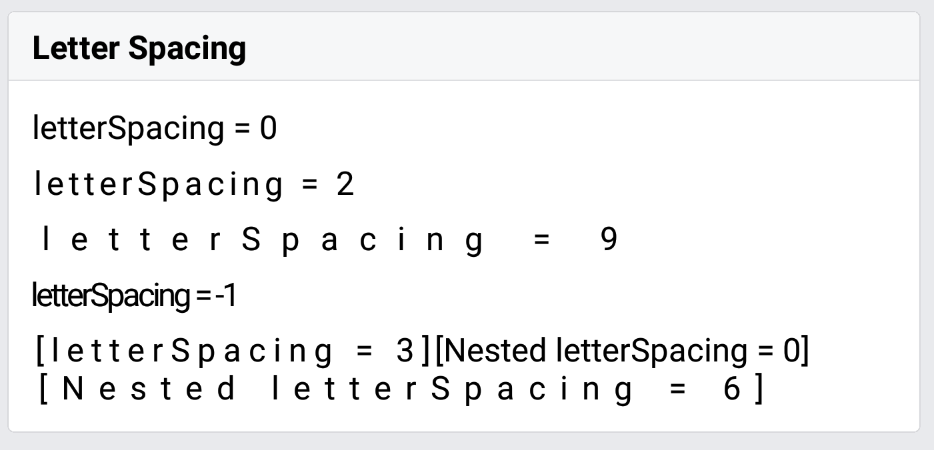
`letterSpacing` is completely missing from RN Android at the moment.

I've reviewed the `letterSpacing` implementations in #13199, #13877 and #16801 (that all seem to have stalled) and managed to put together an improved one based on #13199, updated to merge cleanly post 6114f863c3, that resolves the [issues](https://github.com/facebook/react-native/pull/13199#issuecomment-354568863) I've identified with that code.

I believe this is the closest PR yet to a correct implementation of this feature, with a few caveats:

- As with the other PRs, this only works on Android >= 5.0 (silently falling back to no letter spacing on older versions). Is this acceptable for a RN feature, in general? Would a dev mode warning be desirable?
- The other PRs seem to have explored the space of potential solutions to the layout issue ([Android renders space _around_ glyphs](https://issuetracker.google.com/issues/37079859), iOS to the _right_ of each one) and come up empty, so I've opted to merely document the difference.
- I have neither updated nor tested the "Flat" UI implementation - everything compiles but I've taken [this comment](https://github.com/facebook/react-native/issues/12770#issuecomment-294052694) to mean there's no point in trying to wade through it on my own right now; I'm happy to tackle it if given some pointers.
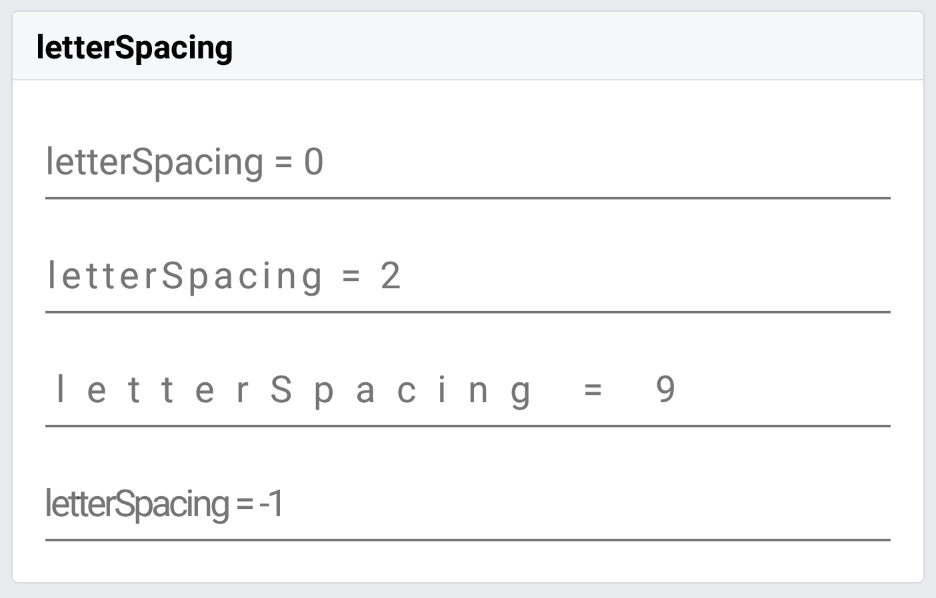
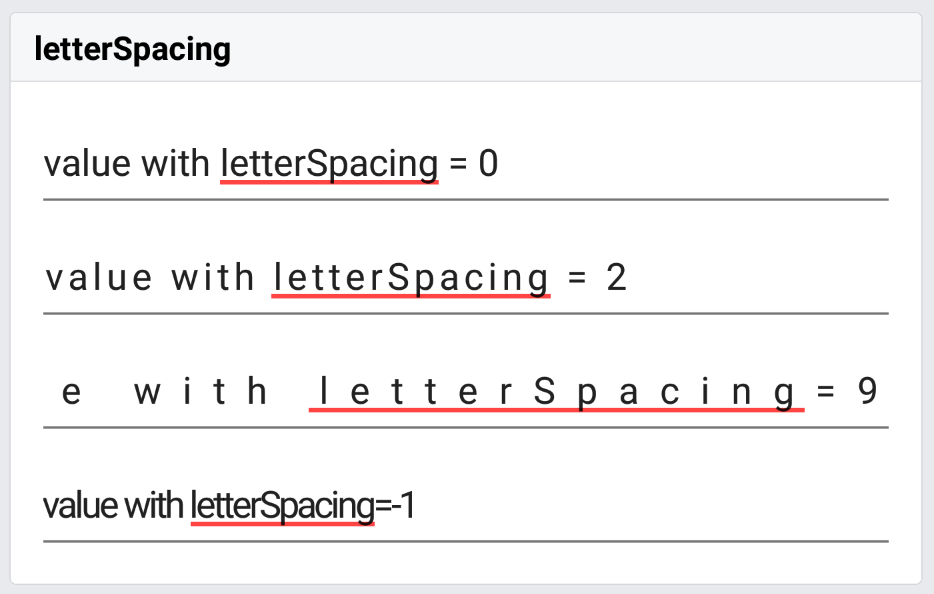
- The implementation in `ReactEditText` is only there to handle the placeholder text, as `ReactBaseTextShadowNode` already affects the input control's contents correctly.
  - I'm not sure whether `<TextInput>` is meant to respect `allowFontScaling`; I've taken my cue here from `ReactTextInputManager.setFontSize()`, and used the same units (SP) to interpret the value in `ReactEditText.setLetterSpacingPt()`.
  - I'm not sure whether `<TextInput>` is even meant to support `letterSpacing` - it doesn't actually work on iOS. I'm not going to be able to handle the Objective-C side of this, not as part of this PR at least.
- I have not added unit tests to `ReactTextTest` - is this desirable? I see that some other props such as `lineHeight` aren't covered there (unless I'm not looking in the right place).
- Overall, I'm new to this codebase, so it's likely I've missed something not mentioned here.

Note comment re: unit tests above; RNTester screenshots follow.

| iOS (existing functionality, amended test) | Android (new functionality & test) |
| - | - |
| <img src=https://user-images.githubusercontent.com/2246565/34458459-c8d59498-edcb-11e7-8c8f-e7426f723886.png width=300> | <img src=https://user-images.githubusercontent.com/2246565/34458473-2a1ca368-edcc-11e7-9ce6-30c6d3a48660.png width=300> |

| iOS _(not implemented, test not in this branch)_ | Android (new functionality & test) |
| - | - |
| <img src=https://user-images.githubusercontent.com/2246565/34458481-6c60a36e-edcc-11e7-9af5-9734dd722ced.png width=300> | <img src=https://user-images.githubusercontent.com/2246565/34458486-8b3cdcf8-edcc-11e7-974b-25c6085fa674.png width=300> |

| iOS _(not implemented, test not in this branch)_ | Android (new functionality & test) |
| - | - |
| <img src=https://user-images.githubusercontent.com/2246565/34458492-d69a77be-edcc-11e7-896f-21212621dbee.png width=300> | <img src=https://user-images.githubusercontent.com/2246565/34458490-b3a1139e-edcc-11e7-88c8-79d4430d1514.png width=300> |

https://github.com/facebook/react-native-website/pull/105 - this docs PR is edited slightly from what's in `TextStylePropTypes` here; happy to align either one to the other after a review.

[ANDROID] [FEATURE] [Text] - Implemented letterSpacing
Closes https://github.com/facebook/react-native/pull/17398

Reviewed By: mdvacca

Differential Revision: D6837718

Pulled By: hramos

fbshipit-source-id: 5c9d49e9cf4af6457b636416ce5fe15315aab72c
Summary:
There appear to be two different types of crashes related to the recent addition of `onKeyPress` on Android introduce in `0.53`. This PR addresses the cause of both of them.

Firstly, it seems possible to get an `indexOutOfBoundsException` with some 3rd-party keyboards as observed in https://github.com/facebook/react-native/issues/17974 & https://github.com/facebook/react-native/issues/17922. I have simplified the backspace determining logic slightly, and also put in an explicit check for zero case so it is not possible to get an indexOutOfBoundsException & it should make sense in the context of the onKeyPress logic.

Secondly, it appears that `EditText#onCreateInputConnection` can return null. In this case, if we set `null` to be the target of our subclass of `ReactEditTextInputConnectionWrapper`, we will see the crashes as seen [here](https://github.com/facebook/react-native/issues/17974#issuecomment-368471737), whereby any of methods executed in the `InputConnection` interface can result in a crash. It's hard to reason about the state when `null` is returned from `onCreateInputConnection`, however I would might reason that any soft keyboard input cannot update the `EditText` with a `null` `input connection`, as there is no way of interfacing with the `EditText`. I'm am not sure, if there is a later point where we might return/set this input connection at a later point? As without the `InputConnection` onKeyPress will not work. But for now, this will fix this crash at least.

I have not managed to reproduce these crashes myself yet, but users have confirmed that the `indexOutOfBounds` exception is fixed with the 'zero' case and has been confirmed on the respective issues https://github.com/facebook/react-native/issues/17974#issuecomment-368471737.

For the `null` inputConnection target case, I have verified that explicitly setting the target as null in the constructor of `onCreateInputConnection` results in the same stack trace as the one linked. Here is also a [reference](https://github.com/stripe/stripe-android/pull/392/files#diff-6cc1685c98457d07fd4e2dd83f54d5bb) to the same issue closed with the same fix for another project on github.

It is also important to verify that the behavior of `onKeyPress` still functions the same after this change, which can be verified by running the RNTesterProject and the `KeyboardEvents` section in `InputText`.
The cases to check that I think are important to check are:
- Cursor at beginning of input & backspace
- Return key & return key at beginning of input
- Select text then press delete
- Selection then press a key
- Space key
- Different keyboard types

This should not be a breaking change.

 [ANDROID] [BUGFIX] [TextInput] - Fixes crashes with TextInput introduced in 0.53.
Closes https://github.com/facebook/react-native/pull/18114

Differential Revision: D7099570

Pulled By: hramos

fbshipit-source-id: 75b2dc468c1ed398a33eb00487c6aa14ae04e5c2
Summary:
Includes React Native and its dependencies Fresco, Metro, and Yoga. Excludes samples/examples/docs.

find: ^(?:( *)|( *(?:[\*~#]|::))( )? *)?Copyright (?:\(c\) )?(\d{4})\b.+Facebook[\s\S]+?BSD[\s\S]+?(?:this source tree|the same directory)\.$
replace: $1$2$3Copyright (c) $4-present, Facebook, Inc.\n$2\n$1$2$3This source code is licensed under the MIT license found in the\n$1$2$3LICENSE file in the root directory of this source tree.

Reviewed By: TheSavior, yungsters

Differential Revision: D7007050

fbshipit-source-id: 37dd6bf0ffec0923bfc99c260bb330683f35553e
Summary:
Fork and rebase of gillessed's PR https://github.com/facebook/react-native/pull/13166 which has gotten stale.

From original PR:

Motivation (required)

Multiple react native developer (including myself) have run into a crash with the react-native-photo-view library (and possibly others). The common solution to this problem lies in the underlying java code, and thus requires a change in the react native source.

The stack trace I am getting is the same as listed here alwx/react-native-photo-view#15.

There was a PR to fix this (#12085) but it was closed. In response to the comments there, in my PR, I do log the exceptions. I don't think we can get any closer to the exception because in the next level of the stack trace, we are in the android sdk code.

Looking at some stack overflow pages and the android bug tracker, it seems that this is the common solution to this bug, and does not cause any impact any functionality.

https://code.google.com/p/android/issues/list?can=1&q=pointerindex+out+of+range&colspec=ID+Status+Priority+Owner+Summary+Stars+Reporter+Opened&cells=tiles

Test Plan (required)

I have manually tested this by compiling react native android from source and have confirmed the exception still gets hit and logged, but does not cause the app to terminate.
Closes https://github.com/facebook/react-native/pull/17167

Differential Revision: D7014296

Pulled By: hramos

fbshipit-source-id: 06b4a31062a591b726d2021e877d16f49881dcfd
Summary:
There seems to be a rounding error in the android code for line height, so that for some fonts and at some combinations of line height and font size the actual height of the elements seems to be slightly too short.
I've identified one issue that I mentioned here https://github.com/facebook/react-native/issues/10712#issuecomment-359382137 that could at least explain some of the problem. That when the line-height minus the original sum of the absolute value of top and bottom from the metrics, happens to be an odd number, the division by two causes a rounding error of 1, so that the actual line height is 1pt less than it should.
The fix uses floating point division instead of integer division, and rounds (arbitrarily) the negative values up and the positive values down so that the total is still the correct for odd numbers.
It turns out that only ascent and descent is used to give the actual line-height between lines in the same text-element. The top and bottom values are only used for padding the top and bottom of the text. So when the line-height is greater than the font size and the extra padding this PR sets the ascent and descent to the same value as the top and bottom respectively.
I've renamed the shouldIncreaseAllMetricsProportionally test to evenLineHeightShouldIncreaseAllMetricsProportionally and added an extra assertion to check that bottom-top still equals the line height.
Added another test oddLineHeightShouldAlsoWork that is similar but uses an odd number for the line height to test that it still works with odd numbers. This test only uses the sum of the values so that it's indifferent to what value the implementation chooses to round up or down.
Improvement on https://github.com/facebook/react-native/pull/16448
Fix line-height calculation on Android.
| Before | After |
| ------------- |-------------|
|  |  |
(All three columns have font size 16 and lineHeight: 32. The first one is has fixed height 9*32, the second is 9 Text elements, the last is one text element with lots of text limited to 9 lines, so they should be the same height. )
Closes https://github.com/facebook/react-native/pull/17952
Differential Revision: D6980333
Pulled By: hramos
fbshipit-source-id: 0a501358cfbf7f139fca46056d0d972b1daf6ae3
Summary:
<!--
Thank you for sending the PR! We appreciate you spending the time to work on these changes.
Help us understand your motivation by explaining why you decided to make this change.
You can learn more about contributing to React Native here: http://facebook.github.io/react-native/docs/contributing.html
Happy contributing!
-->
On current [master](8235a49a33), text input cursor resets to start when `secureTextEntry` prop toggles on Android. This motivate me to maintain position when `secureTextEntry ` prop toggles for better user experience.
On current [master](8235a49a33)

On this PR

[ANDROID] [BUGFIX] [TextInput] - Fix: cursor positions resets to start on toggling `secureTextEntry` prop.
<!--
Help reviewers and the release process by writing your own release notes
**INTERNAL and MINOR tagged notes will not be included in the next version's final release notes.**
CATEGORY
[----------] TYPE
[ CLI ] [-------------] LOCATION
[ DOCS ] [ BREAKING ] [-------------]
[ GENERAL ] [ BUGFIX ] [-{Component}-]
[ INTERNAL ] [ ENHANCEMENT ] [ {File} ]
[ IOS ] [ FEATURE ] [ {Directory} ] |-----------|
[ ANDROID ] [ MINOR ] [ {Framework} ] - | {Message} |
[----------] [-------------] [-------------] |-----------|
[CATEGORY] [TYPE] [LOCATION] - MESSAGE
EXAMPLES:
[IOS] [BREAKING] [FlatList] - Change a thing that breaks other things
[ANDROID] [BUGFIX] [TextInput] - Did a thing to TextInput
[CLI] [FEATURE] [local-cli/info/info.js] - CLI easier to do things with
[DOCS] [BUGFIX] [GettingStarted.md] - Accidentally a thing/word
[GENERAL] [ENHANCEMENT] [Yoga] - Added new yoga thing/position
[INTERNAL] [FEATURE] [./scripts] - Added thing to script that nobody will see
-->
Closes https://github.com/facebook/react-native/pull/17851
Differential Revision: D6925711
Pulled By: hramos
fbshipit-source-id: 6d53ad2dbed2dca20cd21e5b1b0578be13a91aad
Summary:
<!--
Thank you for sending the PR! We appreciate you spending the time to work on these changes.
Help us understand your motivation by explaining why you decided to make this change.
You can learn more about contributing to React Native here: http://facebook.github.io/react-native/docs/contributing.html
Happy contributing!
-->
Fixes#16000
see [Issue #16000](https://github.com/facebook/react-native/issues/16000)
fix a null pointer exception while using higher version 'com.android.support:appcompat-v7'
N/A
[ANDROID][BUGFIX][Switch] - Fix NPE in Android Switch during measure
Closes https://github.com/facebook/react-native/pull/16064
Differential Revision: D6816122
Pulled By: hramos
fbshipit-source-id: ba9a6febad4884b8ab142d8c7142085367006904
Summary:
ClassCastException fix: getText() returns CharSequence not Spanned.
From the other hand, EditTexts getText method returns Editable which extends Spanned.
This commit fixes two similar bugs one in flat TextView and another in standard TextView.
Also, it removes redundant checks in the ReactEditText.

Application without this change sporadically crashes with the following stack trace:
```
java.lang.ClassCastException: java.lang.String cannot be cast to android.text.Spanned
	at com.facebook.react.views.text.ReactTextView.reactTagForTouch(ReactTextView.java:195)
	at com.facebook.react.uimanager.TouchTargetHelper.getTouchTargetForView(TouchTargetHelper.java:269)
	at com.facebook.react.uimanager.TouchTargetHelper.findTargetTagAndCoordinatesForTouch$58866680(TouchTargetHelper.java:101)
	at com.facebook.react.uimanager.JSTouchDispatcher.handleTouchEvent(JSTouchDispatcher.java:77)
	at com.facebook.react.ReactRootView.dispatchJSTouchEvent(ReactRootView.java:151)
	at com.facebook.react.ReactRootView.onInterceptTouchEvent(ReactRootView.java:127)
	at android.view.ViewGroup.dispatchTouchEvent(ViewGroup.java:2110)

```
Closes https://github.com/facebook/react-native/pull/15452

Differential Revision: D6775986

Pulled By: hramos

fbshipit-source-id: 6de929937cbbb3e7bd98a708a40700f883cbaef0
Summary:
<!--
Thank you for sending the PR! We appreciate you spending the time to work on these changes.

Help us understand your motivation by explaining why you decided to make this change.

You can learn more about contributing to React Native here: http://facebook.github.io/react-native/docs/contributing.html

Happy contributing!

-->

Attempted fix for issue #17248

Added unit tests that cover the affected function and manually repeated the reproduction steps found in the issue.

Note: I had to apply the attached patch file to actually *run* the tests because they were not enabled. I didn't include this in the PR because it seemed like a secondary problem with possible ramifications (see comment near patched line) beyond this issue. For example, other, unrelated tests break when that line is uncommented.
[textInputTestEnable.patch.txt](https://github.com/facebook/react-native/files/1565807/textInputTestEnable.patch.txt)

If I should apply the patch to this PR or re-enable the tests in some other fashion, please let me know and I can do so.

(none)

<!--
Help reviewers and the release process by writing your own release notes

**INTERNAL and MINOR tagged notes will not be included in the next version's final release notes.**

  CATEGORY
[----------]        TYPE
[ CLI      ]   [-------------]      LOCATION
[ DOCS     ]   [ BREAKING    ]   [-------------]
[ GENERAL  ]   [ BUGFIX      ]   [-{Component}-]
[ INTERNAL ]   [ ENHANCEMENT ]   [ {File}      ]
[ IOS      ]   [ FEATURE     ]   [ {Directory} ]   |-----------|
[ ANDROID  ]   [ MINOR       ]   [ {Framework} ] - | {Message} |
[----------]   [-------------]   [-------------]   |-----------|

[CATEGORY] [TYPE] [LOCATION] - MESSAGE

 EXAMPLES:

 [IOS] [BREAKING] [FlatList] - Change a thing that breaks other things
 [ANDROID] [BUGFIX] [TextInput] - Did a thing to TextInput
 [CLI] [FEATURE] [local-cli/info/info.js] - CLI easier to do things with
 [DOCS] [BUGFIX] [GettingStarted.md] - Accidentally a thing/word
 [GENERAL] [ENHANCEMENT] [Yoga] - Added new yoga thing/position
 [INTERNAL] [FEATURE] [./scripts] - Added thing to script that nobody will see
-->

[ANDROID] [BUGFIX] [TextInput] - Fix an issue when swapping to and from the `'visible-password'` or `'phone-pad'` keyboard types.
Closes https://github.com/facebook/react-native/pull/17249

Differential Revision: D6713008

Pulled By: hramos

fbshipit-source-id: 85eeb5398748d48e59d33eb86d851fd02d587a31
Summary:
This implements onKeyPress for Android on TextInputs and addresses https://github.com/facebook/react-native/issues/1882.
**N.B. that this PR has not yet addressed hardware keyboard inputs**, but doing will be fairly trivial. The main challenge was doing this for soft keyboard inputs.
I've tried to match the style as much as I could. Will happily make any suggested edits be they architectural or stylistic design (edit: and of course implementation), but hopefully this is a good first pass :).
I think important to test this on the most popular keyboard types; maybe different languages too.
I have not yet added tests to test implementation, but will be happy to do that also.
- Build & run RNTester project for Android and open TextInput.
- Enter keys into 'event handling' TextInput.
- Verify that keys you enter appear in onKeyPress below the text input
- Test with autocorrect off, on same input and validate that results are the same.
Below is a gif of PR in action.

Closes https://github.com/facebook/react-native/pull/14720
Differential Revision: D6661592
Pulled By: hramos
fbshipit-source-id: 5d53772dc2d127b002ea5fb84fa992934eb65a42
Summary:
👋 Hello! Thanks for react-native, it’s a great project.

I was digging into the Android implementation in _ReactAndroid_ and noticed a couple typos in the documentation. I went through and tried to fix all the typos I could find using [aspell](http://aspell.net).

Not applicable: these changes are only to comments, and CI should be skipped.

[ANDROID][ENHANCEMENT][*] - Correct comment and docblock typos
Closes https://github.com/facebook/react-native/pull/17049

Differential Revision: D6472182

Pulled By: shergin

fbshipit-source-id: 7e62cab118609596b483d1cf16c3abf651d6753b
Summary:
This feature was disabled for multiline textinputs in D3528202 ... seems without a good reason.
The broken autoscroll-to-cursor feature is terribly harmful and counter-intuitive in ALL cases.
I also add a contentSize tracking in the example app to make sure that it is unaffected by this change.
https://pxl.cl/9RHPhttps://github.com/facebook/react-native/issues/12799https://github.com/facebook/react-native/issues/15778
Special thanks to konradkierus!
Reviewed By: sahrens
Differential Revision: D6405985
fbshipit-source-id: 337a390a9db7b3528200ef66c4a079b87608294e
Summary:
There's a crash-inducing bug with `Image.blurRadius` on Android.

`blurRadius` is specified in JavaScript as a `float`, but it's cast to `int` before being passed to the `IterativeBoxBlurPostProcessor`. However, in `IterativeBoxBlurPostProcessor`, there is an argument precondition requiring the integer `blurRadius` to be non-zero.

Because the `== 0` condition is evaluated on the `float`, it's possible for a `blurRadius` in the range of `(0, 1)` (non-inclusive) to pass the conditional, and then be truncated to `0` and passed as an argument to `IterativeBoxBlurPostProcessor`, which will fail its precondition and crash the app.

This change works in our app, which was previously crashing.

[ANDROID] [BUGFIX] [Image] Fixed crash when specifying an Image.blurRadius between (0, 1)
Closes https://github.com/facebook/react-native/pull/16845

Differential Revision: D6387416

Pulled By: shergin

fbshipit-source-id: d5191aa97e949ffd41e6d68c96b3c7bcbc82a52e
Summary:
`Canvas.clipPath` isn't supported with hardware acceleration in APIs below 18. The rounded border rendering logic for Android relies on this method. Therefore, rounded borders do not render correctly on such devices.

**Screenshot of Nexus 5 running API 17 (Before these changes):**
https://pxl.cl/9rsf

**The fix**: If the API version is less than 18 and we're rendering rounded borders, I disable hardware acceleration. Otherwise, I enable it. I'm going to check to see if this has perf regressions by running a CT-Scan.

With this change, rounded borders render correctly on Android devices running versions of Android between Honeycomb to JellyBean MR2.

**Screenshot of Nexus 5 running API 17 (After these changes):**
https://pxl.cl/9rrk

Reviewed By: xiphirx

Differential Revision: D6153087

fbshipit-source-id: 16e35be096051ac817c8b8bcdd132ecff3b4b167
Summary:
React Native 0.43 added additional functionality to setSelectionColor that also tints the cursor drawable of the View. However, some views may not have a cursor drawable set in which case, the code will crash when attempting to load a drawable with resource id 0.

We encountered this in our RN 0.45 upgrade in the Airbnb app.

lelandrichardson
Closes https://github.com/facebook/react-native/pull/14789

Differential Revision: D6386076

Pulled By: shergin

fbshipit-source-id: faa5a1edb3be8d08988f46205c0f22d17b63b5bc