# react-native-weibo-login
React Native App接入微博登陆,不需要分享,在github找到了[react-native-weibo](https://github.com/reactnativecn/react-native-weibo),可惜该库已经一年没有更新,使用的不是最新的微博SDK( android SDK版本:4.1,ios SDK版本3.2.1 ),不能很好的兼容最新的RN( 0.55.4 )版本,所以自己动手写了这个库,实现了微博登陆,没实现分享功能。
## Getting started
`$ npm install react-native-weibo-login --save`
or
`yarn add react-native-weibo-login`
### Mostly automatic installation
`$ react-native link react-native-weibo-login`
### Manual installation
#### iOS
1. Add `node_modules/react-native-weibo-login/ios/WeiboSDK.bundle` in you project, or else it will be crash.
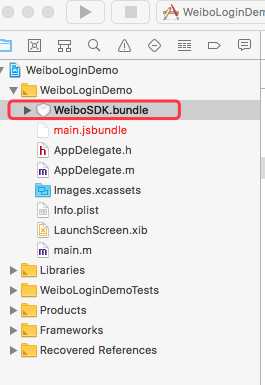
2. In XCode, in the project navigator, right click `Libraries` ➜ `Add Files to [your project's name]`, Go to `node_modules` ➜ `react-native-weibo-login` and add `RCTWeiBo.xcodeproj`.
3. In XCode, in the project navigator, select your project.
Add
- libRCTWeiBo.a
- QuartzCore.framework
- ImageIO.framework
- SystemConfiguration.framework
- Security.framework
- CoreTelephony.framework
- CoreText.framework
- UIKit.framework
- Foundation.framework
- CoreGraphics.framework
- Photos.framework
- libz.tbd
- libsqlite3.tbd
to your project's `Build Phases` ➜ `Link Binary With Libraries`.
4. In the project navigator, in `Targets` ➜ `info` ➜ `URL types`. Add new URL type, `Identifier` value is `com.weibo`, `URL Schemes` value is `wb` + `you weibo appKey`, such as: `wb2317411734`.
5. Right click `Info.plist` open as source code, insert the following lines:
```xml
LSApplicationQueriesSchemes
sinaweibohd
weibosdk
sinaweibo
weibosdk2.5
```
6. Copy the following in `AppDelegate.m`:
```
- (BOOL)application:(UIApplication *)application openURL:(NSURL *)url
sourceApplication:(NSString *)sourceApplication annotation:(id)annotation
{
return [RCTLinkingManager application:application openURL:url
sourceApplication:sourceApplication annotation:annotation];
}
```
#### Android
1. Open up `android/app/src/main/java/[...]/MainActivity.java`
- Add `import com.gratong.WeiBoPackage;` to the imports at the top of the file.
- Add `new WeiBoPackage()` to the list returned by the `getPackages()` method.
2. Append the following lines to `android/settings.gradle`:
```
include ':react-native-weibo-login'
project(':react-native-weibo-login').projectDir = new File(rootProject.projectDir, '../node_modules/react-native-weibo-login/android')
```
3. Insert the following lines inside the dependencies block in `android/app/build.gradle`:
```
compile project(':react-native-weibo-login')
```
4. Insert the following lines inside the allprojects block in `android/build.gradle`:
```
maven { url "https://dl.bintray.com/thelasterstar/maven/" }
```
such as:
```
allprojects {
repositories {
mavenLocal()
jcenter()
maven { url "https://dl.bintray.com/thelasterstar/maven/" }
}
}
```
## Config
- appKey: 你在微博开放平台上申请的应用ID
- scope:OAuth2.0 授权机制中 authorize 接口的一个参数。通过 Scope,平台将开放更多的微博核心功能给开发者,同时也加强用户隐私保护,提升了用户体验,用户在新 OAuth2.0 授权页中有权利选择赋予应用的功能。目前 Scope 支持传入多个 Scope 权限,用逗号分隔。赋值为`all`代表请求所有scope权限。关于 Scope 概念及注意事项,请查看:`http://open.weibo.com/wiki/Scope`
- redirectURI:默认 `https://api.weibo.com/oauth2/default.html`,必须和sina微博开放平台中应用高级设置中的redirectURI设置的一致,不然会登录失败
## Usage
```javascript
import * as WeiBo from 'react-native-weibo-login';
let config = {
appKey:"2317411734",
scope: 'all',
redirectURI: 'https://api.weibo.com/oauth2/default.html',
}
WeiBo.login(config)
.then(res=>{
console.log('login success:',res)
//登陆成功后打印出的数据如下:
// {
// refreshToken: '2.00Gc2PbDcecpWC127d0bc690FE7TzD',
// type: 'WBAuthorizeResponse',
// expirationDate: 1686362993740.243,
// userID: '3298780934',
// errCode: 0,
// accessToken: '2.00Gc2PbDcecpWCa981899f410o5hEX'
// }
}).catch(err=>{
console.log('login fail:',err)
})
```