
DevHub: TweetDeck for GitHub
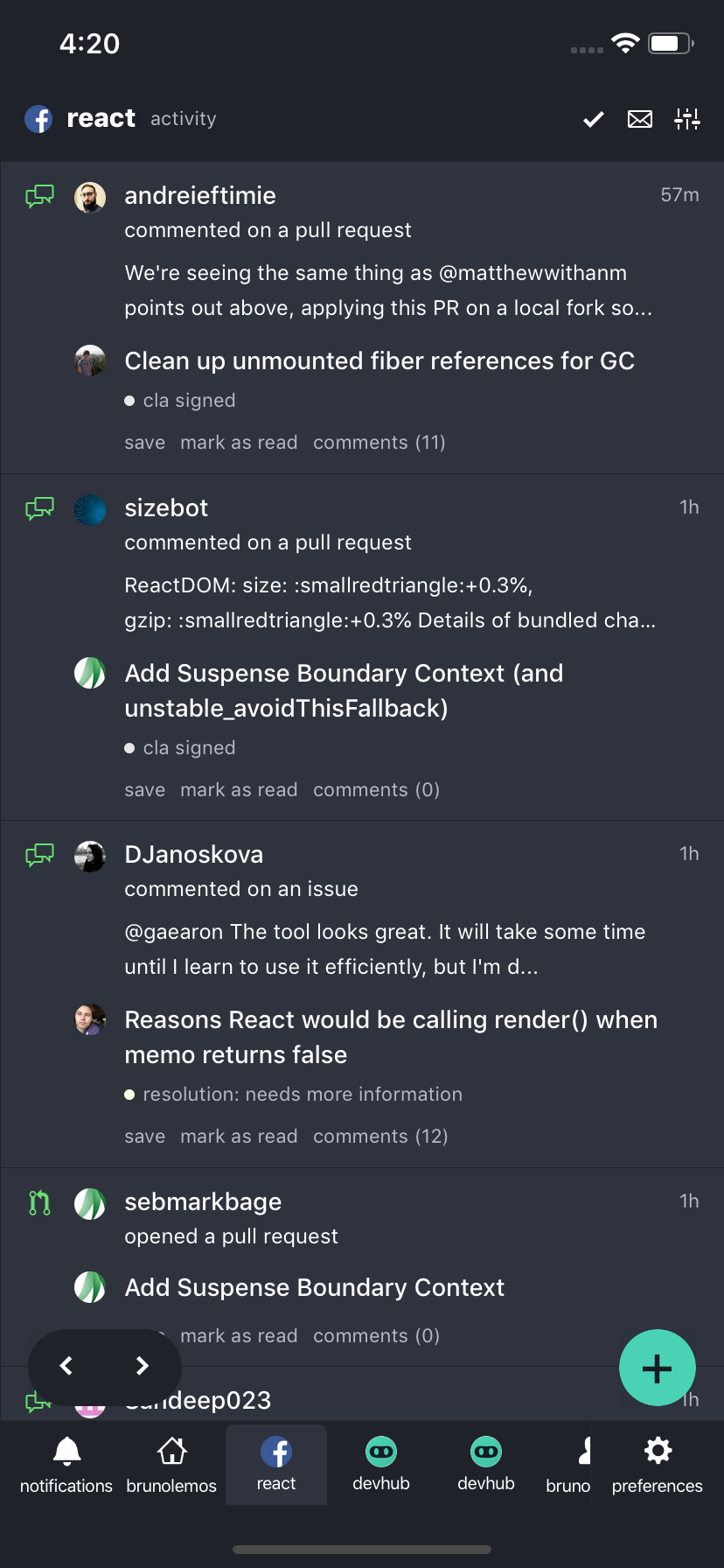
Android, iOS, Web & Desktop with 95%+ code sharing between them
thanks to React Native + React Native Web




## Download links
- Web: [devhubapp.com](https://devhubapp.com/)
- Android: [Play Store](https://play.google.com/store/apps/details?id=com.devhubapp&utm_source=github_repo_link)
- iOS: [App Store](https://itunes.apple.com/us/app/devhub-for-github/id1191864199?l=en&mt=8&utm_source=github_repo_link)
- Desktop:
- [GitHub Releases](https://github.com/devhubapp/devhub/releases) (macOS, Windows, Linux)
- Homebrew (macOS alternative):
```
brew tap devhubapp/devhub
brew cask install devhub
```
## Why
DevHub helps you take back control of your GitHub workflow and stay on top of everything important going on.
## Features
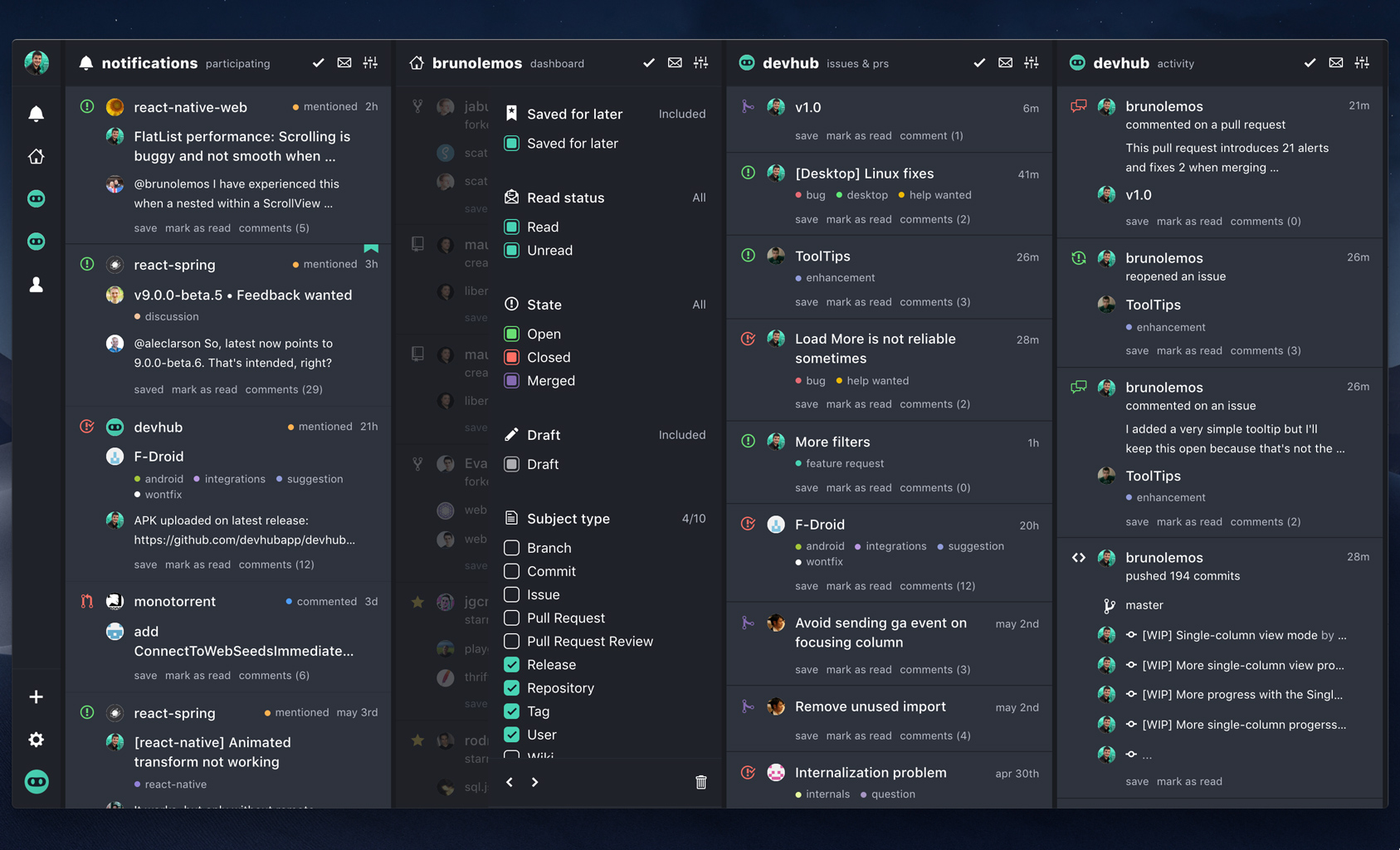
- [x] **Columns layout**: Like TweetDeck, you can see at a quick glance everything that is going on; made for power users;
- [x] **Inbox Zero**: Clear all the seen items and keep your mind clean; Archived items will be moved to a separate place;
- [x] **Filters**: Apply different filters to each column; remove all the noise and make them show just what you want;
- [x] **Enhanced notifications**: See all the relevant information before opening the notification, like issue/pull request status, comment content, release description, etc.;
- [x] **Sanely watch repositories**: Keep up to date with repositories' activities without using the `watch` feature so your notifications don't get cluttered;
- [x] **Stalker mode**: Follow user activities without using the `follow` button and see activities that GitHub doesn't show on your feed, like issue comments and pushed commits;
- [x] **Dashboard viewer**: See other users' home screen (their GitHub dashboard) so you can discover new interesting people and repositories;
- [x] **Save for later**: Save any activity or notification for later, so you don't forget to get back to them;
- [x] **Keyboard shortcuts**: Do anything using only the keyboard ([see shortcuts below](#keyboard-shortcuts));
- [x] **Theme support**: Choose between 6 light or dark themes;
- [x] **And more!**: Private repos support, desktop apps, native mobile apps, open source, modern tech stack, ...
### Next features:
- [ ] **More filters**: Filter items by type (issue, pr, etc.); filter by regex; filter by org/repos;
- [ ] **Issues/PR management**: Manage all issues and PRs, filter the ones related to you, take actions, etc. ([#110](https://github.com/devhubapp/devhub/issues/110));
- [ ] **Trending**: New column type to show Trending repositories ([#48](https://github.com/devhubapp/devhub/issues/48));
- [ ] **Push notifications**: Enable push notifications for your filtered columns on mobile and/or desktop ([#51](https://github.com/devhubapp/devhub/issues/51));
- [ ] **Drag & Drop**: Allow moving columns using drag&drop ([#42](https://github.com/devhubapp/devhub/issues/42))
- [ ] **GitHub Enterprise**: Support for self hosted GitHubs on local networks; contact us via e-mail: [enterprise@devhubapp.com](mailto:enterprise@devhubapp.com) to show your interest.
> Which one do you want first? Any other recommendations? Search for [existing feature requests](https://github.com/devhubapp/devhub/issues?q=is%3Aissue+is%3Aopen+label%3A%22feature+request%22+sort%3Areactions-%2B1-desc) and add a 👍 reaction on them, or create a new one.
#### About paid features
##### What features will be paid?
- Support for private repositories
- Support for GitHub Enterprise
- Push notifications
- Unlimited number of columns and workspaces
##### Why is this app not completely free?
> "If you find something you think is cool then give that person some money for it so they can make more things you think are cool" 💙
DevHub plans to be a sustainable open source project. It's not made by a huge company like Facebook. It is made by a single developer that could be making $200k on Facebook, but instead makes $0 working on this full time. DevHub does not intend to work with donations and, instead, plans to create real value for its users and have a few paid features. If you want the project to live and be actively maintained, understand that it will need a revenue and consider subscribing to the paid plan once it launches.
> [Join the discussion](https://github.com/devhubapp/devhub/issues/106)!
## Keyboard shortcuts
| Key | Action | Implemented | By |
| --------- | -------------------------------- | -------------- | ------- |
| `Esc` | Close currently open modal | ✅ | [@brunolemos](https://github.com/brunolemos) |
| `Esc` | Exit full screen mode on desktop | ✅ | [@brunolemos](https://github.com/brunolemos) |
| `Esc` | Unselect currently selected item | ✅ | [@brunolemos](https://github.com/brunolemos) |
| `n` | Add a new column | ✅ | [@brunolemos](https://github.com/brunolemos) |
| `p` | Open preferences | ✅ | [@brunolemos](https://github.com/brunolemos) |
| `1`...`9` | Go to the `nth` column | ✅ | [@brunolemos](https://github.com/brunolemos) |
| `0` | Go to the last column | ✅ | [@brunolemos](https://github.com/brunolemos) |
| `Arrow`, `j`, `k` | Move down/up inside a column | ✅ | [@thefrontendwizard](https://github.com/thefrontendwizard) |
| `Arrow`, `h`, `l` | Move left/right between columns | ✅ | [@thefrontendwizard](https://github.com/thefrontendwizard) |
| `r` | Mark item as read/unread | ✅ | [@brunolemos](https://github.com/brunolemos) |
| `s` | Toggle save item for later | ✅ | [@brunolemos](https://github.com/brunolemos) |
| `Alt` + `Arrow` | Move currently selected column | ✅ | [@brunolemos](https://github.com/brunolemos) |
| `Tab` | Navigate between buttons and links | ✅ | [@brunolemos](https://github.com/brunolemos) |
| `?` | Show keyboard shortcuts | ✅ | [@brunolemos](https://github.com/brunolemos) |
> **Tip:** To scroll horizontally on devices without horizontal scrolling (e.g. on Windows), hold `Shift` and scroll vertically
## Tech Stack
- [TypeScript](https://github.com/Microsoft/TypeScript)
- [Create React App](https://github.com/facebook/create-react-app)
- [Yarn Workspaces](https://yarnpkg.com/lang/en/docs/workspaces/) (Monorepo)
- [React](https://github.com/facebook/react) with [Hooks](https://reactjs.org/docs/hooks-intro.html)
- [React Native](https://github.com/facebook/react-native)
- [React Native Web](https://github.com/necolas/react-native-web)
- [Redux](https://github.com/reduxjs/react-redux)
- [Redux Persist](https://github.com/rt2zz/redux-persist)
- [Redux Saga](https://github.com/redux-saga/redux-saga/)
- [Reselect](https://github.com/reduxjs/reselect)
- [GraphQL](https://github.com/facebook/graphql)
## Contributing
Bug reports, feature requests and other contributions are more than welcome!
Whenever possible, please make a pull request with the implementation instead of just requesting it.
If the feature is big, open an issue first for discussion.
> **Important**: DevHub is a mobile-first cross-platform project. All code syntax targets react-native, not react-dom. Make sure to use `StyleSheet` instead of normal CSS and to test it on both android/ios instead of only the browser.
### Running it locally
#### Requirements
- [Node.js](https://nodejs.org/) (latest)
- [Yarn](https://yarnpkg.com/)
> **Note:** On Windows, you might need to install Bash commands (e.g. via [git-scm](https://git-scm.com/downloads) or via [linux bash shell](https://www.howtogeek.com/249966/how-to-install-and-use-the-linux-bash-shell-on-windows-10/))
#### How to run
- `git clone git@github.com:devhubapp/devhub.git`
- `yarn`
- `yarn dev`
That's it. It will start three workers: `TypeScript compilation watcher`, `Web server` (create-react-app) and the `Mobile server` (react-native packager). The browser will open automatically.
> Alternatives to `yarn dev`: `yarn dev:web`, `yarn dev:desktop`, `yarn dev:mobile`
To open the mobile projects, use:
- `yarn xcode`
- `yarn studio`
### Running it online
Alternatively, you can contribute using Gitpod, a free online dev environment for GitHub:
[](https://gitpod.io/#https://github.com/devhubapp/devhub)
> Disclaimer: Gitpod is a third party service and is not affiliated with GitHub neither DevHub.
> When using a third party service, your tokens may be less secured.
## Author
Follow me on Twitter: [@brunolemos](https://twitter.com/brunolemos)
Follow DevHub on Twitter: [@devhub_app](https://twitter.com/devhub_app)
Join our Slack Community: [Slack Invitation](https://join.slack.com/t/devhubapp/shared_invite/enQtNjEyNzMzODg3MzYzLWY1NGUwZTVhM2FlMjY5ZmY5YzE1MThjNzM0NDIzNzQyYzJkMWEyYjRkNTg0MTIxNGJkYmM1ZTRmODE2MTVkY2Q)
 BTC: `3KpFKpbEhXsNfTGXRA3P4psxxXd9gNSXzH`
ETH: `0x1f6314A3F01A2f579369bD04B507166fe45b2880`
## License
Copyright (c) 2019 Bruno Lemos.
This project is provided as is without any warranties. Use at your own risk.
By using DevHub you agree with its [privacy](PRIVACY.md) policy and [license](LICENSE.md).