 5ce09db2b3
As a lot of [people](https://hackernoon.com/why-i-no-longer-use-typescript-with-react-and-why-you-shouldnt-either-e744d27452b4) is complaining about TypeScript performance in CRA, I decided to enable `async` mode in TypeScript checker. These changes basically brings the JS compilation times to TS projects. So, recompilation took less than 1 second instead of 3 seconds in medium size project. The problem with async mode is that type-errors are reported after Webpack ends up recompilation as TypeScript could be slower than Babel. PR allows to emit files compiled by Babel immediately and then wait for TS and show type errors in terminal later. Also, if there was no compilation errors and any type error occurs, we trigger a hot-reload with new errors to show error overlay in browser. Also, I wanted to start a discussion about `skipLibCheck: false` option in default `tsconfig.json`. This makes recompilations really slow and we should consider to set it to `true` or at least give users a big warning to let them know that it could be really slow. The following video is showing the updated workflow with a forced 2.5 second delay for type-check to give you an idea how it works. 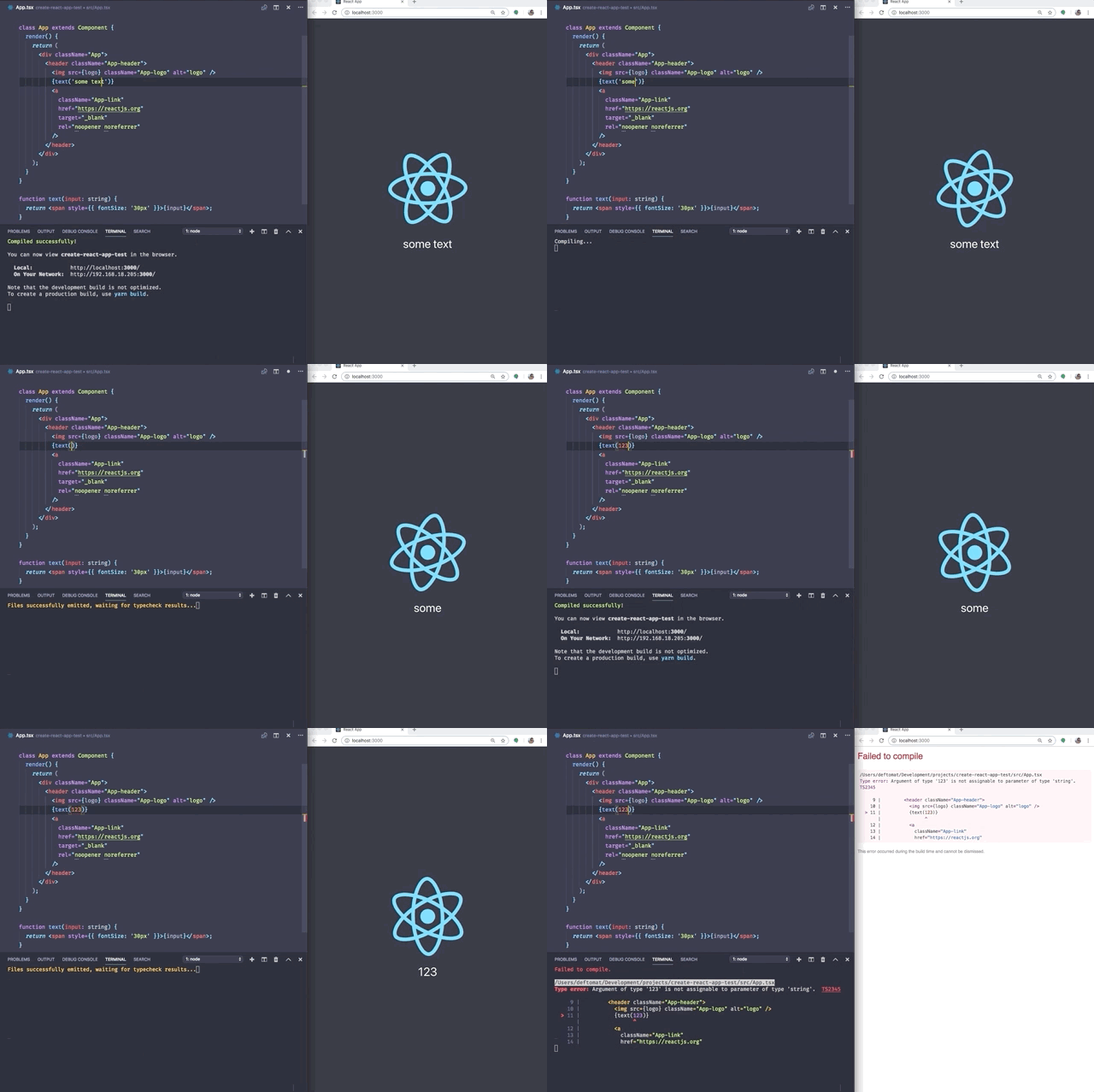 I'm pretty sure that PR needs some polishing and improvements but it should works as it is. Especially a "hack" with reloading the browser after type-check looks ugly to me. cc @brunolemos as he is an initiator of an original TypeScript PR. Should fix https://github.com/facebook/create-react-app/issues/5820

Create React App End-to-End Tests
Usage
These tests ensure various functionality contracts are upheld across dependency upgrades.
To get started locally, run cd packages/react-scripts/ && yarn link; cd ../../test/ && ../node_modules/.bin/jest --watchAll.
It's suggested that you filter down tests to avoid re-running everything. The most common tests will be the webpack messages.
To only run the webpack messages, type p followed by webpack-message and press [enter].
How do these work?
fixtures/
Each fixture/ gets spun up in a temporary directory and has its dependencies installed with Yarn PnP (for speed).
To opt-out of PnP, create a .disable-pnp file in the specific fixture directory.
A global (testSetup) is created which has a few interesting properties:
testSetup.testDirectory: the directory containing the test applicationtestSetup.scripts: an object allowing you to invokereact-scriptscommands and friends
All tests for each fixture/ are then ran.
testSetup.scripts
start
This will run the start command, it can be ran asynchronously or blocking if { smoke: true } is used.
If ran asynchronously, it will return the port and a done function to clean up the process.
If ran blocking, it will return the stdout and stderr of the process.
build
This will run the build command and return the stdout and stderr of the process.
test
This will run the test command and return the stdout and stderr of the process.
serve
This will run serve the application.
It will return the port and a done function to clean up the process.